
Run the workflow on an inbox
By the end of this lesson, you can let ADM extract the new documents of a folder in the background, copy the accepted invoices into a table of your application, approve the document that waits for a person, and read the review rate of the profile.
Lesson 4 left the profile pfx_supplier_forms with three forms, a text model and a vision model of gpt-5.6-luna, and 23 test cases.
The profile reads the folder pfx_samples, and it extracts a document only when you ask for it.
In production, documents arrive at any time, from any application that uploads into ADM.
This lesson builds the workflow for that case:
- The profile reads a folder, the inbox, and extracts each new upload in the background.
- A hook copies every accepted invoice into a table of your application.
- A person approves the document that the extraction could not read, and the approval becomes a test case.
At each step that configures or reviews, the lesson has the tabs Manager and SQL, as in the earlier lessons. The steps that exist only in SQL, such as the hook and the upload, are not in tabs.
Extract new uploads in the background
Section titled “Extract new uploads in the background”A profile with "process_new_documents": true needs no call. The AI queue job ADM_AI_RAG_QUEUE_JOB of the AI Pack runs every five minutes,
and extracts the new documents in the folder of each such profile. A document is new when it has no result of the profile, or its result is for an older version.
A new version of a document is therefore extracted again. The job behaves like this:
- It extracts one document at a time, as the ADM system user, and commits after each document.
- An error rolls back only that document. The job records it as
FAILEDand tries it again in a later run, up to the settingAI_JOB_MAX_ATTEMPTS. - It takes at most
max_documents_per_rundocuments of a profile in one run, the oldest upload first (20 by default). The next run continues with the rest. A backlog of old documents is the same case: copy them into the folder, and the job works through them.
Each new version of a document in the scope of the profile costs at least one model call.
Keep the scope of a profile to the documents that are forms: the profile of this course reads the folder pfx_inbox and nothing else.
Process new documents automatically in the guide has the details.
Copy accepted invoices into your table
Section titled “Copy accepted invoices into your table”The values belong in your own application, for example in an ERP import table. The hook AFTER_FORM_EXTRACTION runs your PL/SQL when a result is accepted:
when an extraction ends with OK, and when a person approves a result. It runs in the same transaction, after ADM has written the result and the annotations.
05_create_hook.sql creates the table pfx_invoices and the package pfx_hook_api. The hook procedure reads the result from adm_my_form_extractions_v
and copies an invoice of this profile into the table:
procedure after_form_extraction ( p_document_id in number, p_version_id in number, p_profile_id in number, p_extraction_id in number, p_status in varchar2)asbegin -- The hook runs for every profile: take only the invoices of this course. <<extraction_loop>> for x in ( select x.document_id , x.fields , x.line_items from adm_my_form_extractions_v x where x.extraction_id = p_extraction_id and x.profile_name = 'pfx_supplier_forms' and x.doc_type = 'invoice' ) loop merge into pfx_invoices i using ( select x.document_id as document_id , json_value(x.fields, '$.invoice_number') as invoice_number , ... , json_value(x.fields, '$.total_amount' returning number) as total_amount , json_value(x.line_items, '$.size()') as line_count from dual ) s on (i.document_id = s.document_id) when matched then update set ... when not matched then insert ...; end loop extraction_loop;end after_form_extraction;ADM runs the text in adm_hooks.hook_plsql as PL/SQL, with the parameters of the event bound by name. The script registers the procedure:
if l_current is not null and l_current not like 'pfx_hook_api.%' then  raise_application_error(-20700, 'AFTER_FORM_EXTRACTION already runs other code. Not overwriting it: ' || l_current);end if;
update adm_hooks set hook_plsql = 'pfx_hook_api.after_form_extraction(p_document_id => :p_document_id, p_version_id => :p_version_id, ' || 'p_profile_id => :p_profile_id, p_extraction_id => :p_extraction_id, p_status => :p_status);' , updated_by = 'PFX_COURSE' , updated_date = current_timestamp where hook_key = 'AFTER_FORM_EXTRACTION';commit;Run @05_create_hook.sql. It calls no model. When you run it again, it creates the table again, empty.
hook AFTER_FORM_EXTRACTION: pfx_hook_api.after_form_extractionThe hook never commits. When it raises an error, ADM takes back the result and the work of the hook, and records the extraction as FAILED.
A hook can refuse a result on purpose with an error from -20700 to -20999, for example for an unknown purchase order.
Run your own code after an extraction in the guide explains the refusal.
Upload documents into the inbox
Section titled “Upload documents into the inbox”05_upload_inbox.sql uploads four new documents into the folder pfx_inbox in the home folder of the ADM user, as an application would:
a Harbour invoice, a Harbour delivery note, a photo of a Nordwind invoice, and a scanned delivery note as a PDF without text. None of them is in the test set.
The scan is the delivery note of inbox-harbour-delivery.pdf, printed and scanned again.
Run @05_upload_inbox.sql:
loaded: inbox-harbour-delivery.pdf loaded: inbox-harbour-invoice.pdf loaded: inbox-harbour-scanned.pdf loaded: inbox-nordwind-photo.pnginbox: 4 new file(s) in /users/admin/pfx_inboxSwitch on the automatic processing
Section titled “Switch on the automatic processing”Point the profile at the inbox and switch the automatic processing on. The sample folder is then no longer in the scope of the profile, so the job does not extract the 23 samples again. The test set and the measurements stay.
- On the profile page, choose Edit.
- In the section Which documents, enter the Folder
/users/admin/pfx_inbox. Use the home folder of the user insettings.sql, or choose Browse… and selectpfx_inbox. - In the section When to read, select Read new documents automatically. The setting Documents in one run is under Advanced settings. Leave it at 20.
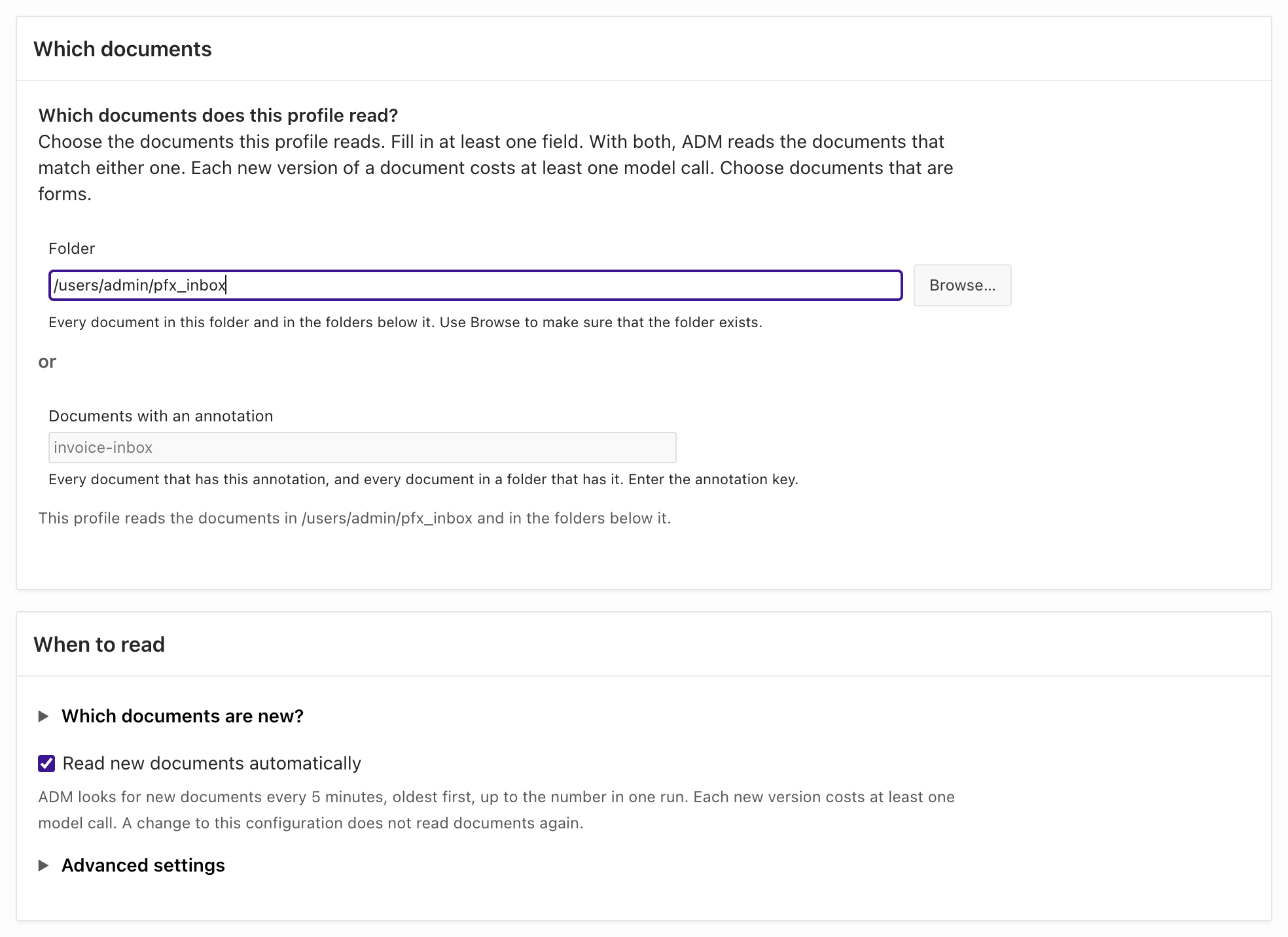
- Choose Save. The header of the profile shows the source and the line Automatic processing:
On, 4 documents waiting.
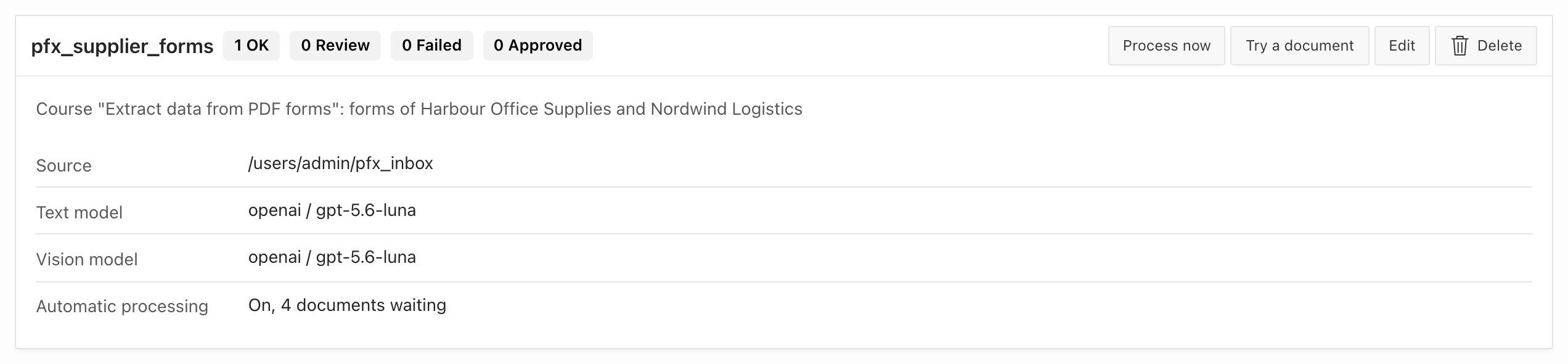
05_enable_processing.sql changes three keys of the stored configuration:
-- update_profile replaces the whole configuration: start from the stored one.l_config := json_object_t(adm_ai_form_config_api.get_profile_config(l_profile_id));
l_config.put('source_folder_path', '&pfx_home/pfx_inbox');l_config.put('process_new_documents', true);l_config.put('max_documents_per_run', 20);
adm_ai_form_config_api.update_profile(p_profile_id => l_profile_id, p_config_json => l_config.to_clob);
Run @05_enable_processing.sql. It calls no model. When you run it again, it sets the same values.
Extract the documents of the inbox
Section titled “Extract the documents of the inbox”The job runs every five minutes, so the four documents are extracted at the next run. To not wait for it, start the same work yourself.
- Choose Process now in the header of the profile. The button is off when the automatic processing is off, or when a job of the profile runs.
- The header shows Processing documents (scheduled). A job that the manager starts can take up to about two minutes to begin. Then it shows
running.
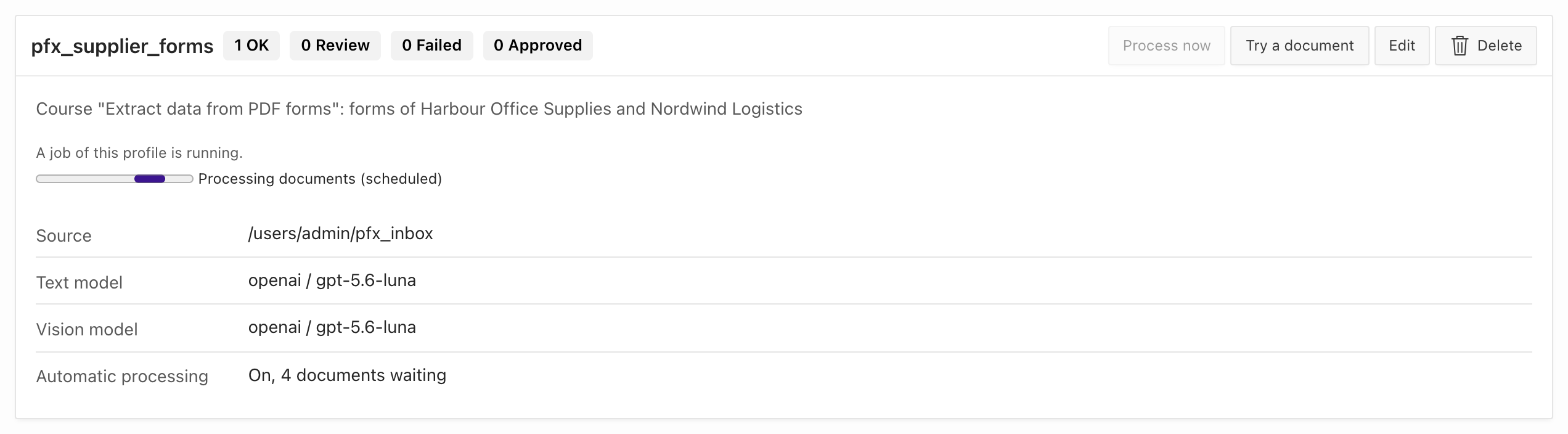
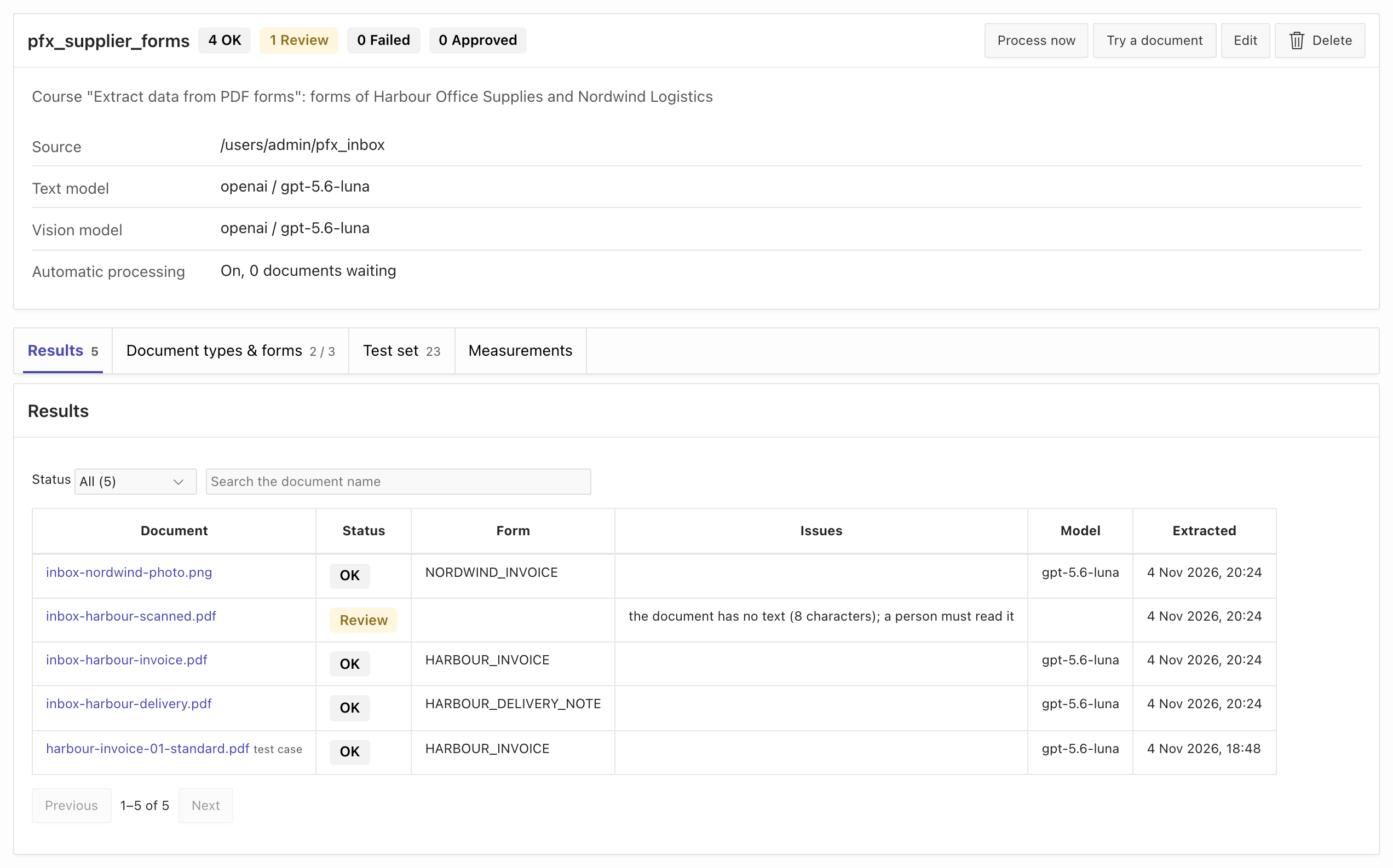
- When the job has finished, the status line is gone and the Results tab lists the four new documents.
Run @05_wait.sql. It waits until the job has extracted every document of the inbox, at most 12 minutes.
If you do not want to wait for the job, run @05_process_now.sql instead. It calls adm_ai_form_extract_api.process_new_documents in your session, which does the same work as the job.
Then run @05_results.sql. It prints the results, the documents with the review tag, the annotations, and the rows of pfx_invoices.
all inbox documents extracted after 60 s
DOCUMENT_NAME                 STATUS    METHOD    FORM_CODE                ISSUES_____________________________ _________ _________ ________________________ __________________________________________________________________inbox-harbour-delivery.pdf    OK        TEXT      HARBOUR_DELIVERY_NOTEinbox-harbour-invoice.pdf     OK        TEXT      HARBOUR_INVOICEinbox-harbour-scanned.pdf     REVIEW    NONE                               the document has no text (8 characters); a person must read itinbox-nordwind-photo.png      OK        IMAGE     NORDWIND_INVOICE
DOCUMENT_NAME                TAG_NAME____________________________ ____________________inbox-harbour-scanned.pdf    extraction-review
DOCUMENT_NAME                 ANNOTATION_KEY                        ANNOTATION_VALUE_____________________________ _____________________________________ ___________________inbox-harbour-delivery.pdf    delivery_note.delivery_note_number    DN-2026-1190inbox-harbour-delivery.pdf    delivery_note.order_reference         LA-2026-131inbox-harbour-invoice.pdf     invoice.customer_number               C-12230inbox-harbour-invoice.pdf     invoice.invoice_number                INV-2026-01107inbox-harbour-invoice.pdf     invoice.total_amount                  420.72inbox-nordwind-photo.png      invoice.customer_number               400-2213inbox-nordwind-photo.png      invoice.invoice_number                NWL/26/10988inbox-nordwind-photo.png      invoice.total_amount                  921.54
INVOICE_NUMBER    INVOICE_DATE    CUSTOMER_NAME                     TOTAL_AMOUNT       LINE_COUNT SOURCE_STATUS_________________ _______________ _________________________________ _______________ _____________ ________________INV-2026-01107    2026-09-30      Gemeinnützige Gesellschaft für    420.72                      3 OKNWL/26/10988      2026-09-29      Van Dijk Bouwmaterialen B.V.      921.54                      2 OK
The job extracted the four documents 60 seconds after the script started to wait. The wait depends on the time of the next run of the job: it is up to five minutes.
The same documents have the same results in both ways:
- The Harbour invoice and the Harbour delivery note matched their forms by the markers, and every check passed:
OK, with annotations. - The photo of the Nordwind invoice went to the vision model, which picked the form
NORDWIND_INVOICE:OK, with the methodIMAGE. - The scanned delivery note has no text. It got the status
REVIEWand the tagextraction-review, without a model call, as in lesson 4.
The Results tab also lists the invoice of lesson 1 (harbour-invoice-01-standard.pdf): a result stays when the scope of the profile changes.
The model read none of the new documents wrong: every field of the three OK results equals the value in samples/inbox/expected.json of the kit.
So the checks caught no wrong value in this run.
Check the rows that the hook wrote
Section titled “Check the rows that the hook wrote”The hook copied the two invoices into pfx_invoices, with the status OK. It ignored the delivery note, because the hook takes only the document type invoice.
The 05_results.sql script of the SQL tab prints this table. With the Manager, query it yourself:
select i.invoice_number , to_char(i.invoice_date, 'YYYY-MM-DD') as invoice_date , substr(i.customer_name, 1, 30) as customer_name , to_char(i.total_amount, 'fm999999990.00') as total_amount , i.line_count , i.source_status from pfx_invoices i order by i.invoice_number;INVOICE_NUMBER INVOICE_DATE CUSTOMER_NAME TOTAL_AMOUNT LINE_COUNT SOURCE_STATUS_________________ _______________ _________________________________ _______________ _____________ ________________INV-2026-01107 2026-09-30 Gemeinnützige Gesellschaft für 420.72 3 OKNWL/26/10988 2026-09-29 Van Dijk Bouwmaterialen B.V. 921.54 2 OKFind the documents that wait for a person
Section titled “Find the documents that wait for a person”Every document with the status REVIEW or FAILED has the tag extraction-review. People see the tag in the file browser of ADM, and they can filter the folder by it.
The issues of the result say why the document waits.
On the Results tab, choose the status Review in the filter. The list shows the documents that wait, with their issues.
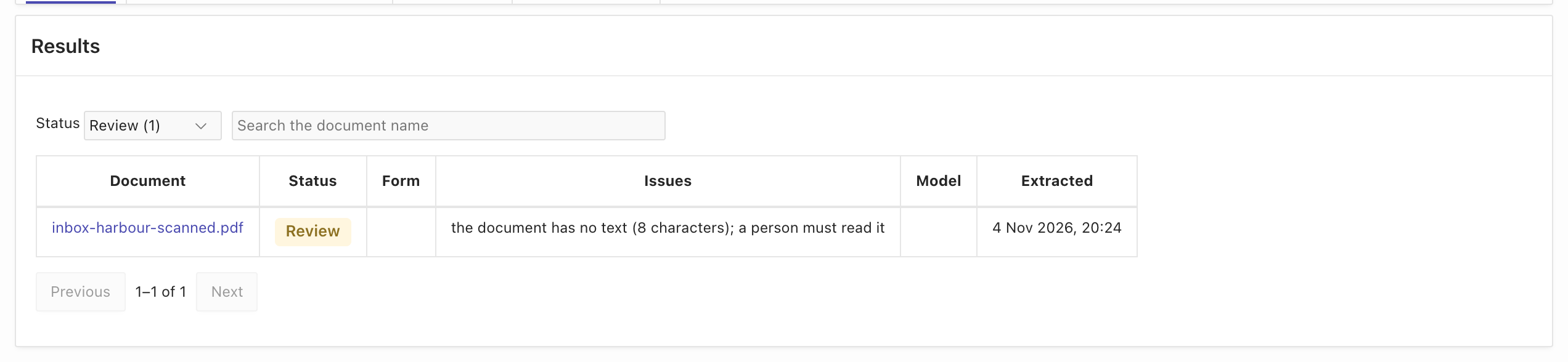
The second block of the output of 05_results.sql above lists the tags. The column issues of adm_my_form_extractions_v says why a document waits:
select x.document_name , x.status , x.issues from adm_my_form_extractions_v x where x.profile_name = 'pfx_supplier_forms' and x.status in ('REVIEW', 'FAILED');The Results tab is the review page for ADM administrators. The reviewers of your application can use the same page: the guide
Form extraction manager shows how to add the plug-in to an APEX page.
You can also build your own page on adm_my_form_extractions_v and the procedure approve.
Put the inbox in a folder that you share with the people who review, so that they see the documents and the tag.
Approve a document with corrected values
Section titled “Approve a document with corrected values”A person reads the scanned delivery note and types its values. The approval takes the values of the person, merges them into the extracted fields,
and runs the checks of the form again. When a check fails, ADM refuses the approval and changes nothing.
When every check passes, it sets the status APPROVED, writes the annotations, removes the review tag, copies the result into the test set, and runs the hook.
The model read no document wrong in this course, so there is no wrong value to correct. The one document that waits for a person is the scan. It has no text, so ADM found no form and no values: the person names the form and types all values from the page. The values below are typed by hand, not corrected from a model result. For a document that the model extracted, a person usually changes one or two values.
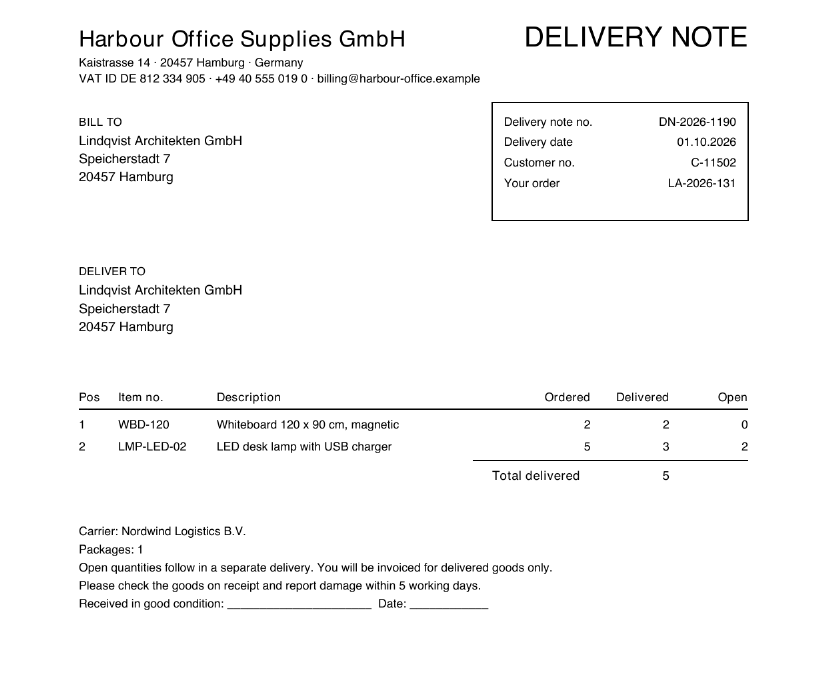
The page has these values. The form wants the date as YYYY-MM-DD:
| Field | Value |
|---|---|
delivery_note_number |
DN-2026-1190 |
delivery_date |
2026-10-01 |
customer_number |
C-11502 |
customer_name |
Lindqvist Architekten GmbH |
order_reference |
LA-2026-131 |
total_quantity |
5 |
| Line 1 | WBD-120, delivered 2 |
| Line 2 | LMP-LED-02, delivered 3 |
The course first enters a typing error in the total, 6: two delivered quantities of 2 and 3 do not give 6, and the check of the document type must refuse it.
- On the Results tab, choose
inbox-harbour-scanned.pdf. The page shows the statusReview, the methodNONE, no form, and the issue.
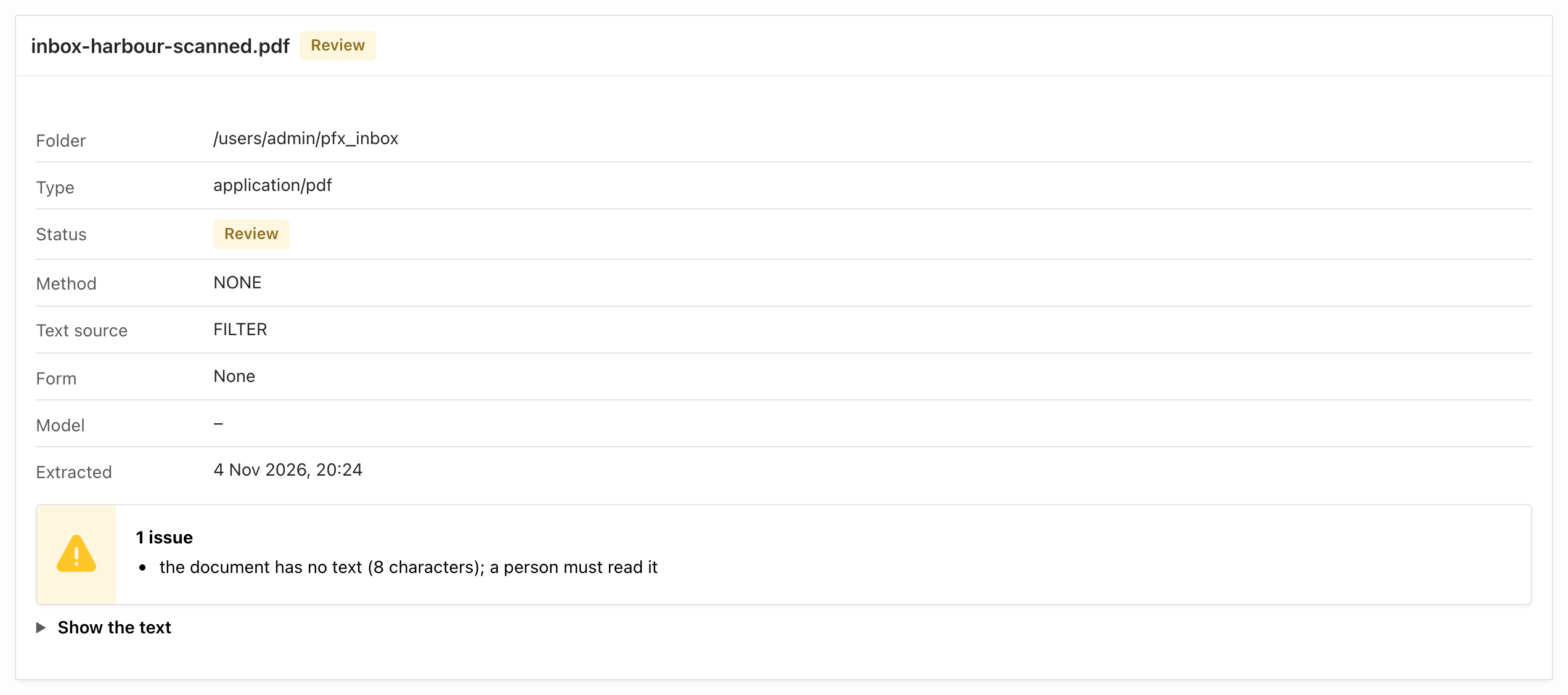
- In the section Review, choose the Form
HARBOUR_DELIVERY_NOTE. The page shows the fields of the form. - Enter the values of the table. Choose Add line twice, and enter the item number and the quantity of each line. Enter
6as thetotal_quantity. - Leave Add to the test set selected, and choose Approve. The checks refuse the values, and the page shows the failed check.
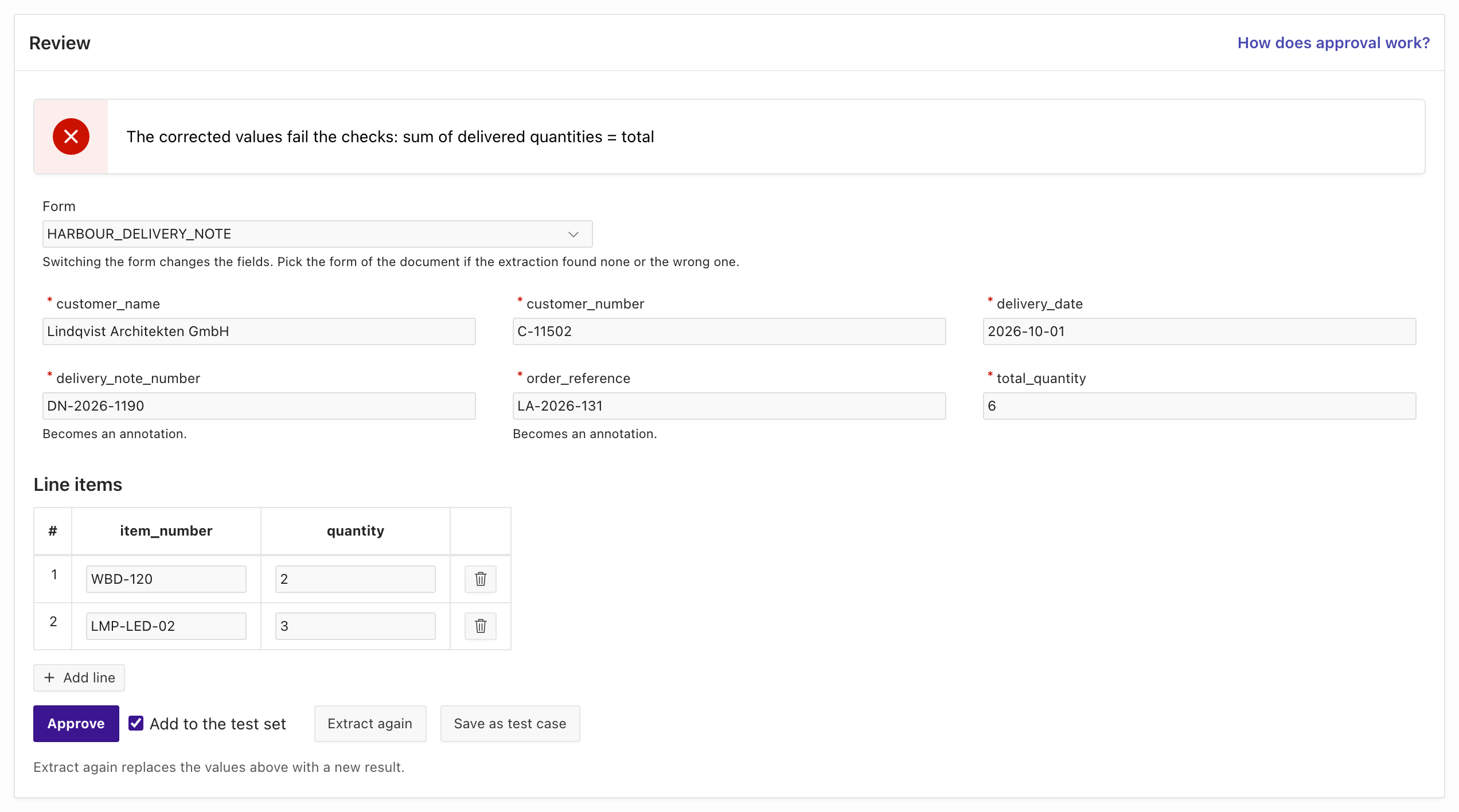
- Change the
total_quantityto5and choose Approve again. The status of the page changes toApproved. The section Test case shows the values with the sourceREVIEW.
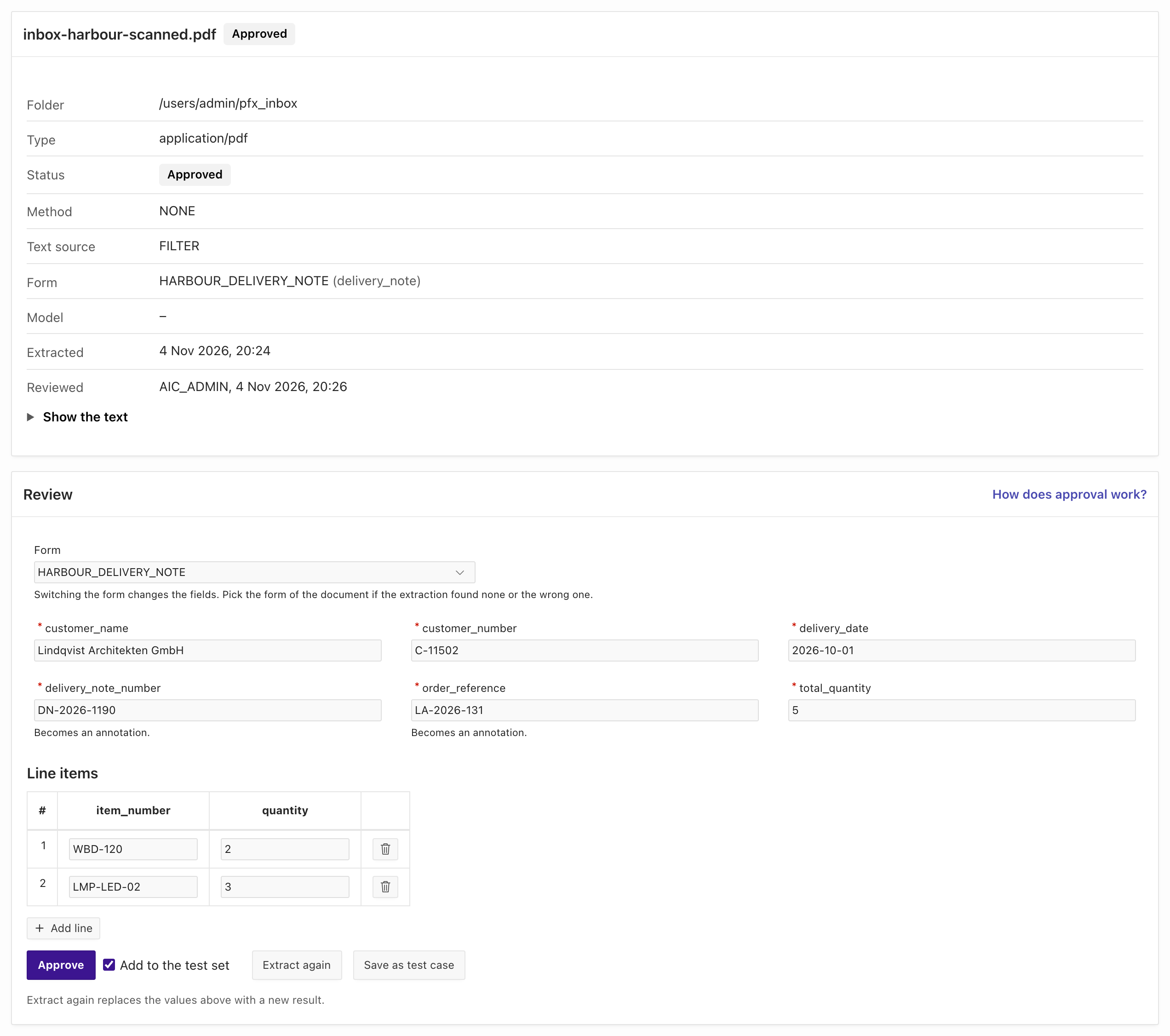
05_approve.sql calls adm_ai_form_extract_api.approve twice, first with the typing error and then with the right values:
adm_ai_form_extract_api.approve( p_profile_id => adm_ai_form_config_api.get_profile_id('pfx_supplier_forms'), p_document_id => l_document_id, p_form_code => 'HARBOUR_DELIVERY_NOTE', p_corrections => '{"delivery_note_number": "DN-2026-1190", "delivery_date": "2026-10-01", "customer_number": "C-11502", "customer_name": "Lindqvist Architekten GmbH", "order_reference": "LA-2026-131", "total_quantity": 5}', p_line_items => '[{"item_number": "WBD-120", "quantity": 2}, {"item_number": "LMP-LED-02", "quantity": 3}]');p_corrections holds the fields that the person set. For a document that the model extracted, it holds only the fields that the person changed, for example '{"total_amount": 285.24}'.
When a check fails, approve raises adm_ai_error.e_form_checks_failed. p_add_to_test_set is true by default. Run @05_approve.sql:
ORA-20619: The corrected values fail the checks: sum of delivered quantities = total
approved
DOCUMENT_NAME                STATUS      FORM_CODE                REVIEWED_BY____________________________ ___________ ________________________ ______________inbox-harbour-scanned.pdf    APPROVED    HARBOUR_DELIVERY_NOTE    ADMIN
The last query shows the result: the status APPROVED, the form that the person named, and the user who approved it.
The checks refused the typing error and changed nothing. The same checks protect the values of the model and the values of a person.
The approval wrote the annotations of the delivery note and removed the tag extraction-review. It also ran the hook, which ignored the delivery note.
When a hook refuses an approval, the approval changes nothing either.
Grow the test set from approved documents
Section titled “Grow the test set from approved documents”With Add to the test set selected (p_add_to_test_set is true by default), every approval writes the document into the test set with the source REVIEW.
Over time, the test set holds the documents that were hard for the model, with values that a person wrote down. The next measurement includes them.
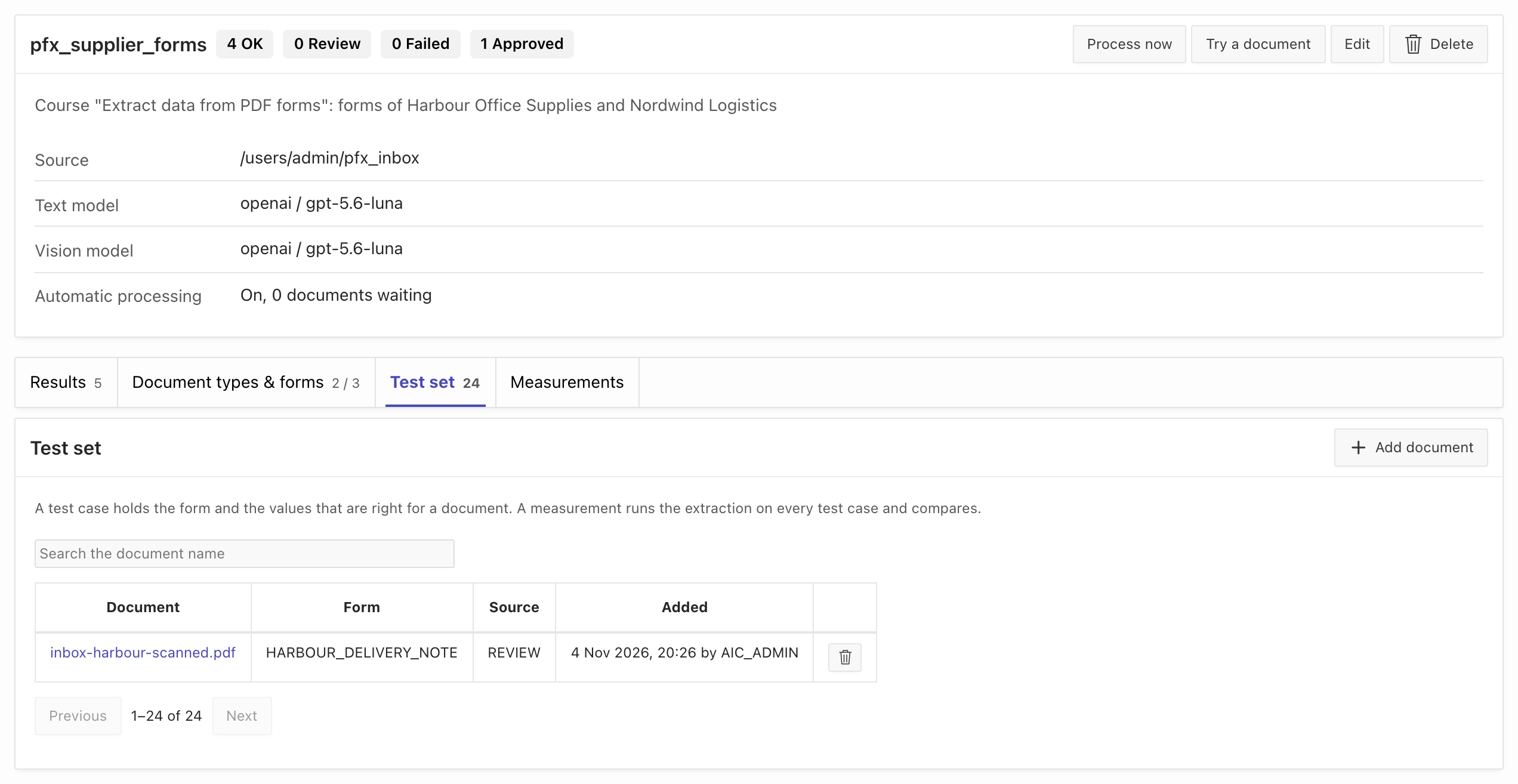
- Open the Test set tab. It has 24 test cases now: the 23 samples and the approved scan, with the source
REVIEW.
- Open the tab Measurements and choose Run measurement. Enter the Label
after-review, leave the other fields as they are, and choose Start. - Choose the label of the run when it has finished.
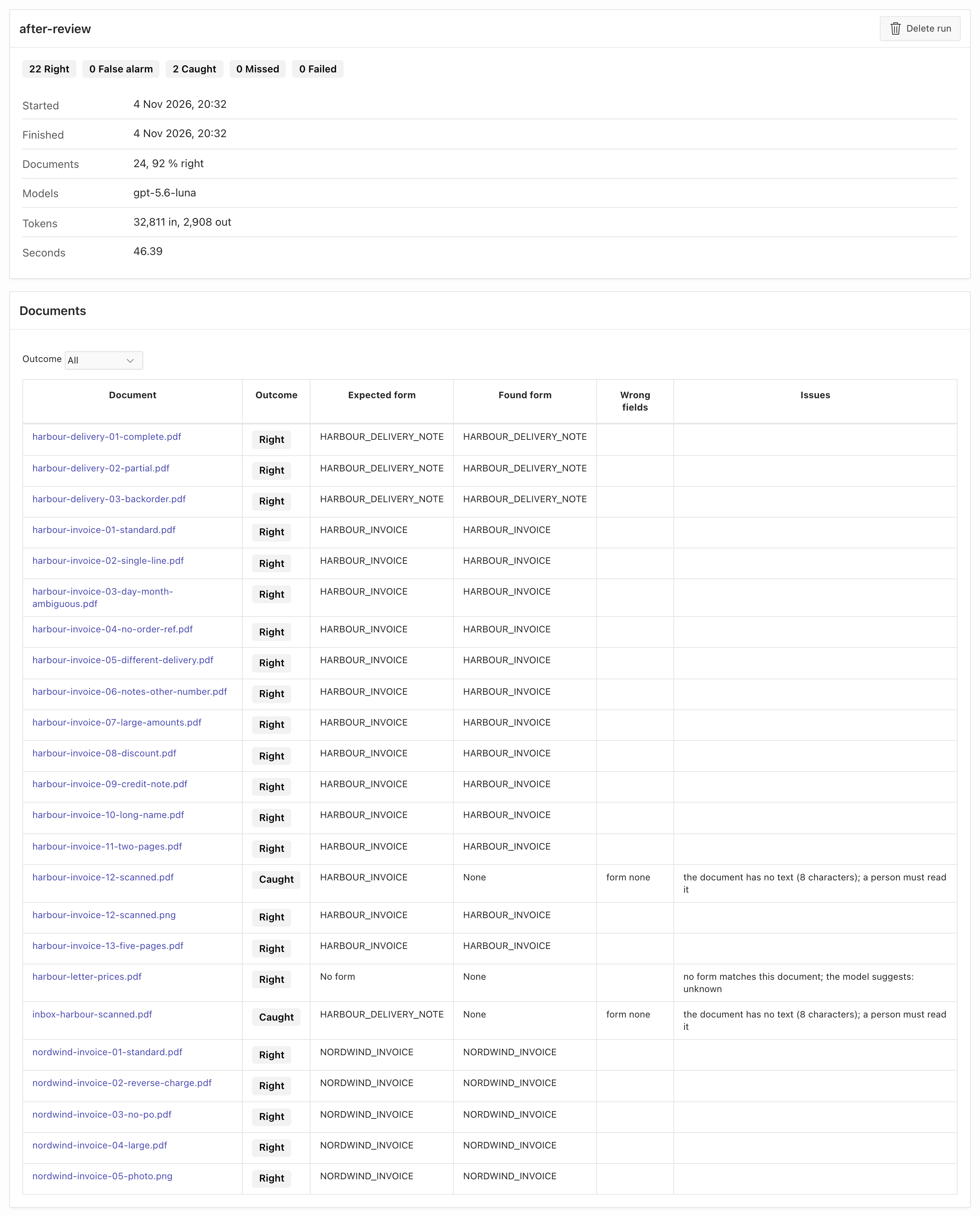
@02_measure.sql after-review % % rules NDOCUMENT_NAME OUTCOME SECONDS DETAILS------------------------------------------ ----------- ------- ------------------------------------------------------------------------------------------------------------------------harbour-delivery-01-complete.pdf RIGHT 1.6harbour-delivery-02-partial.pdf RIGHT 1.6harbour-delivery-03-backorder.pdf RIGHT 1.6harbour-invoice-01-standard.pdf RIGHT 2.2harbour-invoice-02-single-line.pdf RIGHT 1.9harbour-invoice-03-day-month-ambiguous.pdf RIGHT 1.6harbour-invoice-04-no-order-ref.pdf RIGHT 1.5harbour-invoice-05-different-delivery.pdf RIGHT 1.7harbour-invoice-06-notes-other-number.pdf RIGHT 1.8harbour-invoice-07-large-amounts.pdf RIGHT 1.7harbour-invoice-08-discount.pdf RIGHT 1.7harbour-invoice-09-credit-note.pdf RIGHT 2.0harbour-invoice-10-long-name.pdf RIGHT 1.7harbour-invoice-11-two-pages.pdf RIGHT 2.8harbour-invoice-12-scanned.pdf CAUGHT 0.0 wrong: form none | issues: the document has no text (8 characters); a person must read itharbour-invoice-12-scanned.png RIGHT 4.0harbour-invoice-13-five-pages.pdf RIGHT 2.2harbour-letter-prices.pdf RIGHT 1.1 issues: no form matches this document; the model suggests: unknowninbox-harbour-scanned.pdf CAUGHT 0.0 wrong: form none | issues: the document has no text (8 characters); a person must read itnordwind-invoice-01-standard.pdf RIGHT 2.2nordwind-invoice-02-reverse-charge.pdf RIGHT 2.0nordwind-invoice-03-no-po.pdf RIGHT 2.1nordwind-invoice-04-large.pdf RIGHT 3.7nordwind-invoice-05-photo.png RIGHT 3.9
DOCUMENTS RIGHT FALSE_ALARM CAUGHT MISSED FAILED MEDIAN_S COMPLETION_TOKENS--------- ------ ----------- ------ ------ ------ -------- ----------------- 24 22 0 2 0 0 1.8 2908The run measures the 24 test cases: 22 are RIGHT and 2 are CAUGHT. The two CAUGHT documents are the scan PDFs:
harbour-invoice-12-scanned.pdf from lesson 4, and the approved inbox-harbour-scanned.pdf. MISSED is 0.
No text model reads a scan without text, so the approved scan stays CAUGHT: the test case keeps the values of the person as the right answer.
A document that the model can read, but reads wrong, would show here as MISSED or CAUGHT until you adapt a rule.
Measure again with these documents after each change of a rule, a check or the model.
Watch the review rate of the profile
Section titled “Watch the review rate of the profile”When the issuer of a form changes its layout, its markers can still match while the labels move. The model then reads wrong values, the checks catch them, and the review rate of that form rises. A rise for one form is the signal to read its new documents and adapt its rules.
The header of the profile counts the results by status: OK, Review, Failed and Approved. A result needed a person when it is Review, Failed or Approved.
The same counts are in the filter of the Results tab.
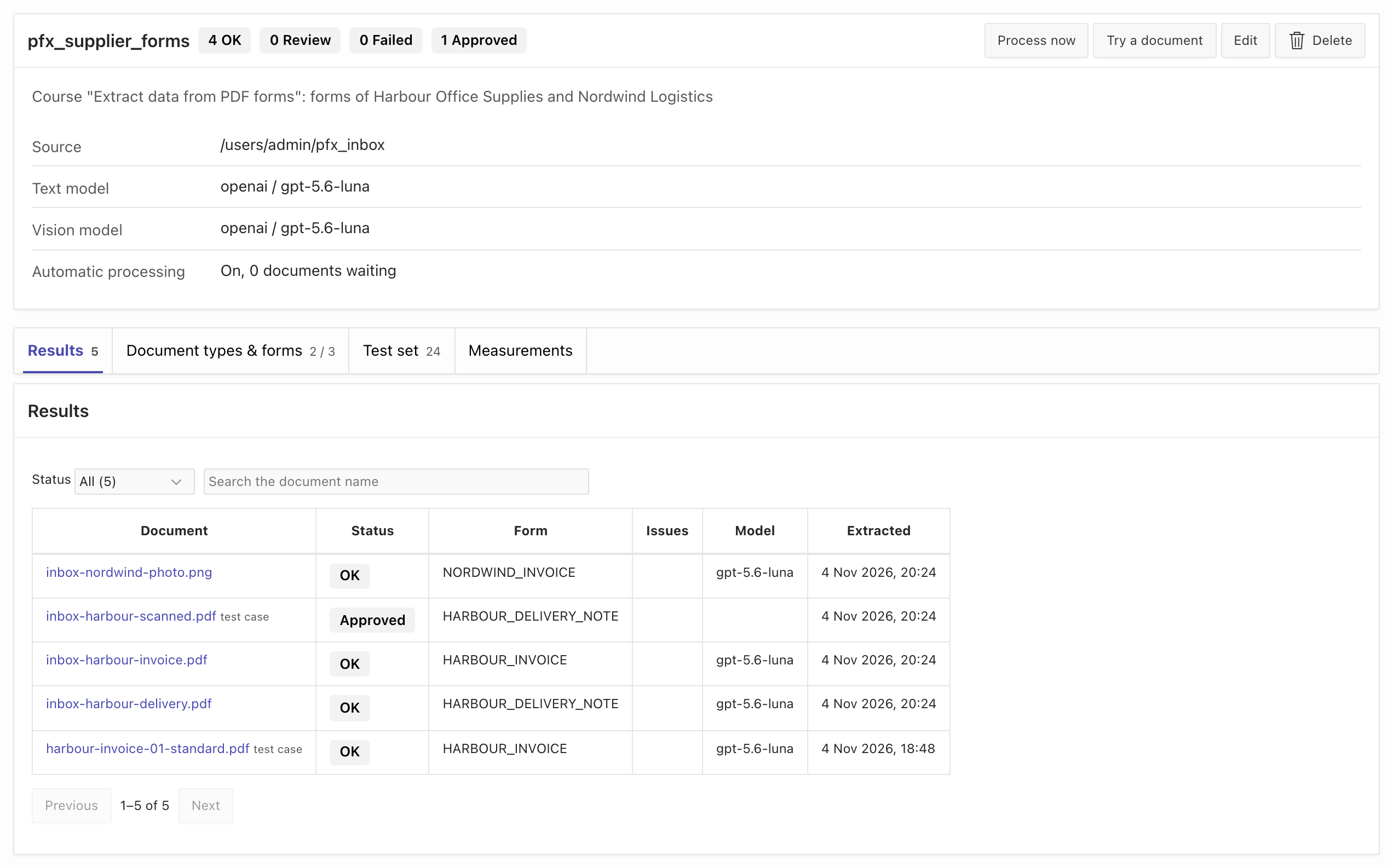
The manager shows the counts of the whole profile. The counts of one form and one week are in the SQL tab.
05_review_rate.sql counts the results of each form by week, and how many of them needed a person:
FORM WEEK DOCUMENTS NEEDED_A_PERSON PERCENT________________________ _____________ ____________ __________________ __________HARBOUR_DELIVERY_NOTE 2026-11-02 2 1 50HARBOUR_INVOICE 2026-11-02 2 0 0NORDWIND_INVOICE 2026-11-02 1 0 0An approved document counts as a document that needed a person. The row HARBOUR_INVOICE also counts the invoice of lesson 1:
a result stays in adm_ai_form_extractions when the scope of the profile changes. The measurements of lessons 2 to 4 write no results, so they do not count.
When the markers of a form stop matching, its documents get the issue no form matches this document. In the SQL output they appear in the row (no form).
Remove the course objects
Section titled “Remove the course objects”The course changed these objects: the profile with its results, test set and measurements, the folders pfx_samples and pfx_inbox, the table pfx_invoices, the package pfx_hook_api,
and the hook AFTER_FORM_EXTRACTION. Deleting the profile in the manager removes only the profile.
Run @99_uninstall.sql to remove all of them. It frees the hook AFTER_FORM_EXTRACTION when it still calls pfx_hook_api, and deletes the profile pfx_supplier_forms
with its results, test set and measurements. It deletes the folders pfx_samples and pfx_inbox with their documents permanently,
and drops the table pfx_invoices and the package pfx_hook_api. The tag extraction-review stays in ADM.
The automatic processing stops with the profile. The job ADM_AI_RAG_QUEUE_JOB belongs to the AI Pack and stays.
freed hook AFTER_FORM_EXTRACTIONdeleted profile pfx_supplier_formsdeleted folder pfx_samplesdeleted folder pfx_inboxdropped package pfx_hook_apidropped table pfx_invoicesReview the finished workflow
Section titled “Review the finished workflow”Your profile reads one folder and extracts each upload in the background. The checks decide which results are accepted.
An accepted result becomes annotations in ADM and a row in your table, through the hook. A document that no form matches, a scan without text, or a result that fails a check
gets the tag extraction-review and waits in the Results tab. A person approves it with the right values, the checks run again, and the approval grows the test set.
The review rate of each form tells you when a form needs new rules.
For your own forms, repeat the steps of lessons 1 to 3 for each form, measure with your own documents (lesson 4), and use a separate inbox folder for each profile.