
Read images and choose the models
By the end of this lesson, you can read an image with a vision model, tell which path a scan takes, and choose the models of a profile with a measurement.
Lesson 3 left the profile pfx_supplier_forms with three forms, 23 test cases and no vision model.
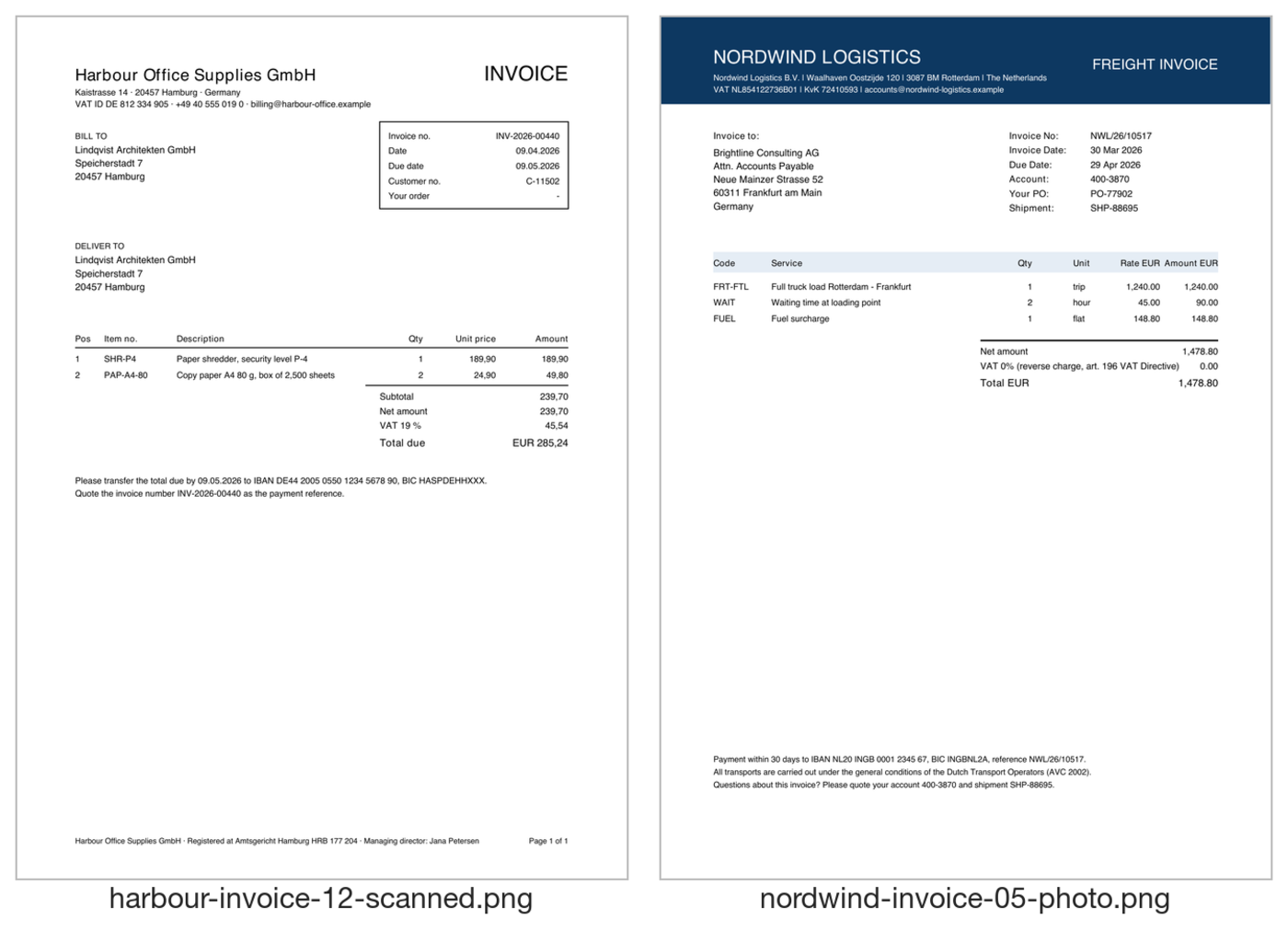
The test set has two images that the measurements of lessons 2 and 3 left out with the filter %.pdf:
harbour-invoice-12-scanned.png and nordwind-invoice-05-photo.png.
This lesson reads these images, explains what happens to a scan that is a PDF, and compares models.
At the end, the profile has a vision model, and the Measurements tab has the runs images-before, images, model gpt-5.6-luna and model gpt-5-mini.
Keep scans without text away from the text model
Section titled “Keep scans without text away from the text model”A scan that is saved as a PDF holds only a picture of each page. harbour-invoice-12-scanned.pdf is such a file: the text extraction finds 8 characters in it.
A text model has nothing to read in such a file, so ADM does not call it.
ADM counts the characters of the text that are not blank. Below min_text_chars of the profile (20 by default), it calls no model.
The result gets the status REVIEW, the method NONE, and an issue that says that the document has no text.
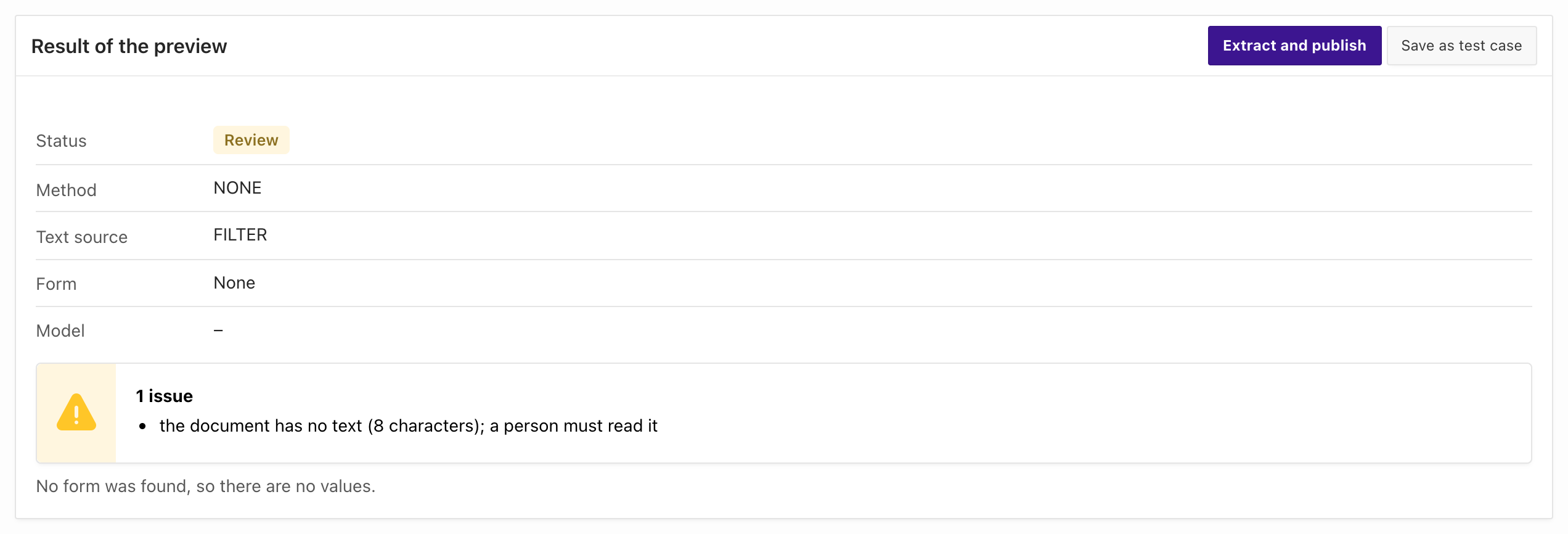
- On the profile page, choose Try a document.
- Search for
harbour-invoice-12-scanned.pdfand choose it. - The preview shows the status
Review, the methodNONE, no form and no model.
Measure the one document. The run is a measurement, so it writes only a row of adm_ai_form_measurements:
@02_measure.sql scan-before % harbour-invoice-12-scanned.pdf rules NDOCUMENT_NAME OUTCOME SECONDS DETAILS------------------------------------------ ----------- ------- ------------------------------------------------------------------------------------------------------------------------harbour-invoice-12-scanned.pdf CAUGHT 0.0 wrong: form none | issues: the document has no text (8 characters); a person must read it
DOCUMENTS RIGHT FALSE_ALARM CAUGHT MISSED FAILED MEDIAN_S COMPLETION_TOKENS--------- ------ ----------- ------ ------ ------ -------- ----------------- 1 0 0 1 0 0 0Both ways show that no model ran: the model is empty (Manager), and the time and the completion tokens are 0 (SQL).
The same issue is in the runs all-pdf and all-naive of lesson 3.
The database cannot turn the pages of a PDF into images, so a PDF scan does not reach a vision model. There are two ways to read it:
- Convert each page to an image before the upload, in your application or in the scanner that delivers the files. The image takes the path of the next section.
- Read the PDF with an OCR service. The section Read a scan with OCR shows the settings.
Read an image with a vision model
Section titled “Read an image with a vision model”An image is a file of the type image/png or image/jpeg, the way a phone or a scanner delivers a page.
The test set has two images, one of each invoice form. An image has no text that ADM can extract, so the markers cannot find its form:
The profile has no vision model yet, so ADM sends every image to a person. Measure the two images of the test set to see it.
The name filter %.png selects them.
- Open the tab Measurements and choose Run measurement.
- Enter the Label
images-beforeand enter%.pngin the field Name contains. Leave the other fields as they are. - Choose Start. A job that the manager starts can take up to about two minutes to begin. Choose the label of the run when it has finished.
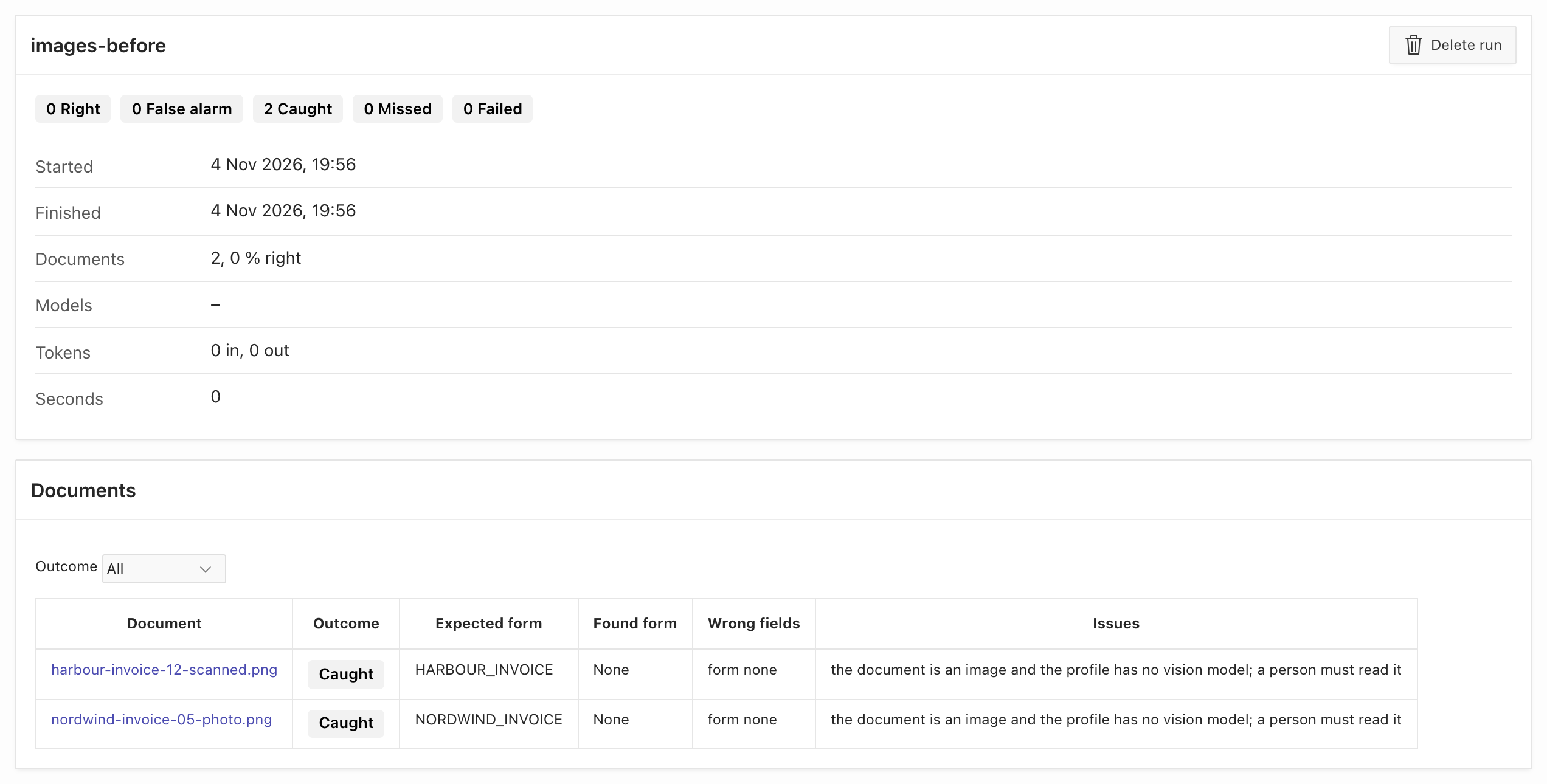
@02_measure.sql images-before % %.png rules NDOCUMENT_NAME OUTCOME SECONDS DETAILS------------------------------------------ ----------- ------- ------------------------------------------------------------------------------------------------------------------------harbour-invoice-12-scanned.png CAUGHT 0.0 wrong: form none | issues: the document is an image and the profile has no vision model; a person must read itnordwind-invoice-05-photo.png CAUGHT 0.0 wrong: form none | issues: the document is an image and the profile has no vision model; a person must read it
DOCUMENTS RIGHT FALSE_ALARM CAUGHT MISSED FAILED MEDIAN_S COMPLETION_TOKENS--------- ------ ----------- ------ ------ ------ -------- ----------------- 2 0 0 2 0 0 0Both images are CAUGHT. ADM called no model, and each image waits for a person.
Add a vision model to the profile
Section titled “Add a vision model to the profile”The section vision_model of the profile has the same parts as the section text_model: a provider, a model and the static ID of the APEX web credential.
The course uses the same model, gpt-5.6-luna, for text and images, with the same credential. Use a model that accepts images as input.
- On the profile page, choose Edit.
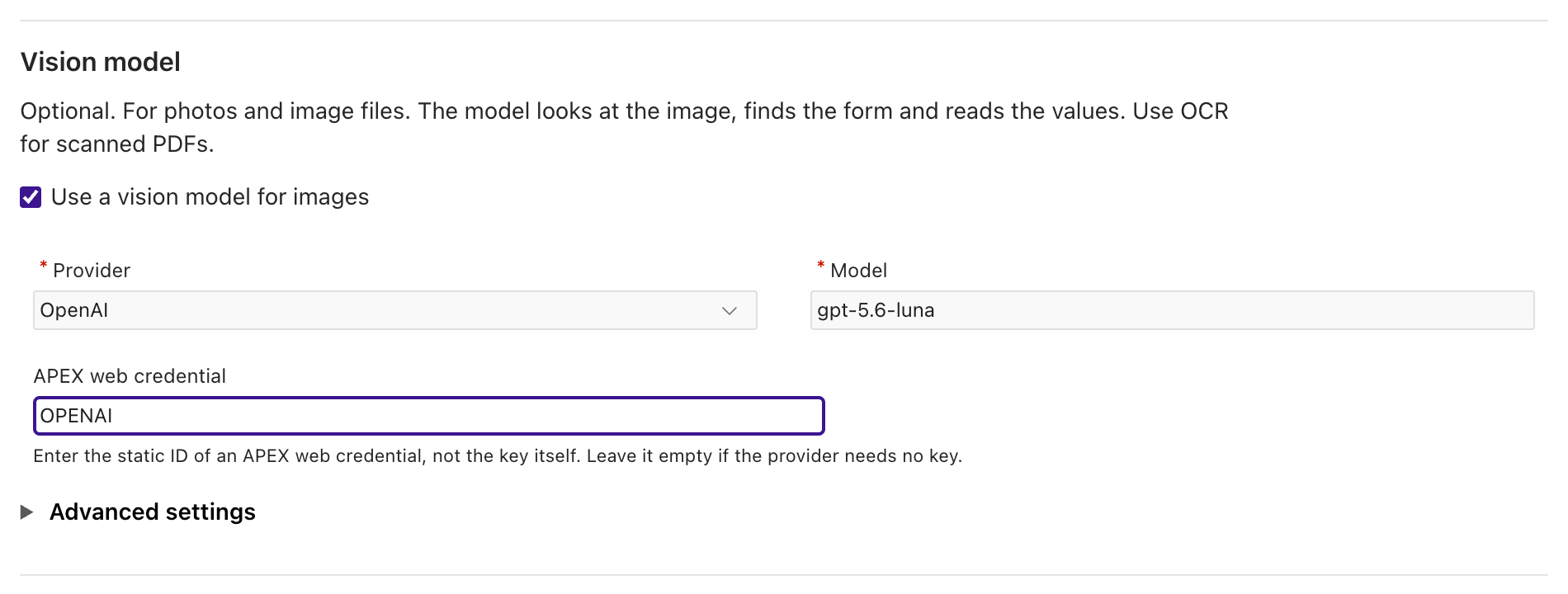
- In the section Vision model, select Use a vision model for images.
- Choose the Provider
OpenAI, enter the Modelgpt-5.6-luna, and enter the APEX web credentialOPENAI.
- Choose Save.
04_add_vision_model.sql copies the section text_model and sets the model of settings.sql:
-- update_profile replaces the whole configuration: start from the stored one.l_config := json_object_t(adm_ai_form_config_api.get_profile_config(l_profile_id));
-- The same provider, credential and options as the text model, with the vision model of settings.sql.l_vision := l_config.get_object('text_model').clone;l_vision.put('model', '&pfx_vision_model');l_config.put('vision_model', l_vision);
adm_ai_form_config_api.update_profile(p_profile_id => l_profile_id, p_config_json => l_config.to_clob);
Run @04_add_vision_model.sql. It calls no model. When you run it again, it sets the same model.
An image has no text for the markers, so ADM reads it in two model calls:
- ADM sends the image with the list of the active forms and their descriptions. The answer schema allows only the form codes and
unknown. - ADM sends the image a second time, with the system prompt of the chosen form. The model reads the fields and the line table. A line pattern needs text, so the model reads the line table of a Harbour image too.
The result then goes through the same checks as the result of a text document: the field patterns, the line checks and the checks of the document type.
Measure the images with the vision model
Section titled “Measure the images with the vision model”Measure the two images again, with a new label.
Choose Run measurement, enter the Label images and the name filter %.png, and choose Start.
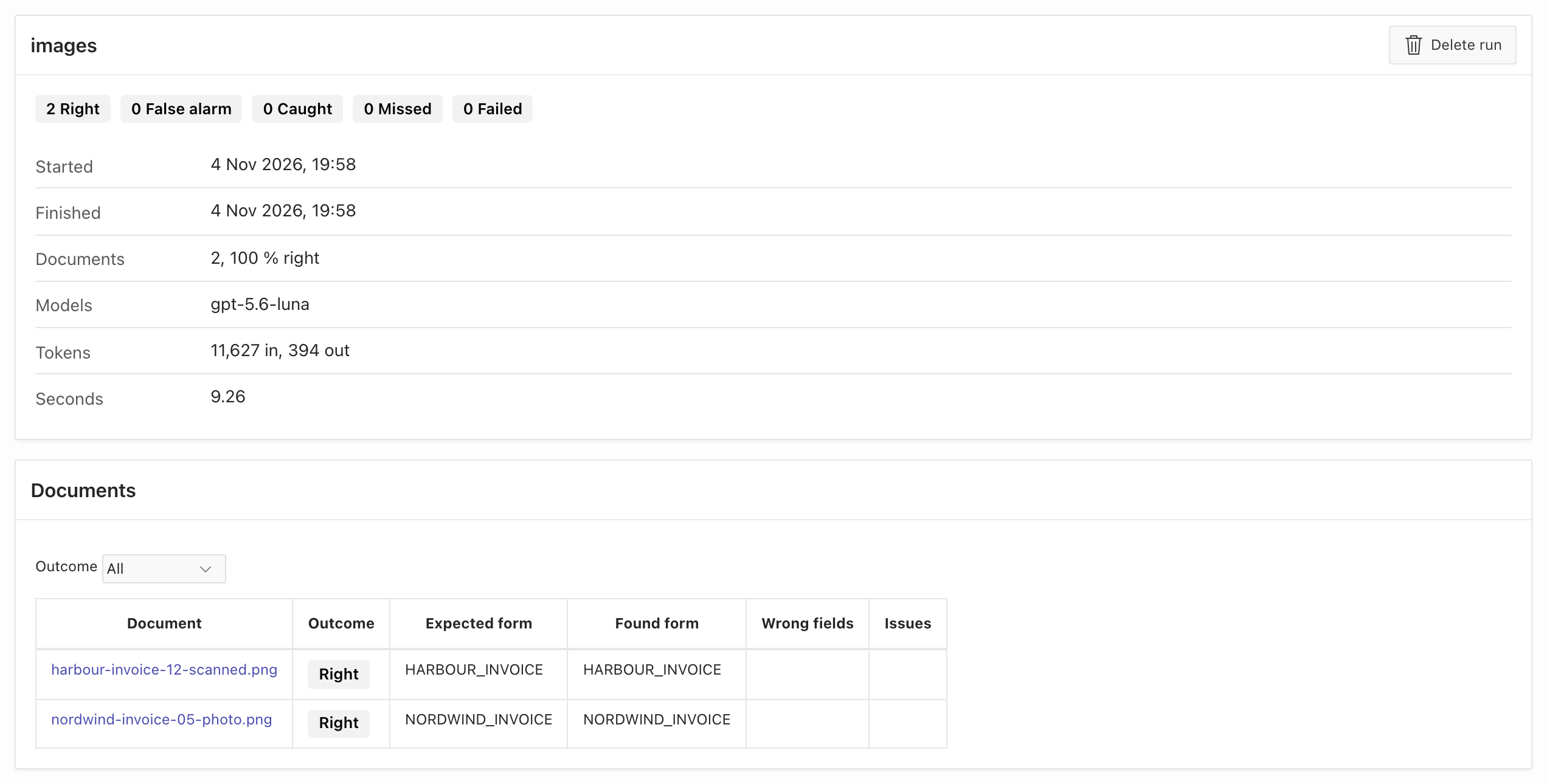
@02_measure.sql images % %.png rules NDOCUMENT_NAME OUTCOME SECONDS DETAILS------------------------------------------ ----------- ------- ------------------------------------------------------------------------------------------------------------------------harbour-invoice-12-scanned.png RIGHT 5.4nordwind-invoice-05-photo.png RIGHT 3.8
DOCUMENTS RIGHT FALSE_ALARM CAUGHT MISSED FAILED MEDIAN_S COMPLETION_TOKENS--------- ------ ----------- ------ ------ ------ -------- ----------------- 2 2 0 0 0 0 4.6 394Both images are RIGHT. The model chose the form of each image and read its values. The Harbour scan that ended in REVIEW as a PDF is RIGHT as an image.
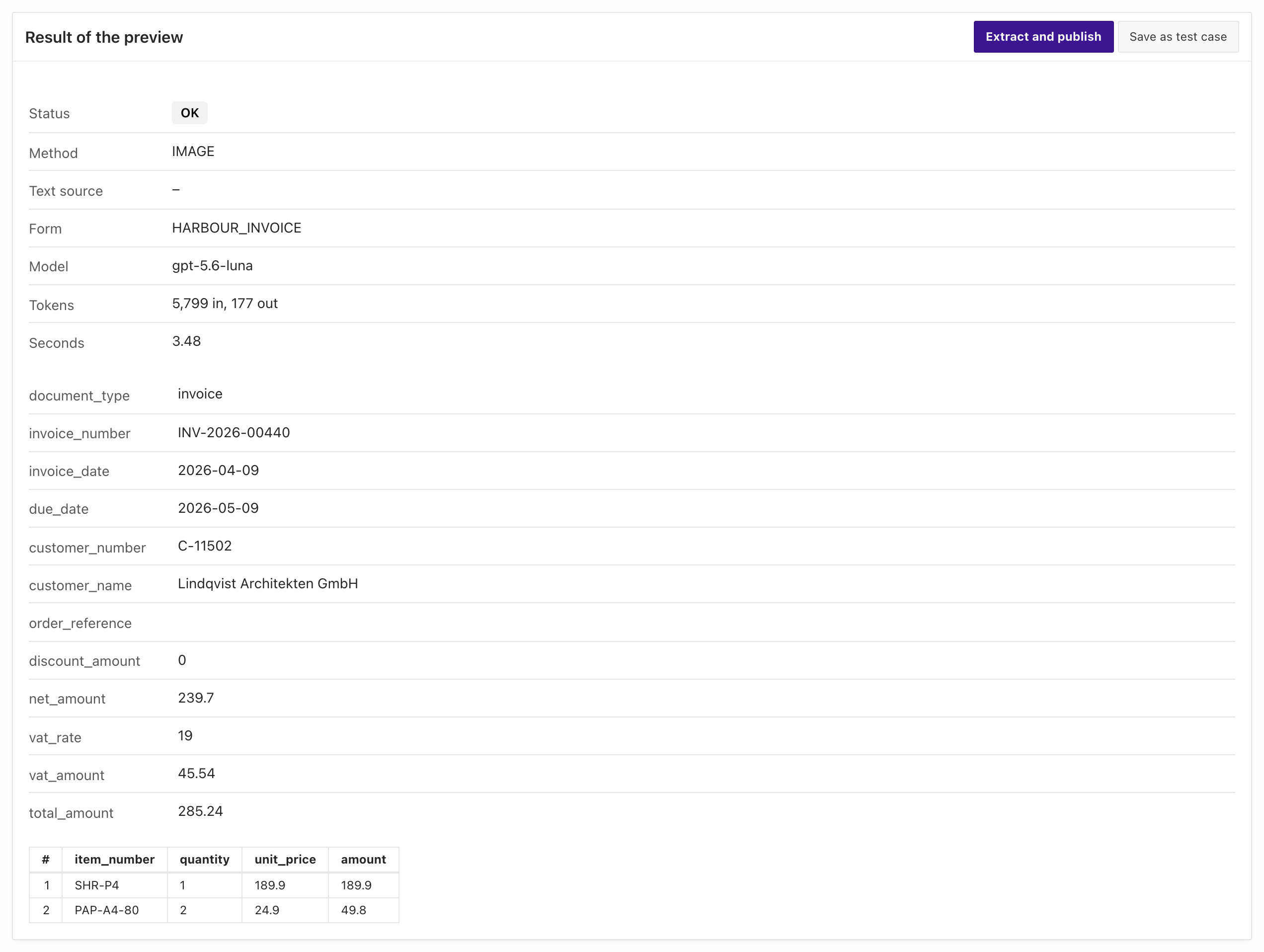
In the Manager, Try a document shows what an image extraction returns. Choose harbour-invoice-12-scanned.png. The preview writes nothing.
The method is IMAGE and the text source is empty, because ADM extracted no text.
Compare an image with a text document
Section titled “Compare an image with a text document”An image costs more than a text document. This query shows one Nordwind invoice as text (run all-pdf of lesson 3) and one as an image (run images):
select m.label , m.document_name , m.prompt_tokens , m.completion_tokens , m.seconds from adm_ai_form_measurements m where (m.label = 'all-pdf' and m.document_name = 'nordwind-invoice-01-standard.pdf') or (m.label = 'images' and m.document_name = 'nordwind-invoice-05-photo.png') order by m.label desc;LABEL DOCUMENT_NAME PROMPT_TOKENS COMPLETION_TOKENS SECONDS---------- ---------------------------------- ------------- ----------------- -------images nordwind-invoice-05-photo.png 5828 189 3.8all-pdf nordwind-invoice-01-standard.pdf 876 176 2.0The values are the totals of the calls of one document. The image used about 6.7 times as many prompt tokens and took about 1.9 times as long as the text. The documents are two different invoices of the same issuer. The recording does not show how the tokens divide between the two calls of the image. Use text when the document has text, and a vision model for the files that have none.
Read a scan with OCR
Section titled “Read a scan with OCR”OCR is a service that reads the characters of an image or of a scanned PDF and returns text. In the profile, the section ocr_text_extraction (“Use OCR for scans” in the Manager) switches it on.
ADM uses OCR for a document when all of these are true:
- The text extraction found fewer than
min_text_charscharacters. - The file type of the document is in the list of file types of the section. The default is
application/pdf. Addimage/pngandimage/jpegto read images with OCR too. - The setting
AI_TEXT_EXTRACTIONisY. It isYon the database of this recording. OCR sends the file to an external service, so the setting must allow it.
The OCR text goes through the markers and then to the text model, as the text of any other PDF does. This is the way for a scan PDF. An image that OCR covers takes this path too, and OCR has priority over the vision model. ADM stores the OCR text on the version of the document, so a second run makes no OCR call. The OCR service is Mistral, OCI or Ollama. An Ollama model reads images only, not PDF files.
The recording of this lesson has no OCR service for PDF files: no Mistral or OCI access was available. The only OCR service available was a local Ollama server with the model gemma3:4b.
The next recording therefore reads the image of the scan with OCR, not the scan PDF. It shows the path and the settings. A small model does not show what a good OCR service returns.
In the profile form, switch on Use OCR for scans in the section OCR. Choose the OCR service, and enter the OCR model if the service needs one. Open Advanced settings for the Server address, and enter the File types.
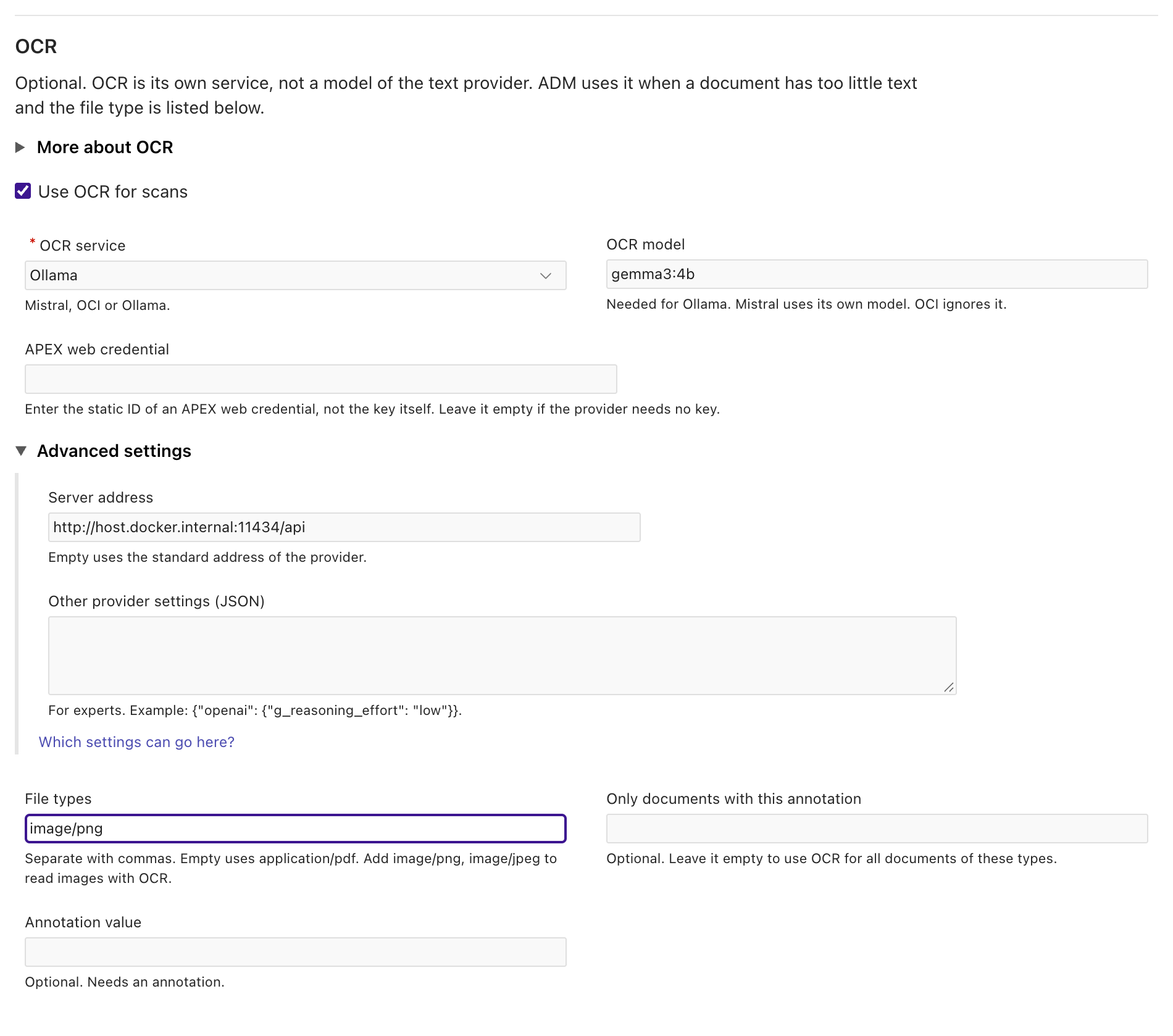
The recording did not save this form. A saved OCR section makes ADM read the images with OCR from then on and store the OCR text on their versions, so the later runs of the course would no longer use the vision model for them.
04_try_ocr.sql adds the section to the profile in a block, reads the image, extracts it, and rolls back at the end.
The profile and the documents stay as they are. The script takes the OCR service from settings.sql (pfx_ocr_provider, pfx_ocr_model, pfx_ocr_credential, pfx_ocr_base_url).
They are empty, because no OCR service fits every installation. Fill in your service first. The script stops when pfx_ocr_provider is empty.
l_ocr.put('provider', '&pfx_ocr_provider');l_ocr.put('apply_to', json_object_t('{"mime_types": ["image/png"]}'));l_config.put('ocr_text_extraction', l_ocr);adm_ai_form_config_api.update_profile(p_profile_id => l_profile_id, p_config_json => l_config.to_clob);
-- p_allow_ocr => true lets the call send the image to the OCR service.l_text := adm_ai_form_extract_api.document_text(l_document_id, l_profile_id, p_allow_ocr => true);l_result := adm_ai_form_extract_api.extract(l_profile_id, l_document_id);
rollback;
The recording used pfx_ocr_provider ollama, pfx_ocr_model gemma3:4b and the address of a local Ollama server.
@04_try_ocr.sql--- The OCR text (the first 700 characters)## Invoice
**Invoice no.** INV-2026-0040**Date** 09.04.2026**Due date** 09.05.2026**Customer no.** C-11502**Your order**
---
**BILL TO**Lindqvist Architekten GmbHSpeicherstadt 720457 Hamburg
**DELIVER TO**Lindqvist Architekten GmbHSpeicherstadt 720457 Hamburg
| Pos | Item no. | Description | Qty | Unit price | Amount ||-----|----------|---------------------------|-----|------------|----------|| 1 | SHR-P4 | Paper shredder, security level P-4 | 1 | 189.90 | 189.90 || 2 | PAP-A4-80| Copy paper A4 80 g, box of 2,500 sheets | 2 | 24.90 | 49.80 |
---
Subtotal: 239.70Net amount: 239.70VAT 19 %: 45.54Total due: EUR 285.24
Please trans--- The result{"method":"TEXT","text_source":"OCR","status":"REVIEW","issues":"no form matches this document; the model suggests: HARBOUR_INVOICE","model":"gpt-5.6-luna","prompt_tokens":501,"completion_tokens":18,"seconds":1.31}The OCR text is Markdown: ## Invoice, **Invoice no.** and a table with |. The OCR service also misread the invoice number: it returned INV-2026-0040,
and the image shows INV-2026-00440 (see the preview above). The output shows the first 700 characters. No form matched the OCR text, so with this model the image ends in REVIEW. The text model only suggests the form HARBOUR_INVOICE: ADM never chooses the form of a text document from a model answer.
The result is specific to this model and to this call, and OCR text can differ from call to call. A form that you read with OCR needs markers that match the OCR text, and a model that reads the characters well. The guide Read scans and images with OCR lists the markers and the line pattern for OCR text.
For a scan PDF, choose the service Mistral or OCI. The recording has no output for them. For Mistral, fill in the OCR service Mistral and the APEX web credential with the static ID of your Mistral credential.
Leave OCR model and File types empty: the file type is application/pdf then. Measure the scan PDF with the label scan-ocr and check the outcome before you rely on it.
Choose the models by measurement
Section titled “Choose the models by measurement”Your forms are different from the forms of this course. Choose a model with a measurement on your own test set, not with a ranking.
A measurement can use another model than the profile. The text model and the vision model of a run replace the models of the profile for this run only.
Everything else stays the same: the provider settings, the rules and the checks. The course compares the model of the profile, gpt-5.6-luna, with gpt-5-mini.
Each run measures the whole test set, and the label starts with model .
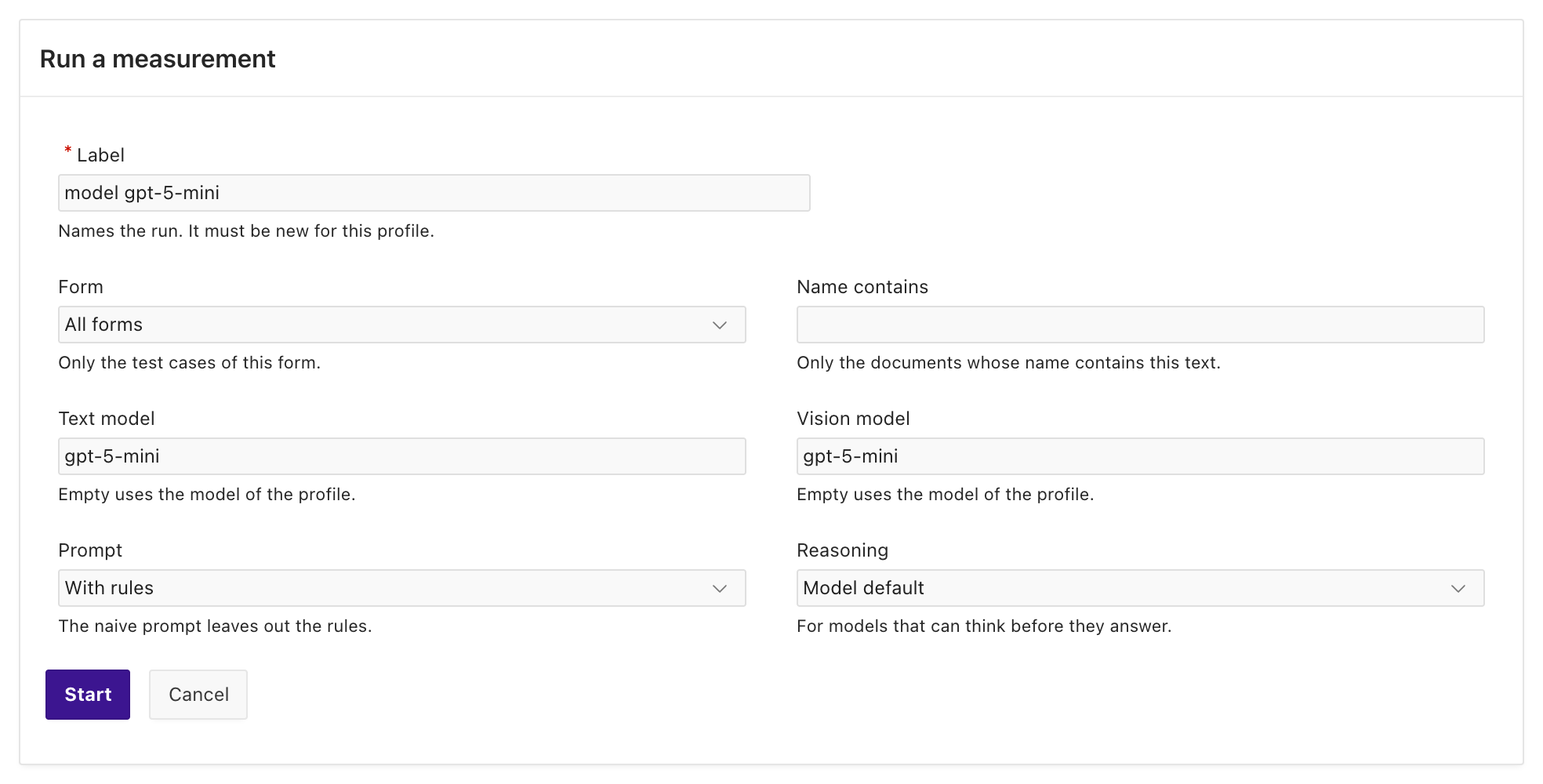
- On the tab Measurements, choose Run measurement.
- Enter the Label
model gpt-5-mini. Leave Form atAll formsand Name contains empty, so that the run takes all 23 test cases. - Enter
gpt-5-miniin the fields Text model and Vision model, and choose Start.
- Run the measurement again with the label
model gpt-5.6-lunaandgpt-5.6-lunain both model fields. - Open the tab Measurements when both runs have finished. The column Models shows the model of each run, and Seconds the total time of its calls.
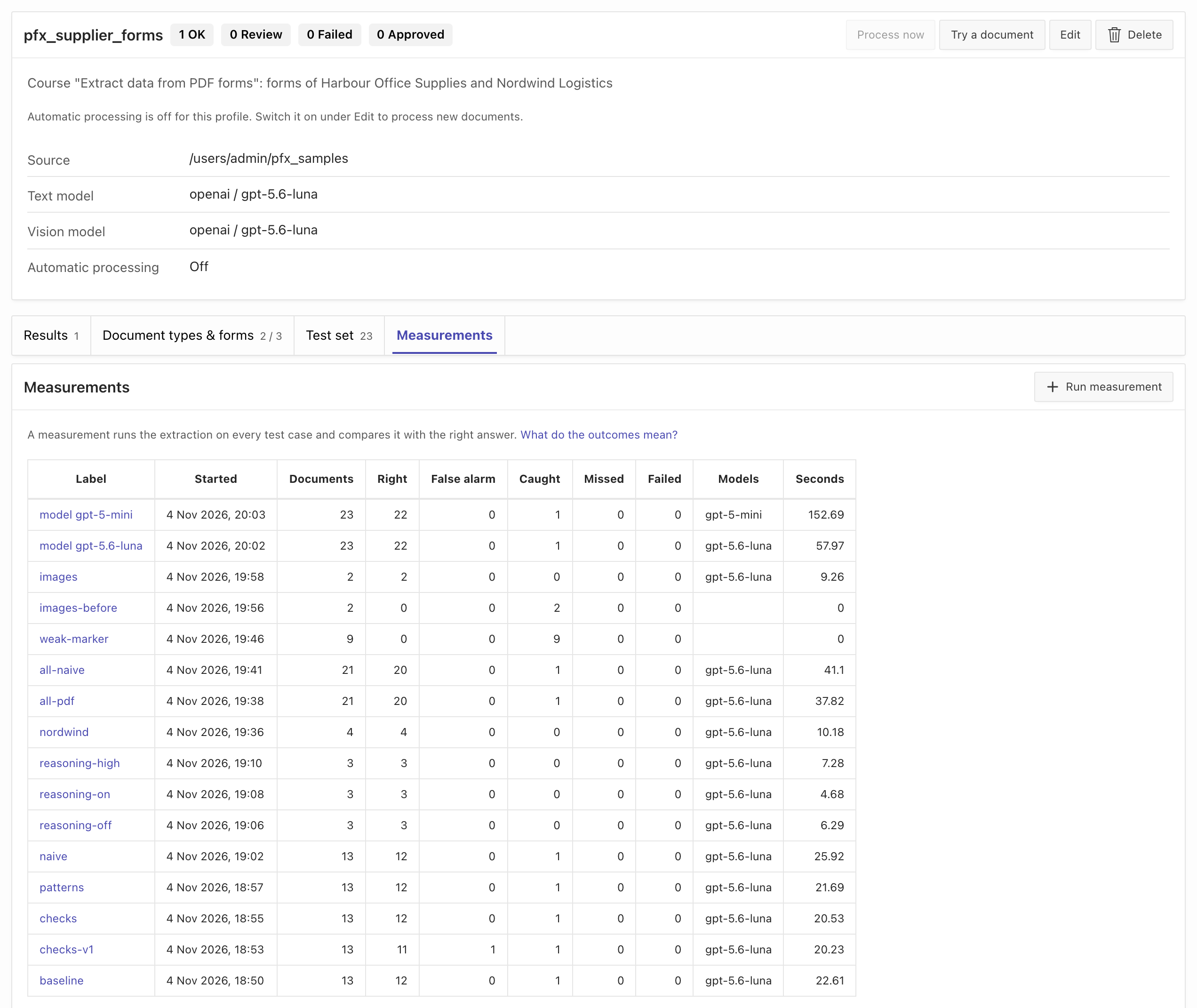
Choose the label of a run to see the outcome of each document. To print one line for each model and kind of document, as the SQL tab does, run @04_compare_report.sql.
04_compare_models.sql measures the whole test set once for each model of the list pfx_compare_models in settings.sql, and prints the comparison.
It sets both p_model and p_vision_model of measure:
<<model_loop>>for m in (select trim(column_value) as model from table(apex_string.split('&pfx_compare_models', ','))) loop -- p_model replaces the model of text_model, p_vision_model the model of vision_model. adm_ai_form_extract_api.measure( p_profile_id => l_profile_id , p_label => 'model ' || m.model , p_model => m.model , p_vision_model => m.model ); commit;end loop model_loop;The list in settings.sql is gpt-5.6-luna,gpt-5-mini. Each model must accept text and images. Run @04_compare_models.sql.
It calls each model once for each PDF with text and twice for each image. The calls of the two recorded runs took 58 and 153 seconds in total.
The comparison comes from 04_compare_report.sql, which the script runs at the end. You can run it again without a model call.
LABEL KIND DOCUMENTS RIGHT CAUGHT MISSED FAILED MEDIAN_S MAX_S PROMPT_TOKENS COMPLETION_TOKENS NOT_RIGHT---------------------- ------ ---------- ---------- ---------- ---------- ---------- -------- ------- ------------- ----------------- ------------------------------------------------------------------------------------------model gpt-5-mini image 2 2 0 0 0 13.6 15.9 11627 1511model gpt-5-mini text 21 20 1 0 0 5.9 9.8 21184 9569 harbour-invoice-12-scanned.pdf (CAUGHT)model gpt-5.6-luna image 2 2 0 0 0 4.2 4.2 11627 366model gpt-5.6-luna text 21 20 1 0 0 2.0 8.6 21184 2484 harbour-invoice-12-scanned.pdf (CAUGHT)Both models give the same outcomes:
- 20 of the 21 PDFs are
RIGHT. The oneCAUGHTPDF is the scan without text, which no text model reads. - Both images are
RIGHT. MISSEDandFAILEDare 0.
The cost is different. gpt-5-mini took a median of 5.9 seconds for a text document and 13.6 seconds for an image. gpt-5.6-luna took 2.0 and 4.2 seconds.
The prompt tokens are the same for both models: 21,184 for the PDFs and 11,627 for the images.
The completion tokens are not the same: 9,569 against 2,484 for the PDFs, and 1,511 against 366 for the images. The recording does not show why gpt-5-mini writes more tokens.
On these 23 documents the models are equal in quality, and the choice is about time and tokens. This test set cannot tell you which model is better on documents that it does not contain. Every model that is right on every document looks the same in a measurement. Add the harder documents that you meet in practice to the test set (lesson 5 does this with approvals), and measure again.
Choose by these numbers, in this order:
MISSEDmust be 0. A model that lets wrong values pass the checks is not usable, however fast it is.CAUGHTdecides the work for people. Fewer documents for review are worth more than a few seconds of the model.- The time decides the volume. The job of lesson 5 extracts one document after another. At a median of 2.0 seconds, one model can extract at most about 1,800 text documents an hour (3,600 seconds divided by the median), before the overhead of the job. At 5.9 seconds, it is about 610. Images take two calls.
- The price per token decides the cost. The recording shows tokens, not money. Multiply the tokens of your measurement with the current price of each model.
A model that reads only text cannot read images. Put such a model only into text_model, and use another model for vision_model.
Size the context and the graphics memory
Section titled “Size the context and the graphics memory”This section applies only to an Ollama server that you operate. A hosted provider such as OpenAI sizes the context for you. This run did not record this section: it used OpenAI, and the course has no recording from an Ollama model. The steps give a rule of thumb, and the only numbers are the OpenAI measurements of this lesson, as an example of the calculation.
A model needs graphics memory for its weights and for its context. The weights are about the size that ollama list shows for the model.
The context grows with num_ctx. When the model and its context do not fit into the graphics memory, Ollama puts a part of the model into the main memory, and calls become much slower.
ollama ps shows the split in the column PROCESSOR, for example 100% GPU or 48%/52% CPU/GPU.
For the provider ollama, settings.sql sets num_ctx to 16,384. Ollama cuts a prompt that is longer than the context without an error.
Size num_ctx and max_text_chars from your measurement, not from the maximum of the model:
- Find the largest prompt of your test set:
select max(prompt_tokens) from adm_ai_form_measurements where label = '<label>'. In the runall-pdfof lesson 3, withgpt-5.6-luna, the largest prompt is the five-page invoice with 4,768 prompt tokens. The tokenizer of an Ollama model gives other numbers. - Add the answer and a margin. The answer of an invoice with a line table read by the model is a few hundred tokens up to a few thousand.
- Set
num_ctxin theconfigof the model to the next power of two above the sum. - Set
max_text_charsso that a text of that length still fits. Divide the characters of the longest text by the prompt tokens of the same document to get the characters for each token. In the recording withgpt-5.6-luna, the text of the five-page invoice has 10,335 characters and its prompt has 4,768 tokens: about 2.2 characters for each token. In the Manager, enter the value in Maximum text, under Advanced settings of the profile. The profile of this course sets no maximum, so ADM sends the whole text. - Make sure that
ollama psshows100% GPUfor the model after a call with this context.
A document with more text than max_text_chars goes to REVIEW instead of to a cut prompt, so a document that is longer than the test set goes to a person.
With two models, for example a text model and a vision model, both must fit at the same time, or Ollama unloads one to load the other. Each load takes seconds. Using one model for text and images avoids that.