
Hooks
Hooks let you attach your own PL/SQL to product events without modifying ADM. Register a snippet once, and ADM calls it every time the event happens — from the application, from the APIs, from a job, from anywhere.
Use them to kick off downstream processing, to keep another system in step, or to refuse an operation that breaks a rule of yours.
The events
Section titled “The events”| Hook key | Fires | Receives |
|---|---|---|
AFTER_NEW_FILE_UPLOAD | A new document was created | p_document_id, p_version_id |
AFTER_NEW_FILE_VERSION | A new version was added to an existing document | p_document_id, p_version_id |
AFTER_NEW_FOLDER_CREATION | A folder was created | p_folder_id |
There are no other hook events. All three fire after the operation has been written but before the transaction is committed — which is what makes rejection possible.
Registering one
Section titled “Registering one”-
Write a procedure with the right signature:
create or replace package my_adm_hooks asprocedure after_new_file_upload(p_document_id in adm_documents.document_id%type, p_version_id in adm_document_versions.version_id%type);end my_adm_hooks;/ -
In the application, go to Administration → Hooks, pick the event, and enter the call. Not the procedure body — the call, with the parameters bound by name:
my_adm_hooks.after_new_file_upload(p_document_id => :p_document_id, p_version_id => :p_version_id);The page shows the expected signature and an example for each event, so you do not have to remember the parameter names.
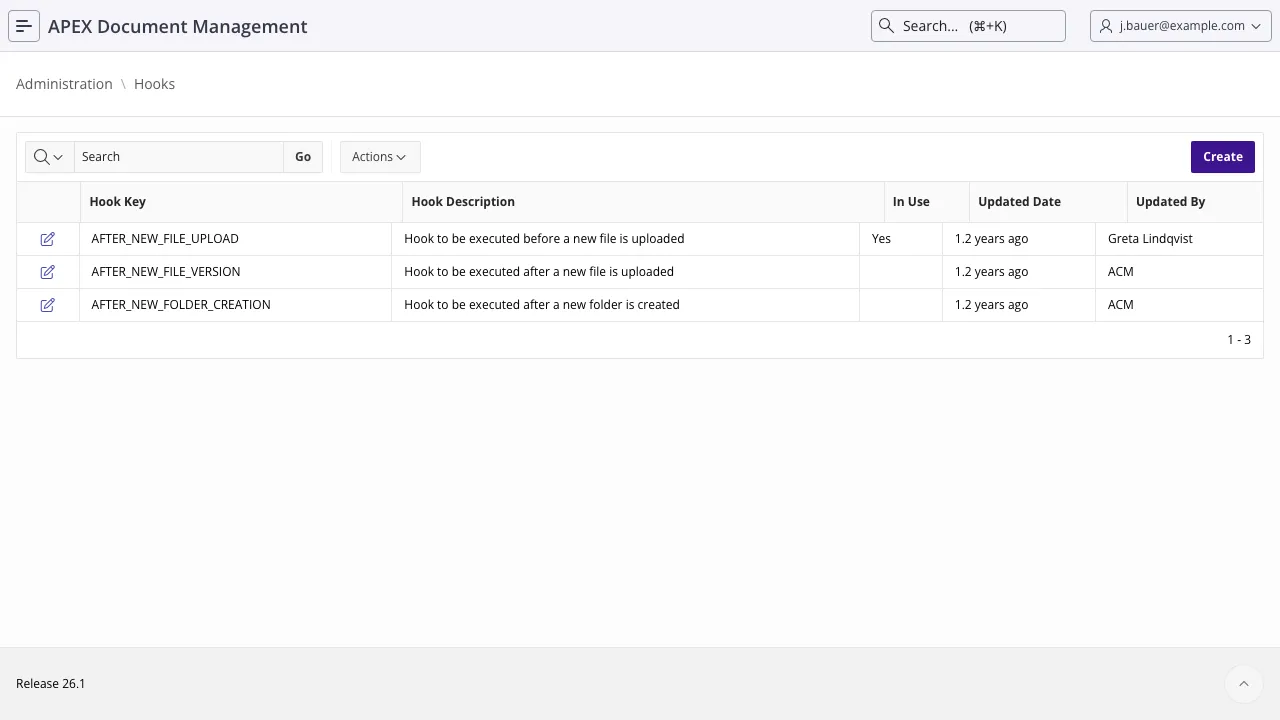
The snippet is stored in adm_hooks.hook_plsql and executed as dynamic PL/SQL with the parameters
bound. It works both inside an APEX session and outside one, so a hook fires for an upload done from
a batch script exactly as it does for one done in the browser.
Rejecting an operation
Section titled “Rejecting an operation”Because a hook runs inside the caller’s transaction and its exceptions propagate, raising from a hook aborts the operation — the supported way to enforce a rule ADM does not have:
create or replace package body my_adm_hooks as  procedure after_new_file_upload(    p_document_id in adm_documents.document_id%type  , p_version_id  in adm_document_versions.version_id%type  )  as    l_name adm_documents.document_name%type;  begin    select document_name into l_name      from adm_documents     where document_id = p_document_id;
if l_name not like 'INV-%' then raise_application_error( -20701 , 'Invoices must be named INV-<number>.<extension>' ); end if; end after_new_file_upload;end my_adm_hooks;/When a hook raises, ADM wraps it and raises its own c_err_hook_failed naming the hook. Your
message and backtrace are logged, so the diagnosis is in the log even though the user sees ADM’s
wrapper.
Keep it fast. The hook runs in the request that uploaded the file. Anything slow — an HTTP call, a large query, a report — makes every upload slow. If the work is not instant, write a row to your own queue table and let a job of yours do it.
Never commit or roll back. The transaction belongs to the caller. A commit inside a hook
commits half of ADM’s own work — the document row without its audit entry, for instance.
Do not call back into ADM’s mutating APIs from a hook. Creating a document inside
AFTER_NEW_FILE_UPLOAD fires the hook again. If you need it, guard against recursion explicitly.
Read metadata rather than content. p_version_id lets you fetch content with
adm_storage_api.get_file_content, but if the file lives in object storage that is a network round
trip on the upload path. Prefer queueing the id.
Handle your own errors unless you mean to reject the operation. An unhandled exception in a hook you intended to be advisory fails the user’s upload.
Testing a hook
Section titled “Testing a hook”The hook runs wherever the API does, so a plain PL/SQL block is enough to exercise it:
declare  l_document_id number;begin  adm_context_api.system_user_login('JDOE');
  l_document_id := adm_document_api.create_document(    p_folder_id      => l_folder_id  , p_document_name  => 'WRONG-NAME.pdf'  , p_file_content   => l_blob  , p_file_mime_type => 'application/pdf'  );
  rollback;   -- expected to raise before it gets hereend;/
apex_debug output from your hook shows up in the ordinary debug log, and the hook code that was
executed is traced before it runs, so you can confirm which snippet is registered.
Also refer to
Section titled “Also refer to”- Extensibility
- Error handling
- Managing the filesystem from the database
- Upgrading — hook registrations survive an upgrade; code in an ADM package does not