
26.2 changelog
This changelog covers the changes in ADM 26.2 since 26.1, the previous tagged release. The base product supports upgrades from 0.1.6 or later. The AI Pack supports upgrades from 26.1 or later. See Upgrading.
PDF operations
Section titled “PDF operations”- New PDF tools let you merge, split, watermark and password-protect PDFs, or convert pages to images.
You can add text, images, comments and page numbers, and read, fill or flatten form fields.
The tools also extract and add attachments, check PDF validity, and convert Office documents to PDF.
Developers can call these tools through
adm_pdf_api. - The tools use APEX Office Print. Each operation checks user permissions before it reads a file. If the result has the same name as an existing file, ADM adds a number to the name.
- The setting
PDF_MAX_FILE_SIZE_MB(default50) limits the total size of the source files of one operation. - PDF changes protect existing signatures by default. Unless automatic signing can replace ADM’s own signature,
you must explicitly allow signature invalidation with
p_invalidate_signatures => true. Automatic signing rejects source PDFs with multiple valid signatures. adm_pdf_provenance_apiand the viewadm_report_pdf_provenance_vrecord where a PDF comes from:NOT_SIGNED,ADM_SIGNED,MODIFIED,FOREIGN_SIGNEDorUNKNOWN. The upgrade does not classify existing PDFs. See Upgrading.- The file browser offers the operations as PDF tools.
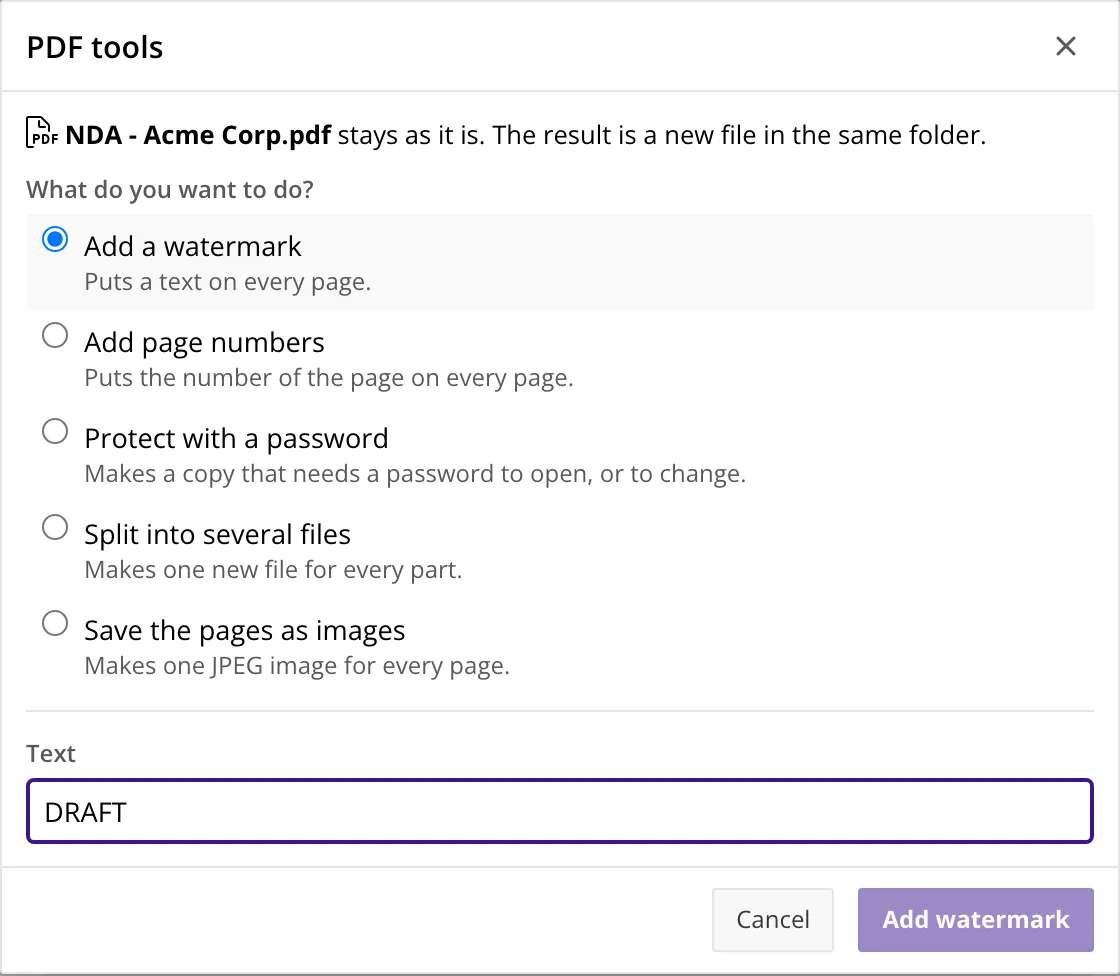
See PDF operations.
PDF signing
Section titled “PDF signing”adm_signing_apiregisters signing keys and grants them to users and groups. The private key can stay in a Transit secrets engine (OpenBao or HashiCorp Vault, providerTRANSIT). Other options are OCI Vault (OCI_VAULT, optional) or the ADM database (DATABASE, not recommended).adm_pdf_api.signsigns a PDF document.adm_pdf_api.verify_signaturesreads and checks the signatures of a PDF. Signing needs AOP 26.1.2 or later.adm_signing_policy_apisets a signing mode for a folder:OFF,WATCHorSIGN. In aSIGNfolder, ADM signs the PDFs it creates and the PDFs users save through the built-in PDF editor.- The settings are
AUTO_SIGN_KEY_ID,AUTO_SIGN_DEFAULT_MODE(defaultWATCH) andSIGNING_TSA_URL. - The release archive includes a script to create a certificate for a Transit key in the
signingdirectory.
See PDF operations and Signing policies.
Records management
Section titled “Records management”- You can set a legal hold or retention period on a folder and all its subfolders. Each document inherits these rules in addition to its own rules.
- A retention period has an end action:
DELETE(the default, as before) orRELEASE, which ends the protection and keeps the document. - An administrator can place a system hold or a system retention. Only an administrator can lift a system hold. Nobody can remove or shorten a system retention before it ends.
- The view
adm_report_documents_vshows the effective hold and retention of each document. - The file browser shows the retention state of folders.
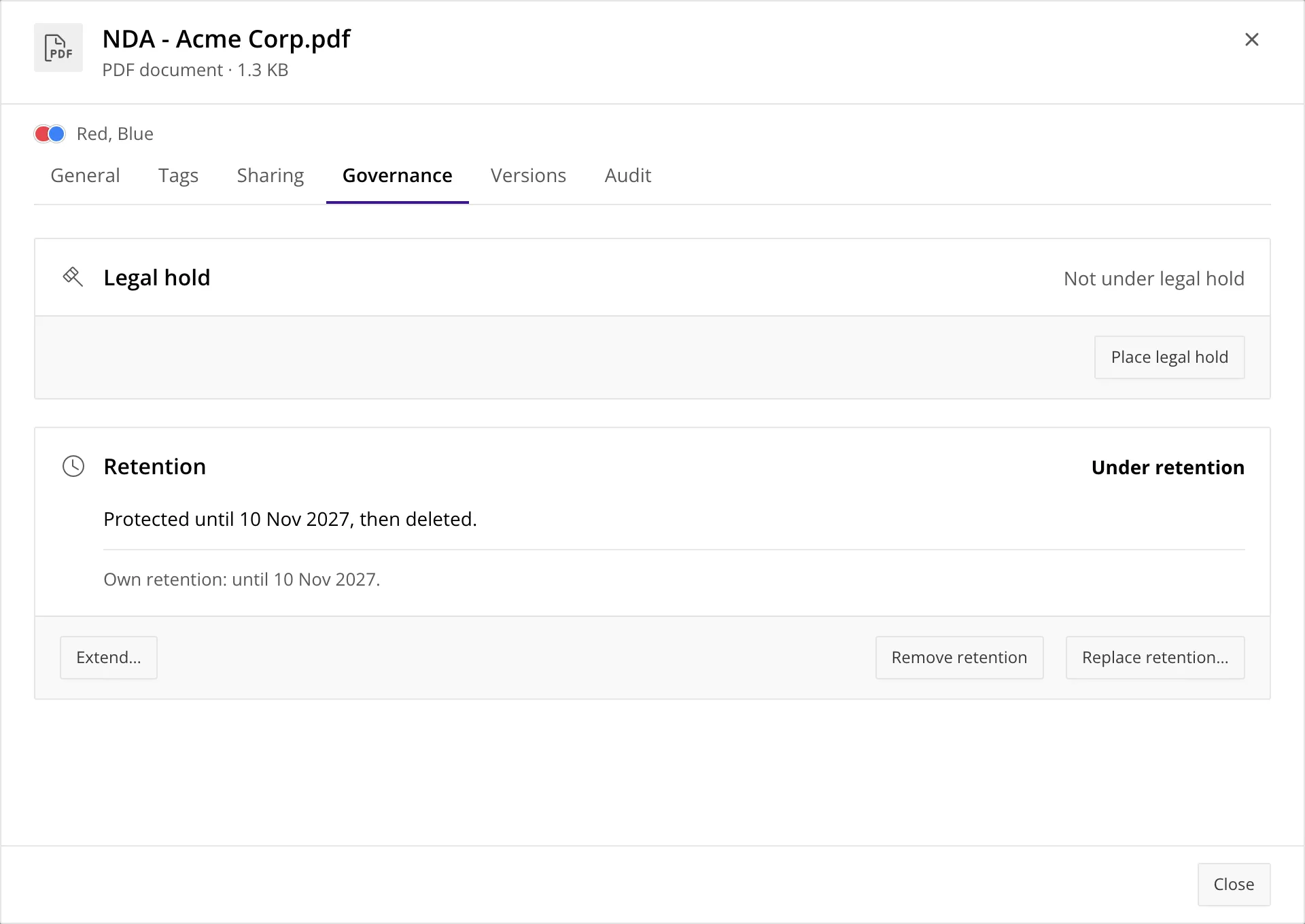
See Records management.
- Ten new events join
AFTER_NEW_FILE_UPLOAD,AFTER_NEW_FILE_VERSIONandAFTER_NEW_FOLDER_CREATION:BEFORE_DOCUMENT_DELETE,AFTER_DOCUMENT_TRASHED,AFTER_DOCUMENT_RESTORED,AFTER_DOCUMENT_MOVED,AFTER_FOLDER_MOVED,AFTER_SHARE_CREATED,AFTER_RETENTION_CHANGED,RETENTION_ENDING_SOON,RETENTION_ENDEDandAFTER_PDF_SIGNED. The AI Pack adds an eleventh event,AFTER_FORM_EXTRACTION. - The daily job triggers the two retention events.
RETENTION_ENDING_SOONruns once within the warning period before retention ends.RETENTION_WARNING_DAYSsets this period (default14days). A value of0disables the warning event. - A hook can reject an operation with an error code from
-20700to-20999. ADM shows the error message from the hook to the user. - Hooks that start other hooks can nest 10 levels deep. The next level raises
adm_error.c_err_hook_depth_exceeded(-20112). An administrator can passp_run_hooks => falsetoadd_folder,create_documentandadd_document_version. - A new tutorial, Build workflows on hooks,
and a sample application in the
examplesdirectory of the delivery.
See Hooks.
Object storage and content search
Section titled “Object storage and content search”- S3-compatible object storage is now available alongside OCI Object Storage. The setting
OBJECT_STORAGE_PROVIDERchoosesOCI(the default) orS3. TheOBJECT_STORAGE_S3_*settings hold the endpoint and the keys, andadm_settings_api.configure_s3_object_storagesets them in one call. The S3 provider needs noDBMS_CLOUD. - Content search uses a shared text index. Files in the database and object storage now use the same
text extraction queue and search index.
Background text extraction now runs every five minutes instead of as part of the daily job. The setting
DATABASE_CONTENT_INDEX(defaultY) controls text extraction for database files. - Database administration scripts are in the
storagedirectory of the release archive. They create tablespaces for file content, reclaim LOB space, and disable LOB compression.
See Object storage, Database storage and Search and taxonomy.
Reading file content
Section titled “Reading file content”adm_document_api.get_contentreturns the content of a document, or of one of its versions, as a BLOB. It checks that the current user may view the document, and in an embed session that the token holds theDOWNLOADgrant. User reads appear in the audit trail as described below. Use it instead ofadm_storage_api.get_file_content, which does not check access.
Versions
Section titled “Versions”- The setting
VERSION_MERGE_WINDOW_MINUTES(default0, off) lets repeated saves by the same user replace the latest version within that window. This groups quick edits into one version. An explicit Upload new version and the PDF tools always add a version. - The version views have the column
merge_window_until.
Audit trail
Section titled “Audit trail”- ADM records user reads as
READ_DOCUMENTin the audit trail. Repeated reads of the same document within one request share an audit entry. System-user reads are excluded by default. Internal calls can explicitly disable read auditing. It also records changes to settings, hooks, embed tokens, storage policies, annotations, signing keys and user roles. - Two optional audit categories are disabled by default.
AUDIT_ACCESS_DENIALSwritesACCESS_DENIEDrows.AUDIT_SESSION_EVENTSwritesIMPERSONATE_USERandSYSTEM_LOGINrows. - The directory
audit-hardeningof the delivery has optional scripts that move the log into an Oracle immutable or blockchain table, with a purge for expired rows.
See Administration and Harden the audit log.
File browser
Section titled “File browser”-
The Info dialog shows the details of a document or folder: tags, versions, the audit trail, the effective hold and retention, and the controls to place them.
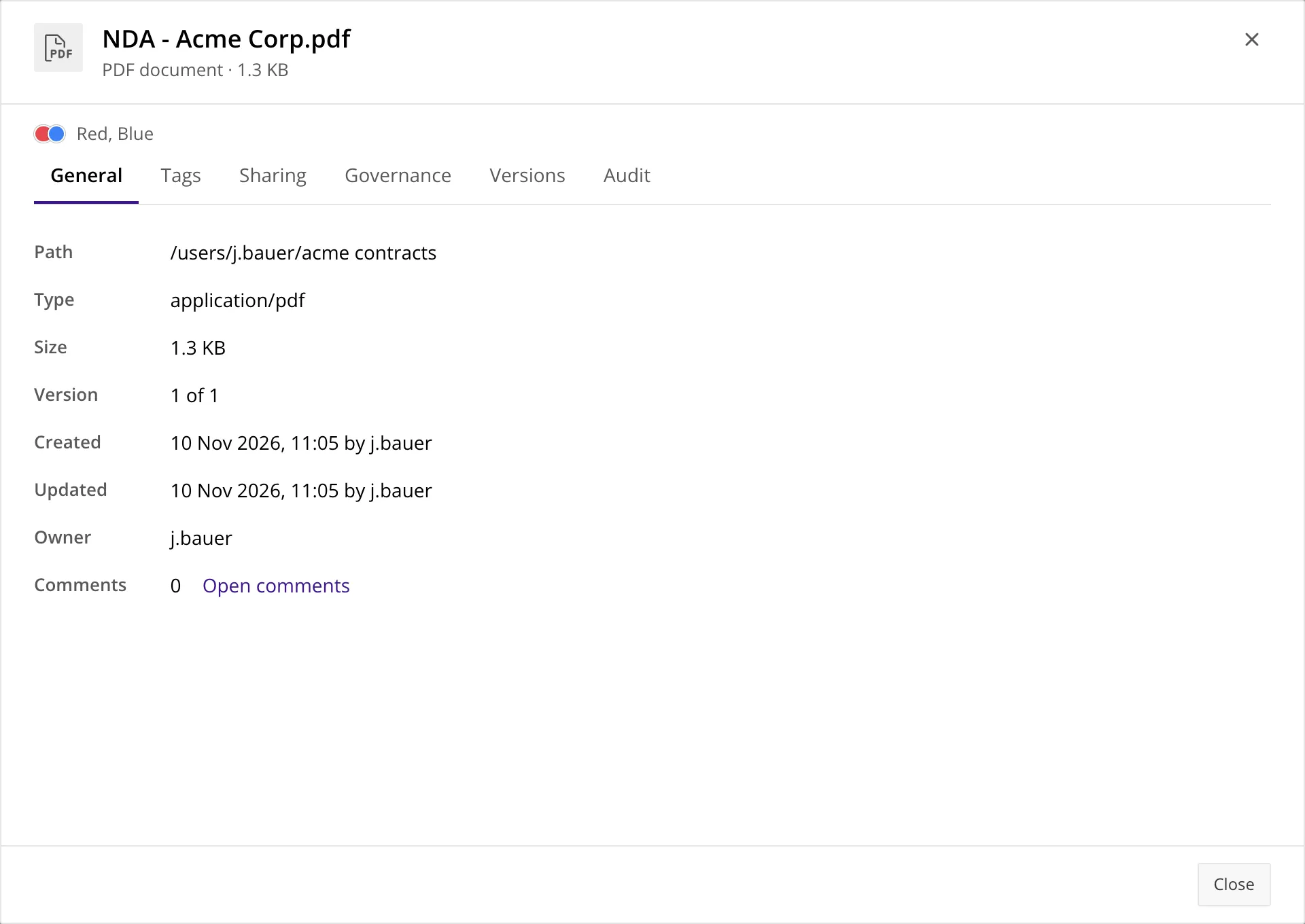
-
Recent and Labels are personal sections in the folder tree. You can assign one of seven colors to documents and folders, and give each color a name.
adm_user_items_apiis the API. The viewsadm_my_recent_documents_v,adm_my_color_labels_vandadm_my_color_label_names_vshow the data of the session user. The settingRECENT_DOCUMENTS_LIMIT(default50) sets the size of Recent.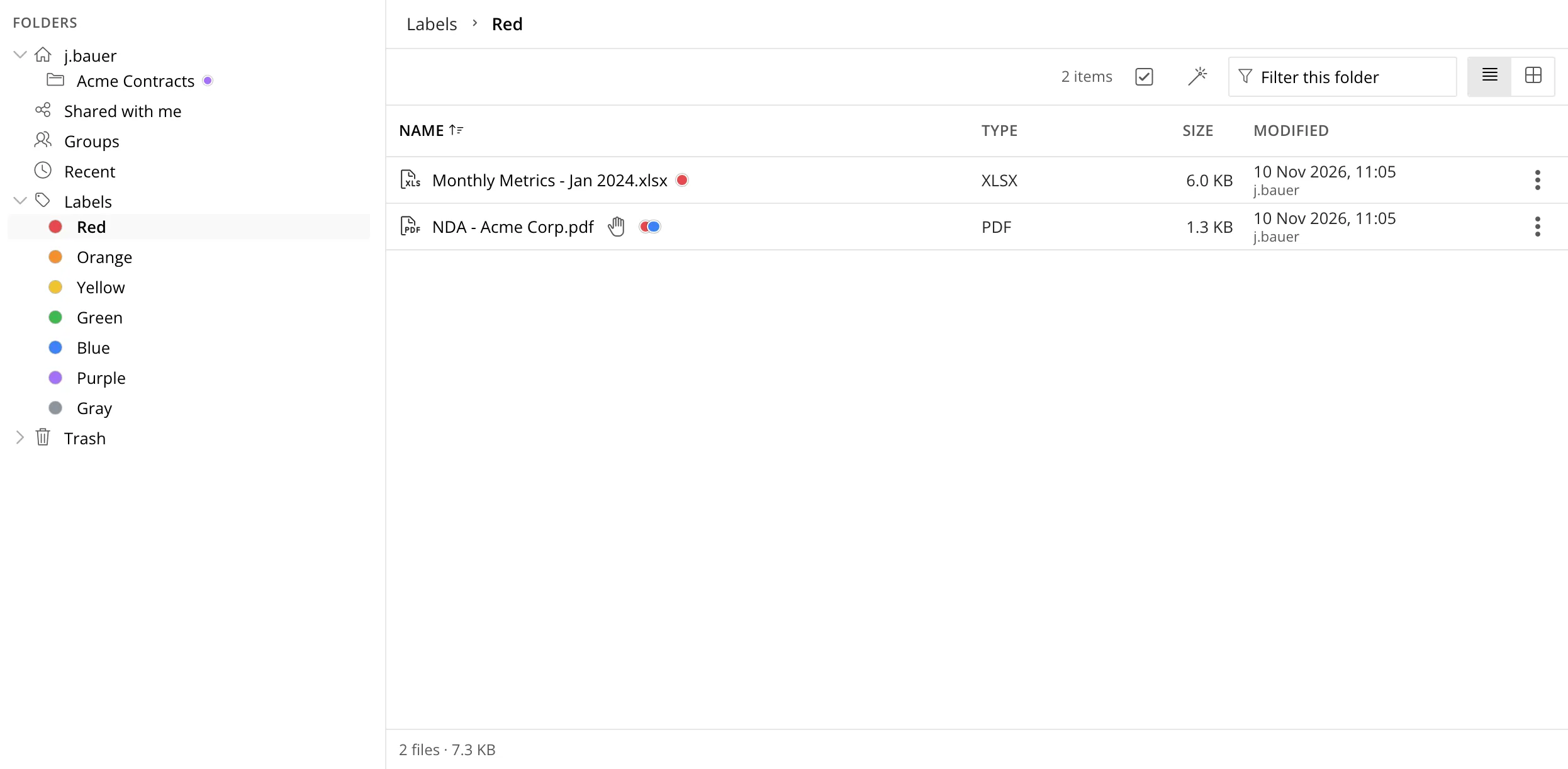
-
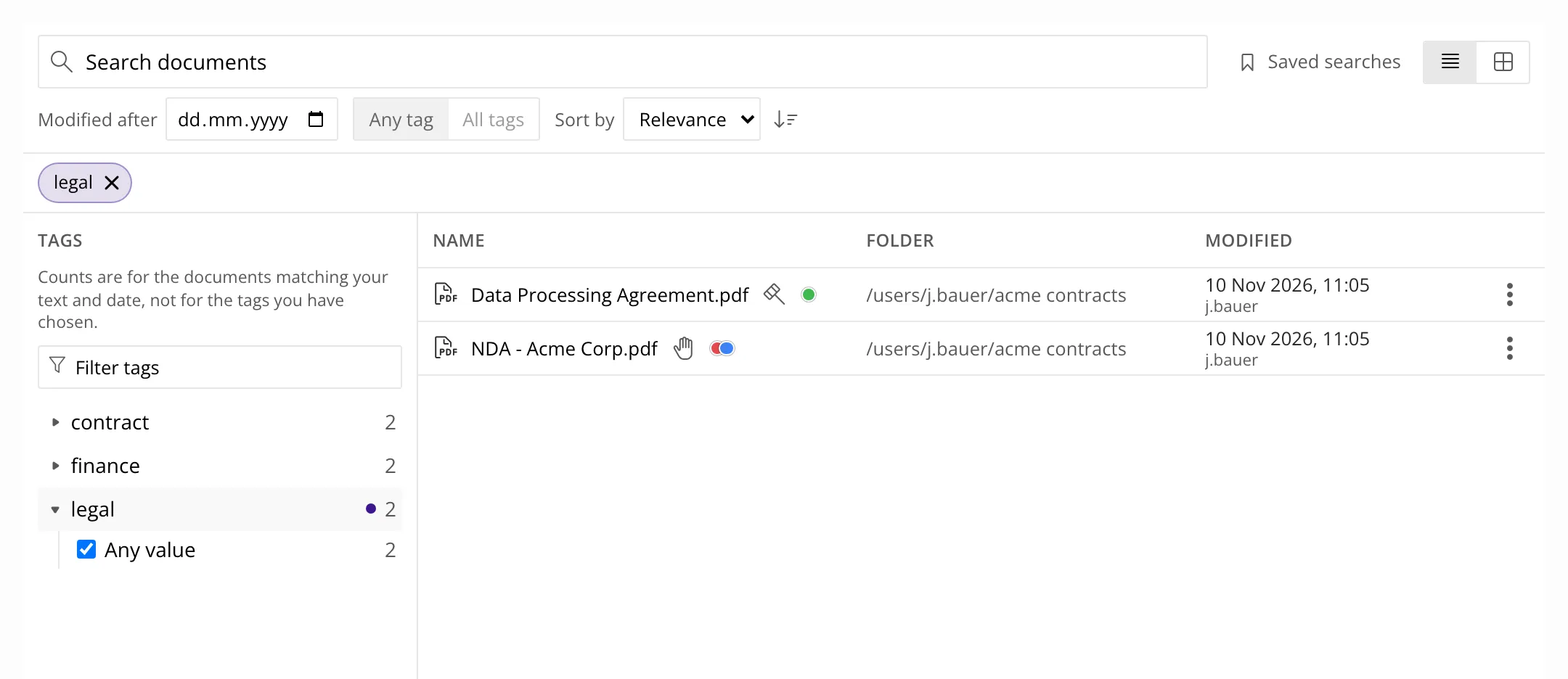
The reworked search page offers filters with result counts, sort options and saved searches. You can combine filters to match all conditions (AND) or any condition (OR).
-
Upload new version now opens a dedicated upload form.
-
Sort and filter results no longer overwrite a more recent selection. Error messages identify missing items after a failed rename, open or folder load. Menus group related actions. If another operation takes a file name during a retry, the browser asks how to resolve the conflict.
See Info dialog and Find your documents again.
Users and groups
Section titled “Users and groups”- A group member has the role
VIEWorEDIT. AVIEWmember can read the folder of the group and cannot change it.adm_group_api.set_member_rolechanges the role. - A group can be hidden in the file browser with
adm_group_api.set_group_browsable. The group keeps its access permissions. adm_group_api.delete_groupdeletes a group with its memberships, shares and folder. It raises an error while the group folder holds content.adm_user_api.change_user_roleandadm_user_api.migrate_userchange the role of a user and move a user to a new user name.adm_session_api.end_user_sessionsends the APEX sessions of a user.adm_link_shares_api.delete_document_link_sharedeletes a link share with a rights check.- The setting
USERS_CAN_CREATE_TAGS(defaultN) controls who creates new tags.
See Users and groups.
Settings
Section titled “Settings”New settings in the base product: PDF_MAX_FILE_SIZE_MB, AUTO_SIGN_KEY_ID, AUTO_SIGN_DEFAULT_MODE,
SIGNING_TSA_URL, OBJECT_STORAGE_PROVIDER, OBJECT_STORAGE_S3_ENDPOINT,
OBJECT_STORAGE_S3_PATH_STYLE, OBJECT_STORAGE_S3_ACCESS_KEY, OBJECT_STORAGE_S3_SECRET_KEY,
DATABASE_CONTENT_INDEX, VERSION_MERGE_WINDOW_MINUTES, AUDIT_ACCESS_DENIALS,
AUDIT_SESSION_EVENTS, USERS_CAN_CREATE_TAGS, RETENTION_WARNING_DAYS and
RECENT_DOCUMENTS_LIMIT. See the settings reference.
Upgrade tooling
Section titled “Upgrade tooling”- One generated, re-runnable script upgrades each product:
upgrade.sqlandupgrade_ai.sql. A second run reportsNothing to change. - The table
adm_product_versionsrecords the installed release. The tableadm_upgrade_historyrecords the data steps that are done.
AI Pack
Section titled “AI Pack”-
OCR text extraction. Collections can use an OCR provider to extract text from scanned PDFs and images. Configure this per collection through
ocr_text_extraction. The settingAI_OCR_FALLBACK_CONFIGprovides a separate, installation-wide OCR fallback. This fallback is disabled by default. -
Form extraction. A language model reads the fields of invoices, delivery notes and other forms. Configurable rules determine which results need human review. The packages are
adm_ai_form_config_api,adm_ai_form_extract_apiandadm_ai_form_admin_api, and the viewadm_my_form_extractions_vshows the results of the session user. A profile can automatically process new documents. The hookAFTER_FORM_EXTRACTIONruns when a result is accepted. A form with"model_input": "file"sends the file to the vision model instead of the text, to preserve layout information, such as grids with empty cells. See Form extraction.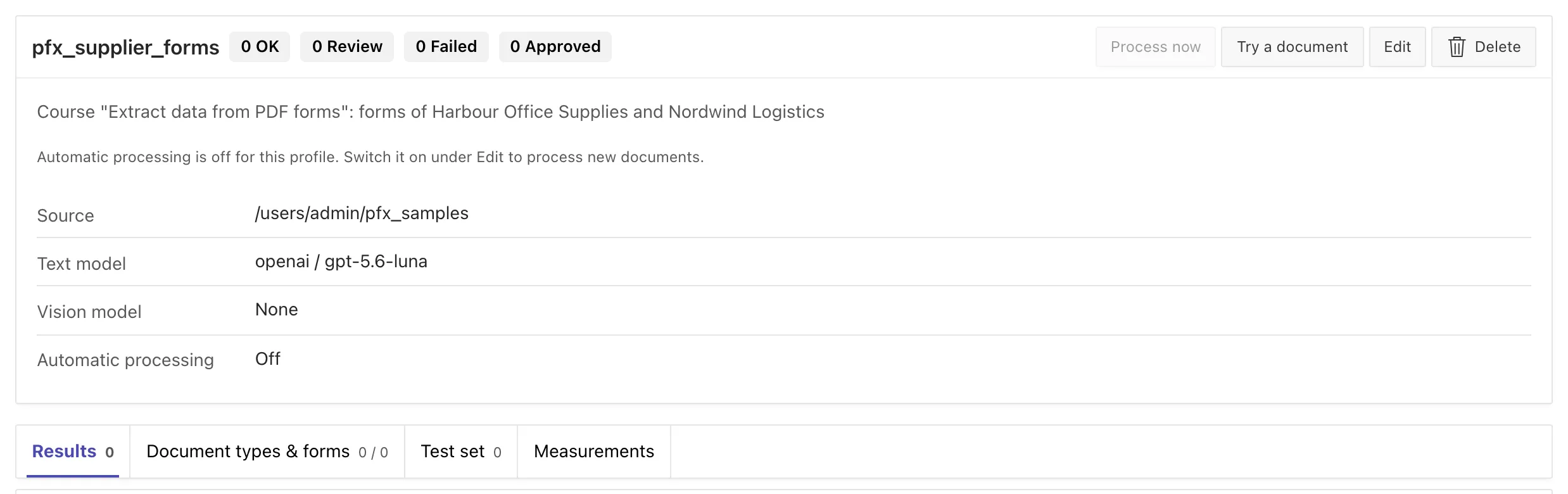
-
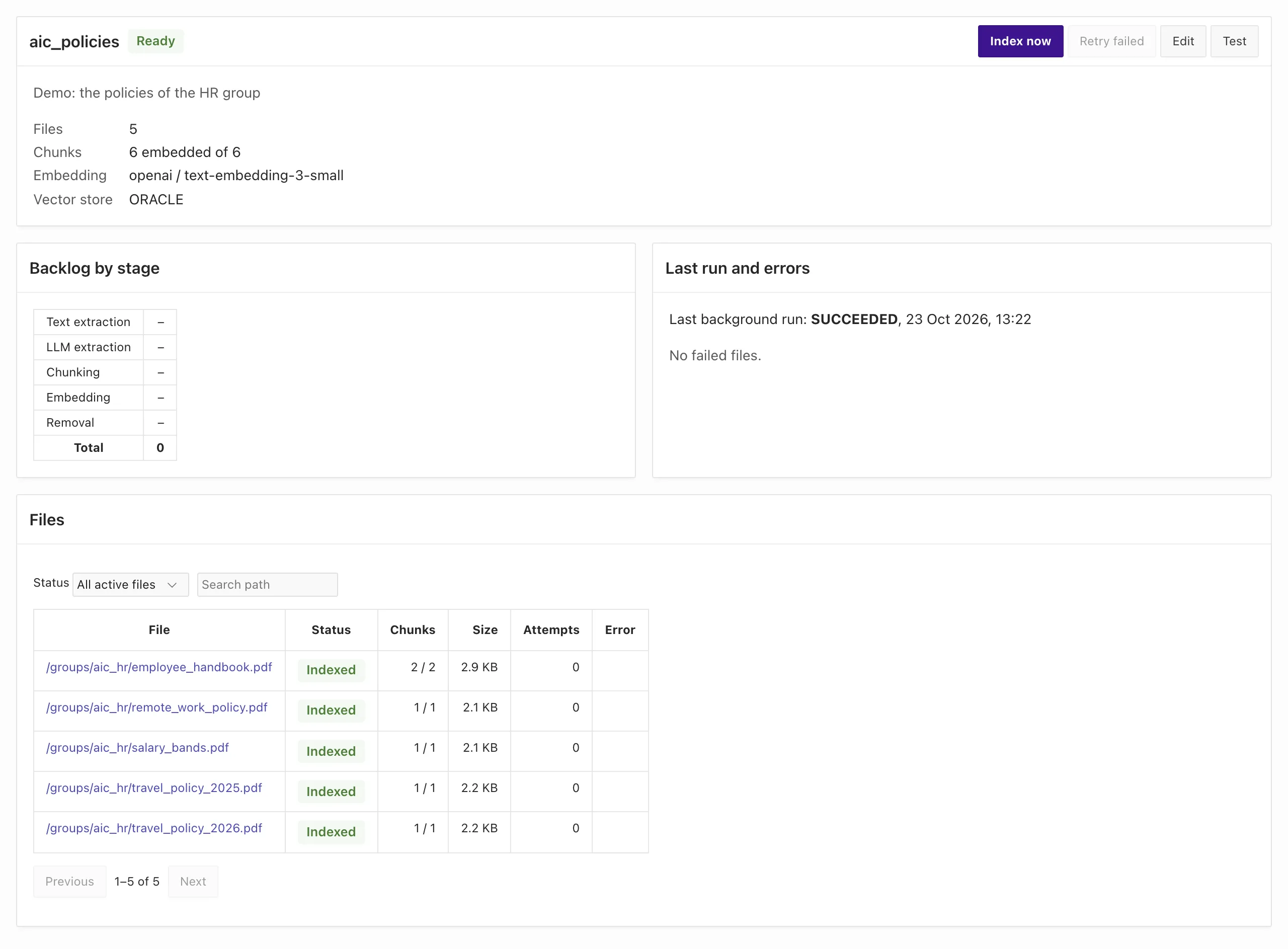
RAG collection manager. The new interface lets administrators create, index, inspect and test collections. You can rebuild a collection to recreate its chunks and vectors with the current configuration. See RAG collection manager.
-
Collection status shows what happened. A file has status
ERRORonly after all retry attempts fail. A file without extracted text has statusEMPTY. A file that awaits indexing has statusNOT_INDEXED. The status view counts failed, empty, unindexed and searchable files, and shows which extraction method produced the text (FILTER,LLM,OCRorUNKNOWN). -
Search retrieves more accessible results.
search_chunksasks for more candidates when the permission check removes some. This lets users find accessible chunks even if inaccessible chunks rank higher. -
A failing file no longer blocks a collection. If chunk creation fails for a file, ADM records one failed attempt and continues with the other files. The columns are
chunk_attemptsandchunk_error. -
Agent tools. The tool
ADM_READ_FILE_CONTENTreturns at most 32000 characters for each page and returns the offset for the next page. -
UC AI 26.4. The bundled UC AI library is updated from 26.3 to 26.4.
Changes that can affect your code
Section titled “Changes that can affect your code”Positional calls to generate_answer_debug need an update.
If your code calls adm_ai_rag_api.generate_answer_debug with positional arguments, change it to use named arguments.
The new optional inputs p_document_id and p_as_admin precede the output arguments po_answer and po_debug_log_id.
RAG embedding and vector store configuration is locked after collection creation.
An existing collection cannot change its embedding provider, model, dimensions or vector store.
Create a new collection for these changes. Calls that attempt these changes raise adm_ai_error.e_embedding_locked.
RAG retrieval uses personal document access for administrators. This applies to search_chunks, prepare_sources and generate_answer.
These calls return chunks from documents the user owns or can access through shares, including for users with the role ADMIN. Only the system user sees every
document. To get the old result for a collection, pass p_as_admin => true.
Document search uses the current ADM identity. adm_search_api.search_documents no longer returns every document to
every user. It reads the user from the ADM context. The role ADMIN and the system user still
find every document. Every other user finds only the documents they own or that were shared with
them, and a session without a context finds nothing. search_user_documents raises
adm_error.c_err_no_permission when p_username is not the context user, unless the context
holds the role ADMIN. Pass sys_context('ADM_CONTEXT', 'ADM_USERNAME') as the user name.
Only administrators can create tags by default. adm_tag_api.create_tag and add_tag_to_document raise
adm_error.c_err_no_permission for a new tag name when the user is not an administrator. Assigning
an existing tag works as before. Create the tags that your users need as an administrator, or set
USERS_CAN_CREATE_TAGS to Y.
HASH_PRIVATE_KEY must have 16 characters or more. The calls that hash share-link and embed
parameters and share passwords raise an error when the setting is missing, blank or shorter. The key
that ADM generates at install time has 20 characters. Make sure that your key is long enough.
The file browser blocks changes for the role VIEW. This also applies to share links with view access.
PL/SQL calls do not enforce this file browser restriction.
If users need to make changes in the file browser, give them edit access.
system_user_login refuses a deactivated user. adm_context_api.system_user_login raises
adm_error.e_no_permission and leaves the session without an identity.
Role changes and deactivation end the affected user’s APEX sessions. The user returns to the login page on their next request. See Users and groups.
The names . and .. are refused for documents, folders, users and groups.
Named errors replace raw Oracle errors. If your code catches the old error, catch the new one:
| Call | Before | Now |
|---|---|---|
adm_folder_api.get_folder_id |
NO_DATA_FOUND |
adm_error.e_folder_not_found |
adm_document_api.permanently_delete_document |
a raw error | adm_error.e_doc_not_found |
adm_document_api.get_file_size |
a raw error | adm_error.e_version_not_found |
adm_folder_api.add_folder with a taken name |
a raw error | adm_error.e_folder_exists |
adm_user_api.add_user with a taken name |
a raw error | adm_error.e_user_exists |
adm_group_api.create_group with a taken name |
a raw error (ORA-00001) |
adm_error.e_group_exists (-20132) |
| A document name over 255 characters | ORA-06502 |
adm_error.e_invalid_name |
Not-found messages no longer include IDs. ADM records the ID in the log. Code that matches the text of a message must be reviewed. Match the exception or the category instead. See Error handling.
Failed share and archive operations preserve transaction state. share_document and share_folder check
the role, the user and the group first, so a failed call shares with nobody. A corrupt archive raises
adm_error.c_err_not_an_archive and no longer rolls back the transaction of the caller.
PDF conversion and PDF tools. adm_aop_api.convert_to_pdf checks the rights before it reads the
file. If a file name already exists, ADM adds a number (report (2).pdf) instead of a timestamp after the extension.
In an embed session, every PDF operation needs the DOWNLOAD grant. A hook that calls a PDF
operation must pass p_run_hooks => false, which only an administrator or the system user can do.
For hooks run by other users, queue the work for a worker with a system context.
Folder paths and storage policies. Folders that were created directly under the root had the path
//name. The upgrade corrects them. A storage policy path pattern must start with / and use lower
case, and _ and % are no longer wildcards.
Object storage tasks no longer depend on OBJECT_STORAGE_ENABLED. The setting decides where new
files go. The daily job still moves files, deletes objects and verifies checksums while it is N, and
skips these tasks only while no bucket is configured. The setting OBJECT_STORAGE_VERIFY_CHECKSUMS now
has an effect.
The view adm_ai_rag_collection_files_v has no status NO_CHUNKS. The status is NOT_INDEXED
or EMPTY. Update the code that tests for the old value.
New columns on views. adm_report_documents_v, adm_report_groups_v,
adm_report_document_versions_v, adm_my_document_versions_v and the RAG collection views have new
columns. List the columns that you need in your queries instead of using select * into a fixed
record.
New grant. The ADM schema needs grant execute on sys.dbms_lock. See
Upgrading.
Security
Section titled “Security”- An embed session is limited by its token. The view and edit checks no longer fall back to the rights
of the signed identity. The limits
maxDepthandOWNapply on every path that opens an item by ID, and the upload quota is checked again at the commit. - A move that changes the owner of a document or folder needs owner rights, and a folder move refuses system folders. A refused move keeps the embed tokens.
- A revoked share no longer stays visible to search and to the AI agent. Triggers on the access tables remove the stale rows of the sharing cache.
- A visitor of a public share link gets a restricted ADM context. ADM checks the link again on every request.
- ADM writes only the first eight characters of a token to the debug log and the error log.
- User name comparisons in access checks are case-insensitive.
- The APEX error handler hides raw constraint and size errors behind the generic message.
- Two sessions that delete a version and a folder at the same time no longer deadlock. Three foreign keys have indexes.
- Deleting a document at the end of its retention no longer fails with
ORA-02292when the document has tags or shares. - The share URL no longer repeats the ORDS path.
- Uploads can resume with keys longer than 255 characters.
- An object that is missing from the bucket is reported as a checksum mismatch.
- Pipelined functions no longer log
ORA-06548as an unhandled error when the consumer stops early. - Qdrant points and collections that a cascade left behind are deleted.
- PDF and RAG packages now compile on Oracle 19c.
- A tag name that you type in capital letters in the grid is stored in lower case.
- The Upload new version page rejects files with a different file extension.
- The file browser gives the same not-found error for a missing item and for an item that you cannot see.
- OCR refuses a password-protected PDF with a clear error.
- The RAG queue now uses the configured
llm_text_extractionorocr_text_extractioneven if built-in indexing already extracted text. Previously, a scanned PDF could show statusINDEXEDwith only its title as extracted text. Files that already have chunks keep their existing text. To extract the text again, save the file as a new version.
Documentation
Section titled “Documentation”- New tutorials: Build workflows on hooks, Classify uploads with an LLM, Ask questions across your documents and Extract data from PDF forms.
- New guides for PDF operations, signing policies, records management, the Info dialog, Recent and color labels, audit hardening, database storage, and the RAG collection manager. The generated API and view references are regenerated.
- ADM works over a database link with some limits. See Database links.
- The customer skills in the
skillsdirectory now cover 26.2.
Upgrading from 26.1
Section titled “Upgrading from 26.1”Follow the upgrade guide. Run upgrade.sql, and
then upgrade_ai.sql if you have the AI Pack. Read the section
What to plan for in 26.2
first: files stored in the database become searchable as ADM_INDEXING_JOB processes
the queue.