
Measure and tune the search settings
By the end of this lesson, you can measure retrieval and answers with a question list, store the score threshold that the measurement supports, make sure that the stored search settings reach the agent, and compare surrounding chunks, a chunk size and query rewriting with the same list.
Write a question list
Section titled “Write a question list”This lesson continues with the agent of lessons 2 to 5. Both collections still have the default score threshold 0.5.
One good answer proves little. A question list gives you numbers to compare after every change. Each question has the document that must be found, and a fact that the answer must contain.
14_aic_questions.sql creates the table aic_questions with these ten questions. The scripts of this lesson print them by the number in the first column:
| Q | Question | Expected document | Expected fact | Asked as |
|---|---|---|---|---|
| 1 | What notice period applies to the Alpenwerk maintenance contract? | contract_alpenwerk_maintenance.pdf |
30 days | AIC_LEGAL |
| 2 | How long is the notice period in the Ferrotek framework agreement? | contract_ferrotek_framework.pdf |
six months | AIC_LEGAL |
| 3 | Was the notice period of the Nordlicht supply agreement changed? | scan_nordlicht_amendment.pdf |
120 | AIC_LEGAL |
| 4 | How many days per week may I work remotely? | remote_work_policy.pdf |
three | AIC_LEGAL |
| 5 | What is the hotel limit per night for a business trip in a large city? | travel_policy_2026.pdf |
165 | AIC_LEGAL |
| 6 | What was the hotel limit in 2025? | travel_policy_2025.pdf |
140 | AIC_LEGAL |
| 7 | What is the notice period for an employee who resigns after probation? | employee_handbook.pdf |
four weeks | AIC_LEGAL |
| 8 | What is the liability cap in the Helios distribution agreement? | contract_helios_distribution.pdf |
2,000,000 | AIC_LEGAL |
| 9 | Which salary band is a senior engineer in? | salary_bands.pdf |
B4 | AIC_HR |
| 10 | Does the company allow dogs in the office? | none: no document answers it | “nothing found” | AIC_LEGAL |
Questions 1, 2, 3 and 8 search aic_contracts, the others search aic_policies. Questions 8 and 9 are asked as the user who may read the document.
The correct result for question 10 is that nothing is retrieved, and that the answer says so.
Measure retrieval at four thresholds
Section titled “Measure retrieval at four thresholds”Most wrong answers start in retrieval: if the right passage is not found, the model cannot use it. Run @14_aic_questions.sql. It calls the search tool with the question as the search text, and varies one setting at a time.
It makes no call to the answer model, but about 60 calls to the embedding model. It switches the hybrid search on for both collections for a while, and back off at the end.
A cell shows the rank of the expected document among the documents returned and its score, or MISS:
Vector search onlyQ   expected document                     thr .5        thr .41   contract_alpenwerk_maintenance.pdf    #1 0.711      #1 0.7112   contract_ferrotek_framework.pdf       #1 0.648      #1 0.6483   scan_nordlicht_amendment.pdf          #1 0.655      #1 0.6554   remote_work_policy.pdf                #1 0.610      #1 0.6105   travel_policy_2026.pdf                MISS          #2 0.4566   travel_policy_2025.pdf                MISS          #1 0.4397   employee_handbook.pdf                 #1 0.749      #1 0.5938   contract_helios_distribution.pdf      #1 0.538      #1 0.5389   salary_bands.pdf                      #1 0.644      #1 0.64410  (no answer exists)                    ok, none      ok, none
Vector search only, lower stillQ   expected document                     thr .3        thr .21   contract_alpenwerk_maintenance.pdf    #1 0.711      #1 0.7112   contract_ferrotek_framework.pdf       #1 0.508      #1 0.5083   scan_nordlicht_amendment.pdf          #1 0.655      #1 0.6554   remote_work_policy.pdf                #1 0.610      #1 0.6105   travel_policy_2026.pdf                #2 0.456      #2 0.4566   travel_policy_2025.pdf                #1 0.439      #1 0.4397   employee_handbook.pdf                 #1 0.593      #1 0.5938   contract_helios_distribution.pdf      #1 0.538      #1 0.5389   salary_bands.pdf                      #1 0.644      #1 0.64410  (no answer exists)                    FALSE 1       FALSE 4

Hybrid search on (scores are RRF scores)Q   expected document                     thr 0.5       thr 0.41   contract_alpenwerk_maintenance.pdf    #1 0.0330     #1 0.03302   contract_ferrotek_framework.pdf       #1 0.0330     #1 0.03303   scan_nordlicht_amendment.pdf          #1 0.0330     #1 0.03304   remote_work_policy.pdf                #1 0.0330     #1 0.03305   travel_policy_2026.pdf                #1 0.0160     #2 0.03306   travel_policy_2025.pdf                #2 0.0160     #1 0.03307   employee_handbook.pdf                 #1 0.0240     #1 0.03308   contract_helios_distribution.pdf      #1 0.0320     #1 0.03209   salary_bands.pdf                      #1 0.0330     #1 0.033010  (no answer exists)                    FALSE 2       FALSE 2
(collection configuration restored: hybrid search off)
At the default threshold of 0.5, questions 5 and 6 about the hotel limits are MISS: the right documents score 0.456 and 0.439. At 0.4, every document is found, and question 10 still returns nothing.
At 0.3, question 10 starts to return one unrelated document, and at 0.2 it returns four.
The score of question 7 drops from 0.749 at 0.5 to 0.593 at 0.4, although the document is the same. The score in a cell is the score of the document in the tool result, and that is the mean score of its matched chunks. The employee handbook has two chunks. At 0.5 only its best chunk matches. At 0.4 its second, weaker chunk matches too, and the mean drops.
The hybrid search at the end mixes in a keyword search. It finds both hotel documents at 0.5, but it returns passages for question 10 at both thresholds, because the threshold does not apply to the keyword side. Its scores are fused RRF scores, not similarities. The hybrid search section of the RAG configuration guide describes the settings.
Repeat question 5 in the test console
Section titled “Repeat question 5 in the test console”The test console of the RAG collection manager runs one search and shows the parameters, the time of each stage and every chunk with its score. The RAG collection manager guide describes it.
The console searches with your own access, not with the access of AIC_HR or AIC_LEGAL. The search applies the personal access check to each chunk, also for an administrator: you see passages of the documents that you own or that are shared with you or your groups.
The policies are in the group folder /groups/aic_hr, and your administrator is not a member of the group AIC_HR. So the console finds no policy yet.
In lesson 1, Index now indexed the same policies, although it also ran as your administrator. Indexing and search use different rules. The indexing run takes every file in the source folder of the collection, and it does no access check for the person who started it. The search checks every chunk for the person who searches.
Run 14b_aic_admin_sees_policies.sql with the ADM username of your administrator. It adds that user to the group AIC_HR. The teardown removes the membership with the group:
adm_context_api.system_login;adm_group_api.add_user_to_group(p_group_id => l_group_id, p_user_id => l_user_id);commit;@14b_aic_admin_sees_policies.sql MY_ADMINThen do these steps in the ADM application, logged in as that administrator:
-
Open Administration > RAG Collections, and open
aic_policies. -
Select Test.
-
Enter
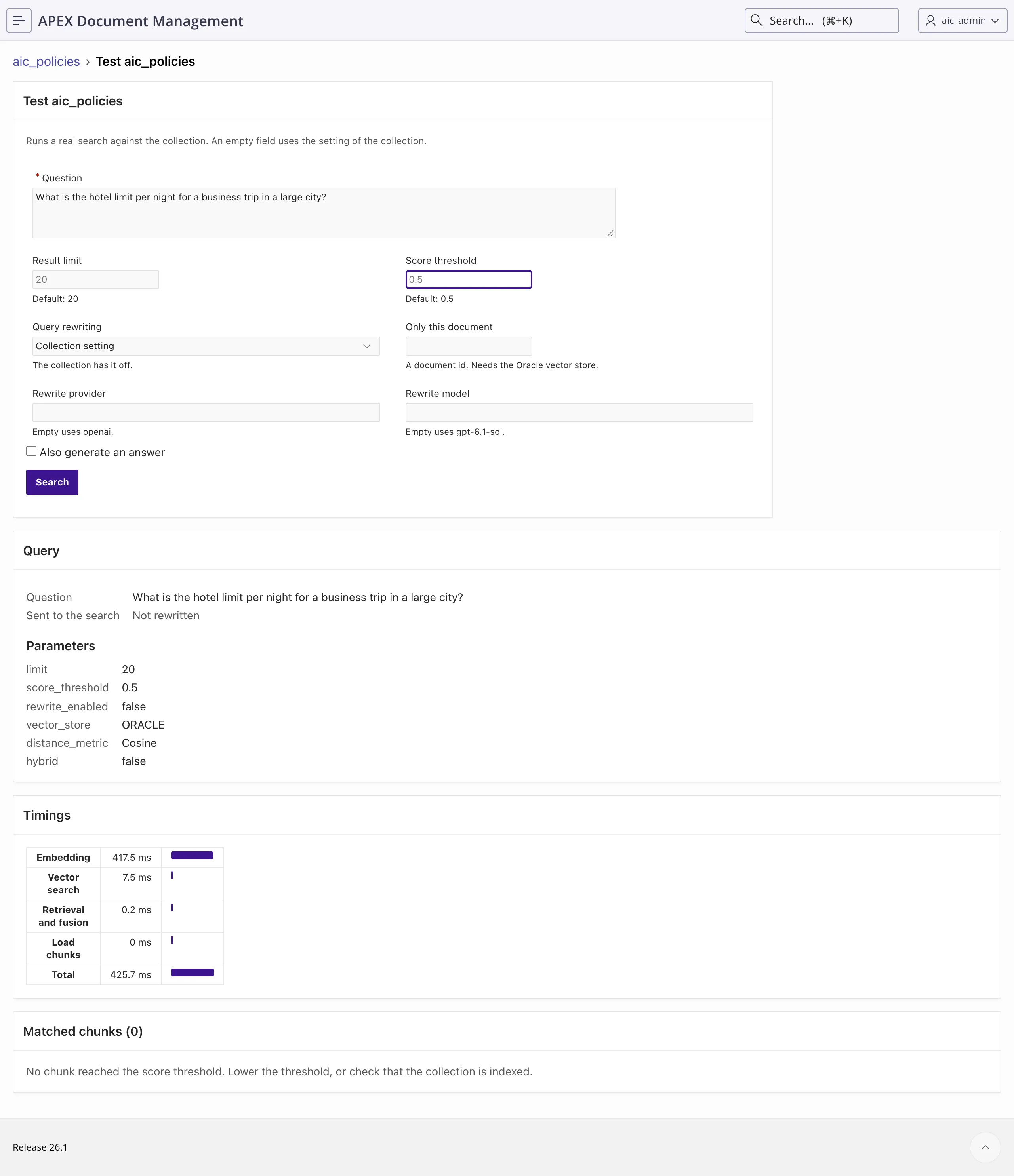
What is the hotel limit per night for a business trip in a large city?in Question. Keep Score threshold empty, so that the console uses the threshold of the collection, 0.5. -
Select Search. The console finds no chunk:
-
Enter
0.4in Score threshold, and select Search again. The field changes only this search, not the collection.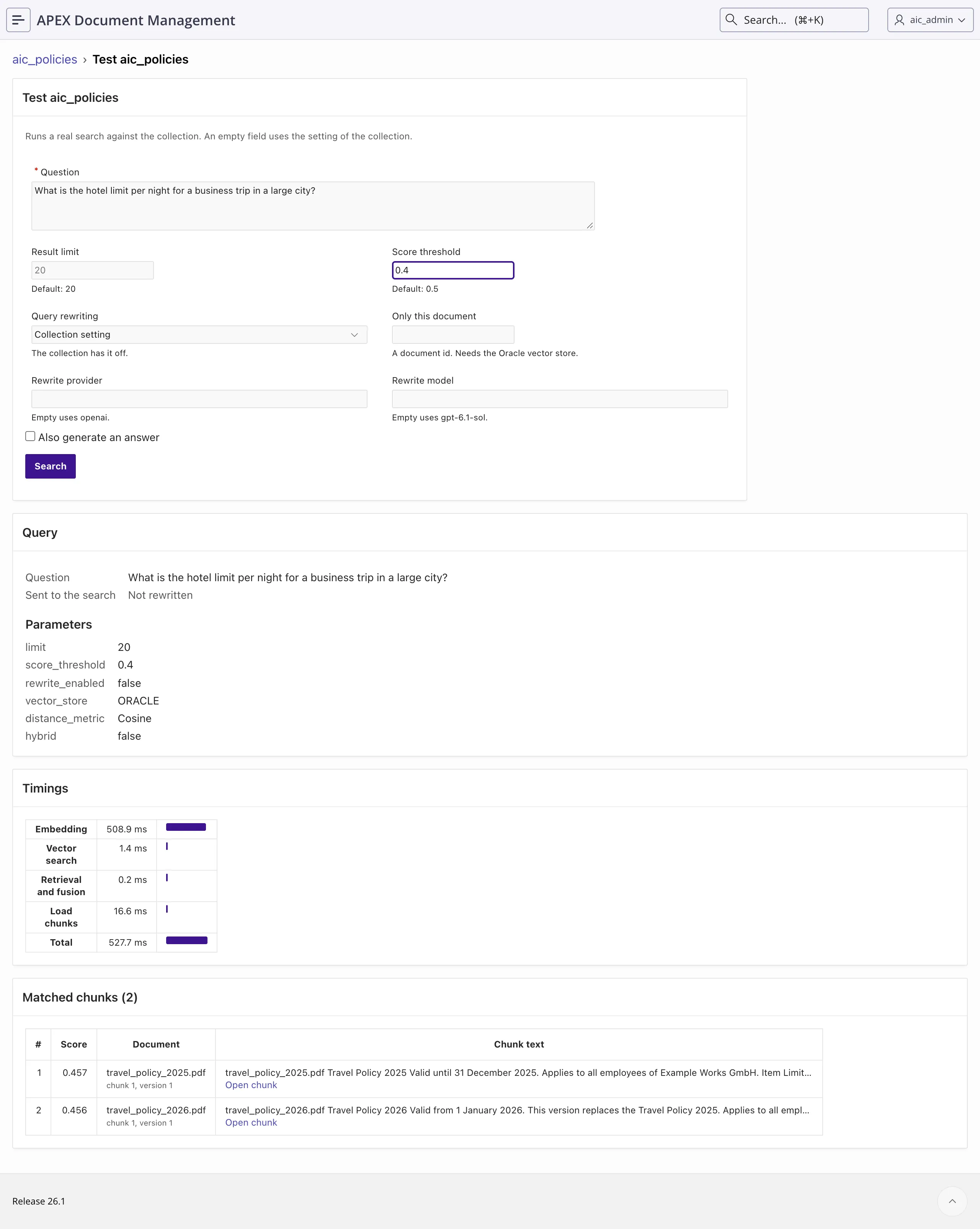
At 0.4, the console finds both travel policies. The 2025 policy has the higher score (0.457 against 0.456), so it is the first chunk, although the 2026 policy holds the current limit. The timings show that the embedding call of the question takes most of the time of a search.
Select Also generate an answer, and then Search and answer. The console sends the chunks to the answer model of the collection, and shows the answer, the prompts and the sources.
This makes one call to gpt-6.1-sol:
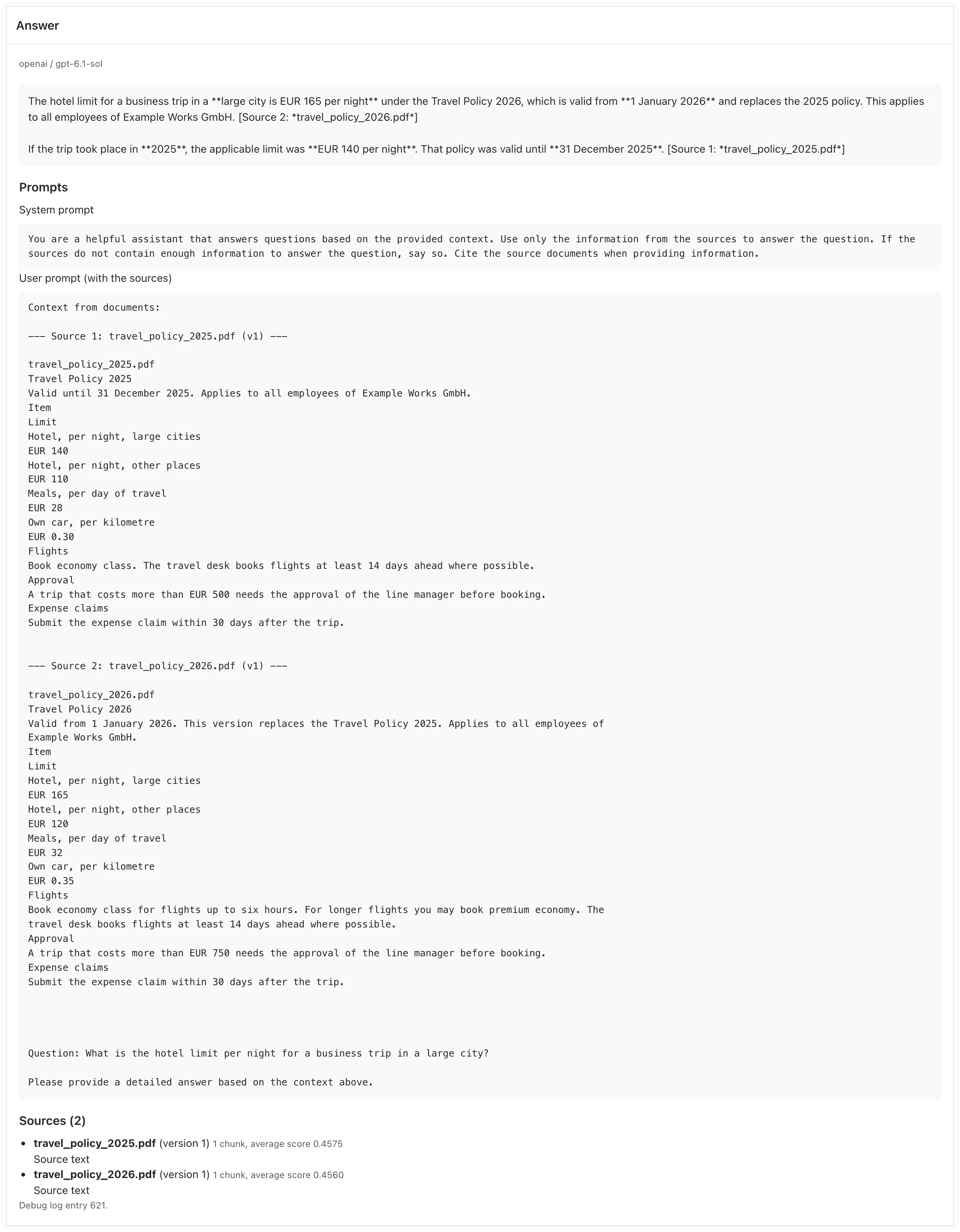
The model gives the 2026 limit as the answer and the 2025 limit for older trips, because each source states its validity dates. So the lower threshold adds the outdated policy, and the answer is still right.
Store the threshold in the collection
Section titled “Store the threshold in the collection”A threshold in the console or in a script applies to one search. To change it for every search that does not pass its own value, store it in the collection:
-
Open
aic_policiesfrom the RAG Collections list, and select Edit. -
In the section Search defaults, enter
0.4in Score threshold.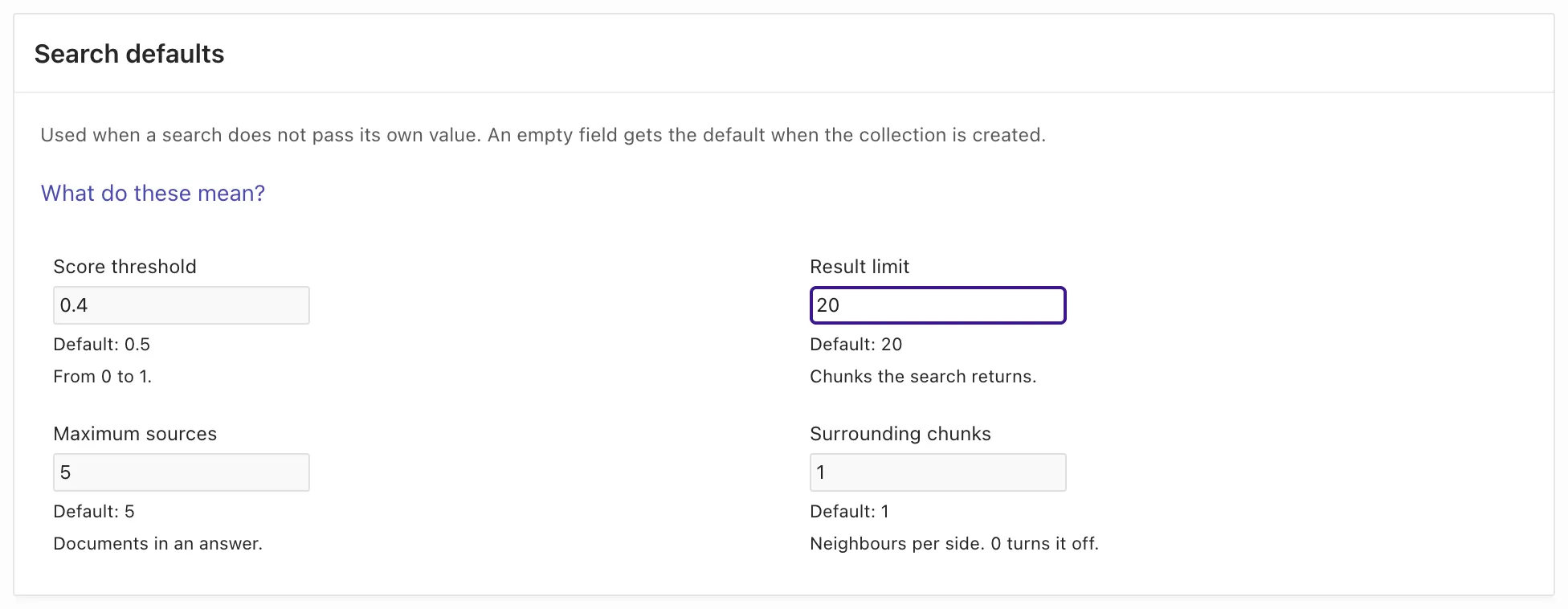
-
Select Save.
The form saves the setting default_score_threshold in the configuration of the collection. From now on, the search tool of the agent and the chat page of lesson 4 use 0.4 for the policies.
The contracts keep 0.5, because the measurement found no reason to lower that threshold. The right threshold is a result of this measurement for this corpus and this embedding model, not a general rule.
Measure the answers through the agent
Section titled “Measure the answers through the agent”The agent does not search with the text of the question. It chooses its own words. 15_aic_agent_questions.sql runs each question through the agent as the user of the list, reads the trace, and checks three things for each answer:
whether a tool result contained the expected document (retrieved), whether the answer names it (cited), and whether the answer contains the expected fact (fact).
Run @15_aic_agent_questions.sql 0.5, and then @15_aic_agent_questions.sql 0.4. The argument sets the threshold of both collections for the run, and the script puts back the stored values at the end.
Each run makes ten agent runs and takes one to three minutes. The excerpts show question 5 and the totals:
default_score_threshold aic_contracts : 0.5default_score_threshold aic_policies : 0.5Q asked as retrieved cited fact tools in out sec search texts the model chose[...]5 AIC_LEGAL NO NO NO 2 1942 87 10 hotel limit per night large city | travel accommodation hotel metropolitan A: I found nothing about the nightly hotel limit for business trips in large cities in the documents I can see.6 AIC_LEGAL yes yes yes 2 2283 191 9.7 hotel limit 2025 | travel policy accommodation nightly rate A: The **2025 hotel limits per night** were: - **Large cities: EUR 140** — “Hotel, per night, large cities EUR 140” (travel_policy_2025.pdf). - **Other places: EUR 110** — “[...]retrieved 8 of 9, cited 8 of 9, fact right 9 of 10total: 13 tool calls, 16103 tokens in, 1054 tokens out, 63 s(default_score_threshold put back)default_score_threshold aic_contracts : 0.4default_score_threshold aic_policies : 0.4Q asked as retrieved cited fact tools in out sec search texts the model chose[...]5 AIC_LEGAL yes yes yes 2 2302 165 7.5 hotel limit per night large city | travel policy hotel accommodation A: The limit is **EUR 165 per night** under the 2026 policy: “Hotel, per night, large cities EUR 165.” It is “Valid from 1 January 2026” and “replaces the Travel Policy 2025[...]retrieved 9 of 9, cited 9 of 9, fact right 10 of 10total: 12 tool calls, 17201 tokens in, 1110 tokens out, 59 s(default_score_threshold put back)| Threshold | Retrieval list (14) |
Agent (15) |
Right facts (15) |
|---|---|---|---|
| 0.5 | 7 of 9 found | 8 of 9 retrieved | 9 of 10 |
| 0.4 | 9 of 9 found | 9 of 9 retrieved | 10 of 10 |
At 0.5, the agent found the 2025 policy for question 6, which the retrieval list missed, with the words “travel policy accommodation nightly rate”. For question 5, both of its searches scored below 0.5 against the 2026 policy. The wrong answer is polite: “I found nothing about the nightly hotel limit …”. Nothing in the answer says that the document exists. Only the trace and the retrieval list show it.
At 0.4, the first search for question 5 also found nothing, and only the second search with other words found the policy. Search words differ between runs, so a single run gives one result, not a fixed rate. The rows with two tool calls are the model trying again after no_passages.
Measure one search per question under other settings
Section titled “Measure one search per question under other settings”Every later model call of a conversation sends the earlier tool results again, so the size of one search result counts in every call that follows. Four settings of a collection decide how much text one search returns: the result limit, the maximum sources, the surrounding chunks and the chunk size. The RAG configuration guide describes each one. The sample documents are short, so the effects in characters are small here. The script prints them, so you can run it on your own collections.
20_aic_config_matrix.sql measures in three parts. Part 1 calls the search tool once for each question, with the question as the search text, under seven settings.
For each row, it stores the settings in both collections, and it puts the stored configuration back at the end:
l_cfg := json_object_t.parse(pio_stored_map(c.collection_name));l_cfg.put('default_max_sources', p_max_sources);l_cfg.put('default_surrounding_chunks', p_surrounding);if p_threshold is not null then l_cfg.put('default_score_threshold', p_threshold);end if;adm_ai_rag_api.update_rag_collection(p_rag_collection_id => c.rag_collection_id, p_config_json => l_cfg.to_clob);Run @20_aic_config_matrix.sql search. The argument search runs parts 1 and 2 only. They call no answer model, only about 80 search embeddings. Part 2 needs a collection that you create later in this lesson. Until then, it prints that aic_policies_large does not exist.
=== 1. One search per question, with the question as the search text ===stored default_score_threshold aic_contracts : 0.5stored default_score_threshold aic_policies  : 0.4
setting                           found  fact   Q10     docs  chars   largest  fact missing in5 sources, 1 surrounding (stored) 9/9    9/9    0       12    11138   2015     -5 sources, 0 surrounding          9/9    9/9    0       12    10608   1524     -5 sources, 2 surrounding          9/9    9/9    0       12    11138   2015     -1 source,  1 surrounding          8/9    8/9    0       9     8260    1189     Q5threshold 0.2, 5 sources          9/9    9/9    4       38    34536   5025     -threshold 0.2, 2 sources          9/9    9/9    2       20    19408   2511     -threshold 0.2, 2 sources, asks 5  9/9    9/9    4       38    34536   5025     -
Search with the words the model chose for question 8:surrounding chunks 1: 1 matched chunk(s), 1188 characters, liability cap EUR 2,000,000 in the result: yessurrounding chunks 0: 1 matched chunk(s), 942 characters, liability cap EUR 2,000,000 in the result: NO(stored configuration put back)
found counts the questions whose expected document is in the result, and fact counts the results that contain the expected fact. Q10 counts the documents returned for question 10, where 0 is right. docs, chars and largest are the number of documents, the characters of the ten results, and the characters of the largest single result.
With the stored thresholds, one source loses question 5, because the 2026 travel policy is the second document of its result. The rows with the threshold 0.2 show a collection where many chunks qualify: there, 5 sources returned about 34,000 characters for the ten questions, and 2 sources about 19,000.
Remove max_sources from the tool parameters
Section titled “Remove max_sources from the tool parameters”The last row of part 1 passes "max_sources": 5 in the parameters of the tool, while the stored value is 2. The result is the same as the row with 5 sources.
prepare_sources uses a value that its caller passes before the value of the collection, and the tools of lesson 2 pass max_sources from the parameters that the model sends.
The model sent it in every call. The output of 11_aic_second_tool.sql in lesson 3 ends with the tool calls of its conversation:
{"max_sources":5,"query":"Alpenwerk maintenance notice period termination"}{"max_sources":5,"query":"travel policy hotel costs"}{"max_sources":5,"query":"Reiserichtlinie Hotel Übernachtungskosten"}{"max_sources":5,"query":"travel policy hotel costs"}So the field Maximum sources in the RAG collection manager does not reach this agent. The parameter description said Default 5, and the model copied it. Remove the parameter from the JSON schema of both tools.
Then the tool passes null, and the stored value of the collection applies. 21_aic_tools_without_max_sources.sql registers both tools again with only query:
l_tool_id := uc_ai_tools_api.merge_tool_from_schema( p_tool_code => t.code, p_description => t.description, p_function_call => t.function_call, p_json_schema => json_object_t('{ "type": "object", "properties": { "query": { "type": "string", "description": "What to look for. Key words, not a whole sentence." } }, "required": ["query"] }'), p_tags => apex_t_varchar2('aic_demo'), p_code_mode_access => 'direct');The script reads the description and the function call of each tool from uc_ai_tools, so they stay as they are. Run @21_aic_tools_without_max_sources.sql. It calls no model:
Parameters of the search tools now:
TOOL_CODE               PARAMETERS_______________________ _____________AIC_SEARCH_CONTRACTS    queryAIC_SEARCH_POLICIES     query
The tool function still reads max_sources if a caller passes it, but a model sees only the parameters of the JSON schema. If you run 08_aic_register.sql or 11_aic_second_tool.sql again, they register the parameter again. Then run 21 again.
Keep one surrounding chunk
Section titled “Keep one surrounding chunk”With 0 surrounding chunks, the results of part 1 are a few percent smaller, and every fact still arrives when the search text is the whole question. The agent searches with key words.
The last lines of part 1 repeat the search that the model chose for question 8, Helios distribution liability cap. These words match only the first chunk of the Helios contract.
The liability clause is in the second chunk, so only the surrounding chunk brings it into the result. Part 3 below shows the effect on the answers.
Compare a larger chunk size
Section titled “Compare a larger chunk size”Lesson 1 created aic_policies with chunks of 700 characters, below the default of 2,048. A new chunk size applies only to files that have no chunks yet.
The files that are already indexed keep their chunks. When you edit a collection, the text above the chunk sizes says so: “New sizes apply to files that have no chunks yet. To apply them to every file, run Rebuild on the collection page.”
Rebuild replaces the chunks of one collection, so the old size is gone afterwards. To compare two chunk sizes, create a second collection over the same folder:
-
Open Administration > RAG Collections, and select Create.
-
Enter
aic_policies_largein Collection name, andDemo: the policies with the default chunk sizein Description. -
In Source folder path, select
/groups/aic_hras in lesson 1. -
Set Preset to
openai / text-embedding-3-small (1536), and enterOPENAIin Web credential (static ID). -
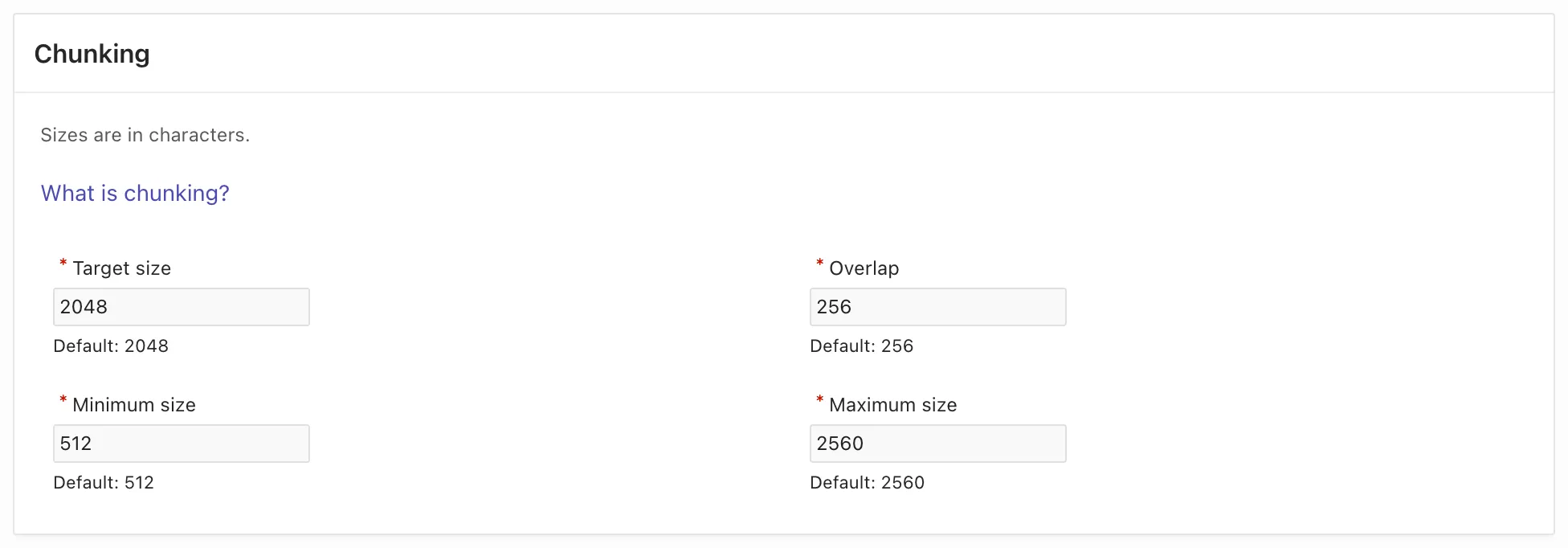
Keep the values in the section Chunking. The form fills in the defaults:
-
Keep Answer model off. The comparison only searches.
-
Select Create collection, and then Index now. Wait until the collection is
Readywith 5 indexed files.
The index run makes one embedding call for each of the five files. Then run @20_aic_config_matrix.sql search again. Part 2 now compares the two collections:
=== 2. Chunk size: aic_policies (700 characters) and aic_policies_large (the defaults) ===aic_policies        6 chunksaic_policies_large  5 chunks
Q   expected document         aic_policies    aic_policies_large4   remote_work_policy.pdf    #1 0.610        #1 0.6105   travel_policy_2026.pdf    #2 0.456        #2 0.4566   travel_policy_2025.pdf    #1 0.439        #1 0.4397   employee_handbook.pdf     #1 0.749        #1 0.4689   salary_bands.pdf          #1 0.644        #1 0.644
Part 2 searches as the user of each question at the threshold 0, and shows the best chunk score of the expected document. Four of the five policies are shorter than 700 characters, so they are one chunk in both collections, and their scores are the same. The employee handbook is two chunks at 700 characters and one chunk at 2,048. As one chunk, its notice period is a small part of a long text, and its score drops from 0.749 to 0.468. That still passes the threshold 0.4, but not the default 0.5.
Test query rewriting in the console
Section titled “Test query rewriting in the console”Query rewriting sends the search text to a model first. The model writes it as a statement of the kind that a document contains, and ADM searches with that statement. You can try it in the test console without a change to the collection:
-
Open
aic_policies, and select Test. -
Enter
What is the hotel limit per night for a business trip in a large city?in Question. -
Set Query rewriting to
On. The hint under the field says that the collection has rewriting off. The valueOnapplies only to this search. -
Keep Rewrite provider and Rewrite model empty. The hints show the values that the console uses,
openaiandgpt-6.1-sol. -
Select Search.
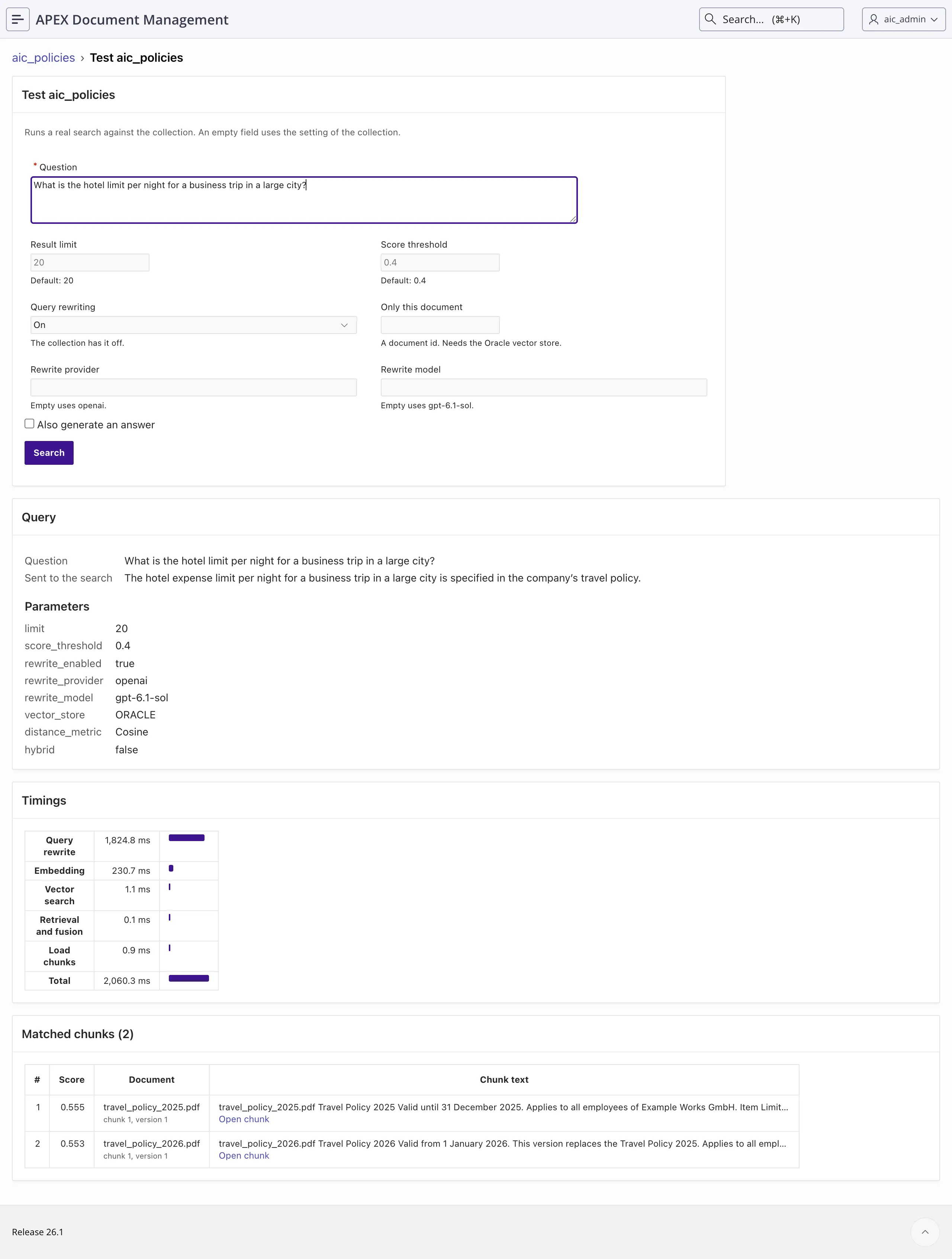
The console shows the question as you typed it and the text that it searched with. Both travel policies now score above 0.5 (0.555 and 0.553), against 0.457 and 0.456 without the rewrite. The 2025 policy is still first. The rewrite took 1.8 of the 2.1 seconds of the search. The model and its wording can differ in your run.
Run the question list through the agent
Section titled “Run the question list through the agent”Part 3 of 20_aic_config_matrix.sql runs the ten questions through the agent three times: with the stored settings, with 0 surrounding chunks, and with query rewriting on for both collections. It scores each answer the way 15_aic_agent_questions.sql does.
Each list uses 5 sources and the stored thresholds. The script sets the rewriting itself for the third list, and puts the stored configuration back at the end.
Run @20_aic_config_matrix.sql without an argument. It runs parts 1 and 2 again, and then 30 agent runs on gpt-6.1-sol. In the recording, part 3 used about 47,500 input tokens and took about four minutes.
The third list also makes one call to the rewrite model for each search, 12 in the recording. The token figures of the agent do not include them, because the tool makes these calls inside ADM.
=== 3. The question list through the agent (5 sources each; cells: tool calls, + when the answer has the fact) ===setting retr fact calls chars sent in sec Q1 Q2 Q3 Q4 Q5 Q6 Q7 Q8 Q9 Q101 surrounding (stored) 9/9 10/10 12 989 none 15045 64 1+ 1+ 1+ 1+ 2+ 1+ 1+ 1+ 1+ 2+0 surrounding 9/9 9/10 14 890 none 17049 94 1+ 1+ 2+ 1+ 2+ 1+ 1+ 2- 1+ 2+query rewriting on 8/9 9/10 12 1115 none 15430 94 1+ 1+ 1+ 1+ 2- 1+ 1+ 1+ 1+ 2+retr: questions whose expected document was in a tool result. chars: mean size of one tool result.sent: the max_sources values the model passed. in: input tokens of the 10 runs.(stored configuration put back)Each cell of the grid is one question: the number of tool calls, and + when the answer has the expected fact. sent is none, because the tools no longer offer max_sources. The model chooses its own search words, so two runs of the same list differ. In the recorded run:
- 0 surrounding chunks made the mean tool result smaller (890 against 989 characters), and answered question 8 wrongly: “The returned excerpt of the Helios distribution agreement does not include a liability clause.” The model searched a second time for questions 3 and 8, so the list used more input tokens than with 1 surrounding chunk (17,049 against 15,045), not fewer. Earlier runs of the same lists gave the same two results.
- Query rewriting did not improve the list. It retrieved 8 of 9 and answered 9 of 10, against 9 of 9 and 10 of 10 with the stored settings, and the list took 94 seconds against 64. The agent already searches with key words.
- Question 5 needed two searches in every list, and it failed in the list with query rewriting.
On this corpus, one search result is about 1,000 characters, and most of the input of a run is the system prompt, the tool definitions and the question. In a collection with long documents, one search can return much more text. Measure the settings there with your own question list before you change them.
Choose the settings of the course collections
Section titled “Choose the settings of the course collections”For the course collections, the measurements support these choices:
- A score threshold of 0.4 for
aic_policies, and 0.5 foraic_contracts. - No
max_sourcesin the tool parameters, so that the stored value of the collection applies. - 1 surrounding chunk. 0 lost a clause that the answer needed, and saved no tokens.
- Chunks of 700 characters. The larger chunk lowered the score of the one policy that is longer than a chunk.
- No query rewriting for the agent. It added time and did not improve the list.
The AI Pack also ships keyword search tools and an assistant that uses them. The agent tools guide describes them.
To remove aic_policies_large, open it and select Delete, or run 99_aic_teardown.sql at the end of the course.