
- AI
 APEX Office Print
Template-based printing and document generation for APEX
 APEX Media Extension
Image processing for the Oracle Database
 APEX Office Edit
Office document editing for APEX
 Plug-ins Pro
Professional APEX plug-ins built and maintained by our team
Cloud Office PrintTemplate-based printing and document generation for any technology
 APEX Project Eye
Quality assurance & productivity tool for APEX developers
 APEX Message Service
Real-Time communication in APEX
 dbLinterNew
Boost database quality with automated code reviews
 APEX Document ManagementNew
APEX-based enterprise document management platform
- APEX Document Management
- Features
- Pricing
AI Pack for APEX Document Management
Turn invoices and forms into checked data.
Run from your Oracle database.
A language model reads the fields of your PDFs and images. Checks that you write in SQL decide which values are saved as metadata on the document, ready for your reports or your ERP. Everything else waits in a review queue for a person.
Or read the form extraction guide.
The document
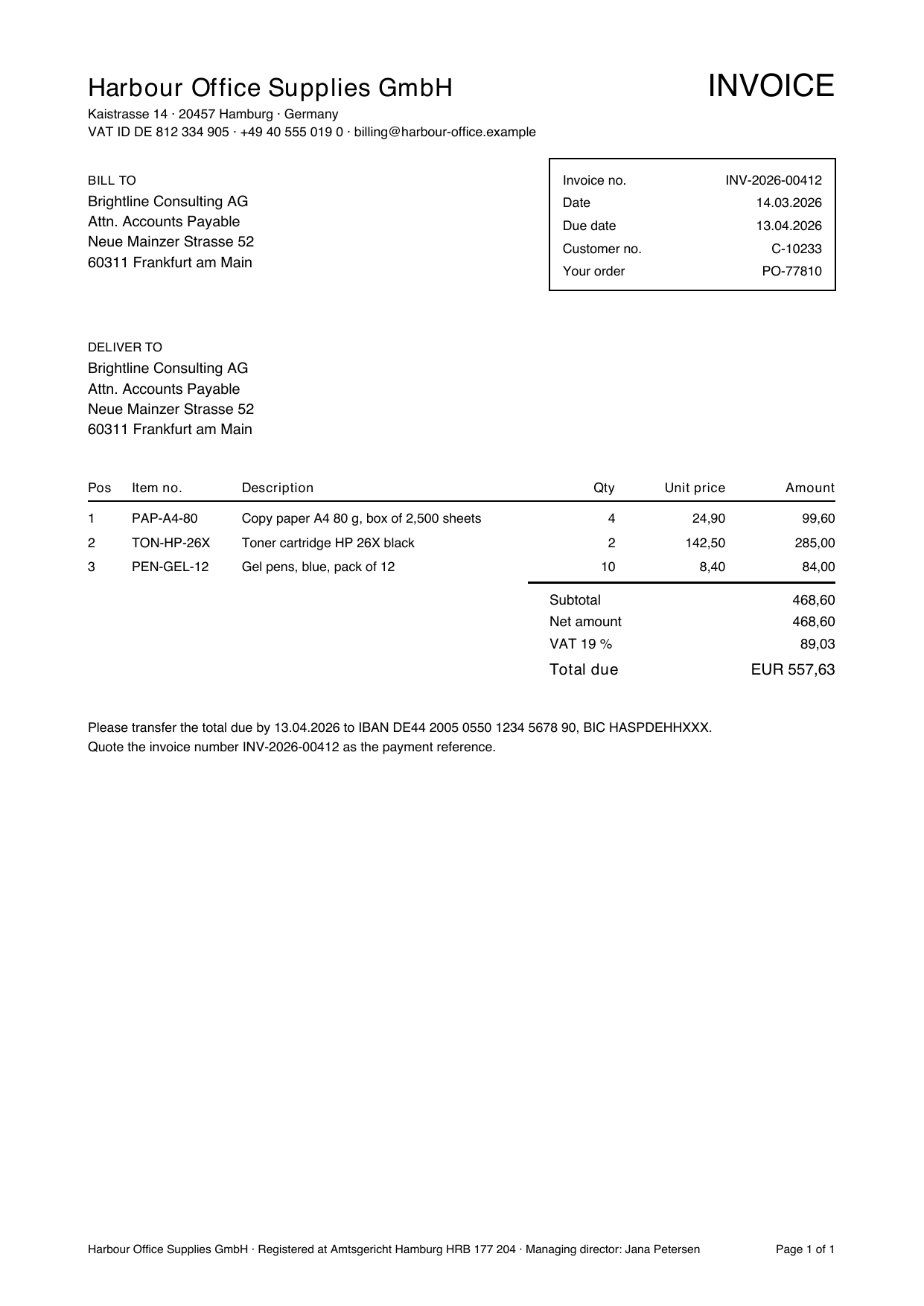
Select the invoice to see the whole page.
Extracted values
OK- Invoice number
- INV-2026-00412
- Invoice date
- 2026-03-14
- Customer
- Brightline Consulting AG
- Net amount
- 468.60
- VAT
- 89.03
- Total amount
- 557.63
- Line items
- 3 lines
Checks
- quantity x unit price = amount
- sum of lines - discount = net amount
- net amount + VAT = total
- net amount x VAT rate = VAT
All checks passed: the result is accepted, and its values are saved on the document.
What it reads
PDFs, images and scans, and what each one needs
PDFs with text
ADM reads the text with Oracle Text, the same text that its search uses. Other files that Oracle Text reads, such as Word documents, work the same way.
Needs: A language model.
Images
PNG, JPEG and other images go to a vision model, which recognizes the form and reads the values.
Needs: A vision model.
Scanned PDFs
A PDF without a text layer has nothing to read. An OCR service turns it into text first. Without OCR, the document goes to review.
Needs: An OCR service.
Grids and check boxes
Their layout carries the meaning, and the text loses it. Set such a form to send the PDF itself to a vision model.
Needs: A vision model that accepts PDF files.
How it works
The model reads. Your rules decide.
Every document goes through the same five steps. Which form a document is, and whether its values are good enough, is decided by configuration that you control.
-
Read
ADM gets the text of the document, or sends an image to a vision model.
-
Match
Markers, patterns that you set for each layout, decide which form a document with text is, not the model. For an image without text, the vision model picks the form.
-
Extract
The model returns exactly the fields of your schema.
-
Check
Your checks test the values: required, of the right type, and consistent with each other.
-
Save or review
All checks pass: the values are saved as metadata on the document. Otherwise a person reviews it.
A saved value is an annotation on the document, such as invoice.total_amount = 557.63. Users search and filter on it, your reports read it from a view, and a hook can copy it into your ERP in the same transaction.
Checks
What checks catch, and what they cannot
Required fields and types
The JSON schema makes a field required, a number, or one of a list of values.
Arithmetic
Lines add up to the net amount, net plus VAT is the total, opening balance plus transactions is the closing balance.
Ranges and rules
A quantity is positive, a VAT rate is 7 or 19, a credit note has a negative total.
Lookups in your database, in your hook
Your PL/SQL hook can check values against your tables, for example that the purchase order exists, and refuse the result. The document then goes to review.
What checks cannot do
Checks catch values that do not fit together. They cannot prove that every value is right. A single check box or a free-text remark has no second value to compare with, and nothing to look up. For such fields, measure how often the model is right, and decide whether a review is cheaper than a mistake.
One document type, as JSON
{
  "json_schema": {
    "type": "object",
    "properties": {
      "invoice_number": {"type": "string"},
      "net":   {"type": "number"},
      "vat":   {"type": "number"},
      "total": {"type": "number"}
    },
    "required": ["invoice_number", "total"]
  },
  "annotation_fields": ["invoice_number", "total"],
  "checks": [{
    "name": "net + VAT = total",
    "expr": "abs(net + vat - total) <= 0.01"
  }]
}
The document type says what to read and how to check it. Each supplier layout is a form of that type: a few markers that recognize it, and hints for that layout. A new supplier needs only a new form. Edit all of it in the form extraction manager, an APEX region that shows the text of a document and runs a test extraction before you save, or with the PL/SQL API. The guide covers every setting and the known limits.
Measurement
Measure it. Do not guess.
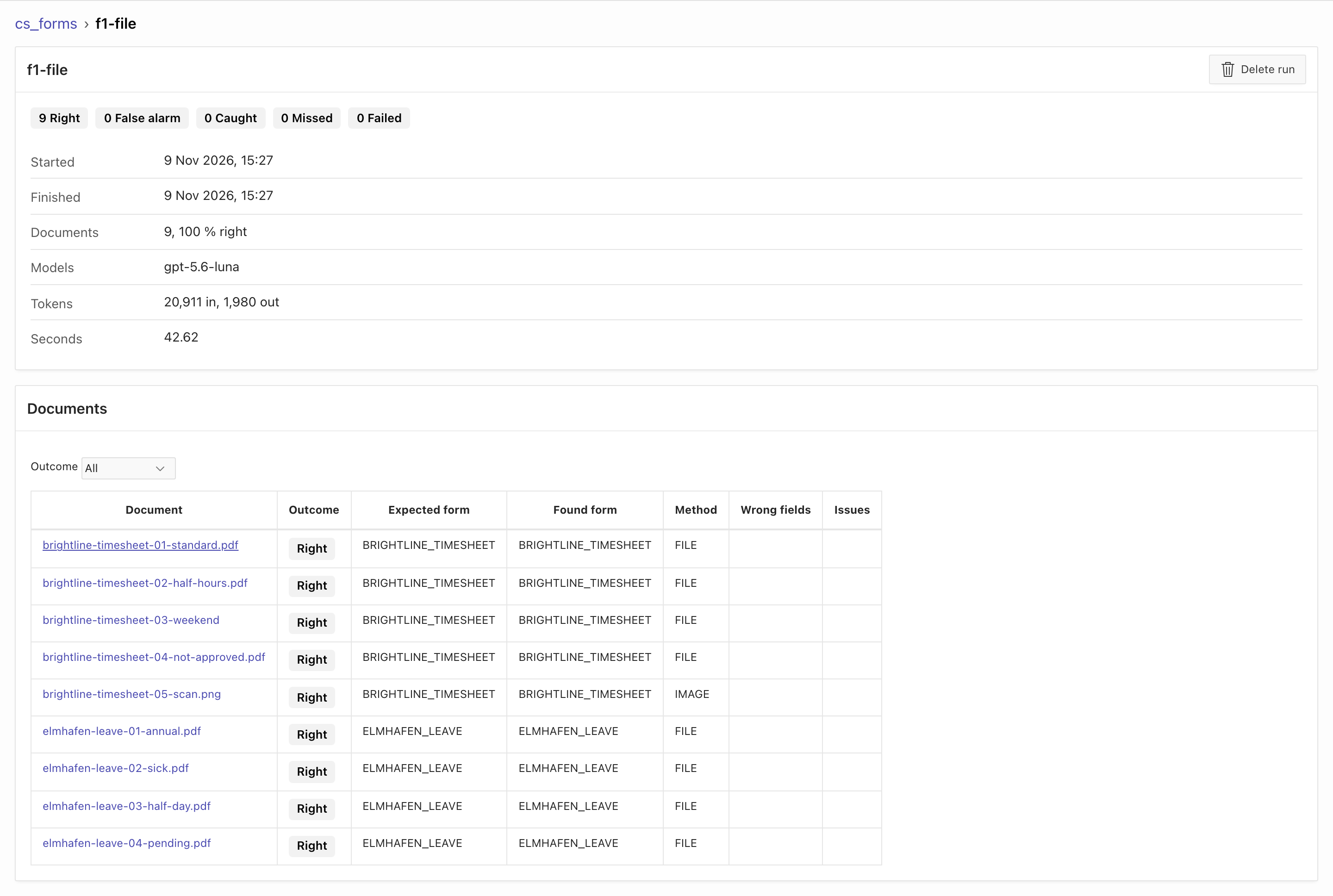
A model that is right on the three documents you tried can be wrong on the fourth. By default, approved results go into a test set with their right values. One call extracts the whole test set again and tells you, for each document, whether it was right, caught by a check, a false alarm, or wrong and saved. That last number is the one to bring to zero.
It also records the tokens and the seconds, and it can run the same test set with another model. So you compare quality and cost before you switch.
Case study
Not only invoices: a test with five document types
In our sample, checks sent every sign error in a bank statement to review instead of saving it. For timesheets and leave requests, sending the PDF to a vision model kept the layout, and every extraction was correct.
1. What we tested
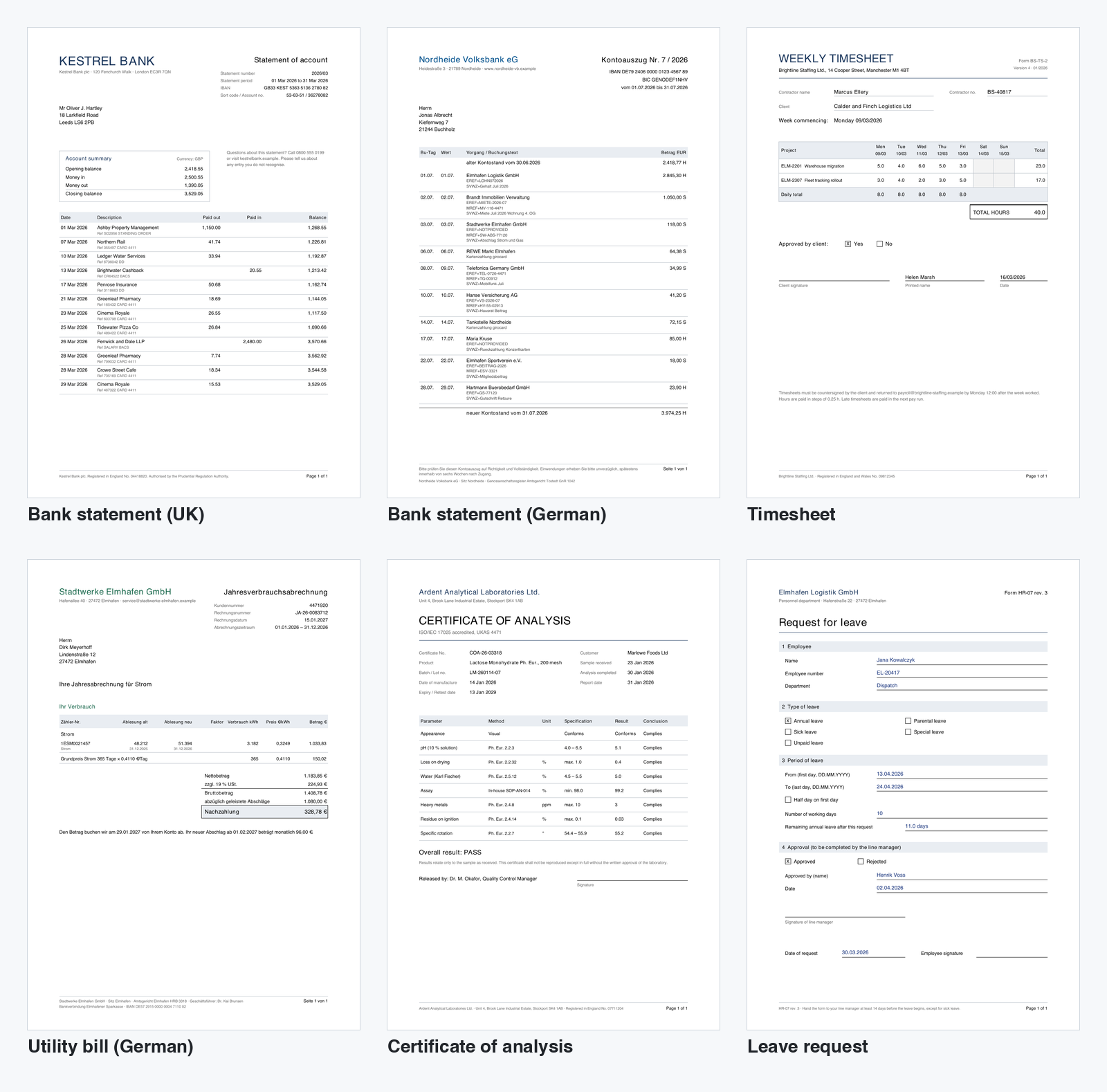
- 31 invented documents from six issuers: bank statements in English and German, timesheets, German utility bills, certificates of analysis and leave requests, plus two letters that are no form. Four are simulated scans, supplied as images.
- One model:
gpt-5.6-luna, a small, low-cost model. Every extraction was compared with the known correct values. - Tuned on the same documents. The rules, the sign rules for the bank statements, the setting for statements without transactions and the switch to the vision model came from failures in these runs. So the results below show that the final configuration works for these documents. They are not an error rate for new documents.
Not tested: your documents, scanned PDFs (the scans were images), and other model families. Measure on your own forms.
2. Results with the final configuration
| Document type | Processing method | Observed result |
|---|---|---|
| Certificates of analysis | Extracted PDF text (the scan: vision model) | All 15 extraction attempts correct (5 documents, 3 runs) |
| Utility bills (German) | Extracted PDF text | All 15 extraction attempts correct (5 documents, 3 runs) |
| Bank statements (English and German) | Extracted PDF text (the scan: vision model) | All 18 extraction attempts correct (9 documents, 2 runs), after adding sign rules and allowing statements without transactions |
| Timesheets (grid) | PDF sent to a vision model (the scan: image) | All 10 extraction attempts correct (5 documents, 2 runs) |
| Leave requests (check boxes) | PDF sent to a vision model (the scan: image) | All 10 extraction attempts correct (5 documents, 2 runs) |
| Letters (no form) | Form matching on the text | All 6 attempts correctly sent to review (2 letters, 3 runs) |
With the final configuration, no attempt saved an incorrect value. Before it, the bank statements already saved none: the balance check sent 2 sign errors to review, and 3 correct statements without transactions went to review because their table was empty. Timesheets and leave requests did save incorrect values when the model read the text: 13 of 30 attempts. That is part 3.
- Markers never picked the wrong form. Letters on the same letterhead as a form went to review.
- German documents needed one rule for decimal commas, debit and credit signs, and the m³ to kWh conversion.
- A provider error saved nothing. When the account ran out of credits, every document became
FAILEDwith a sentence for the reviewer.
3. Why timesheets and leave requests need a vision model
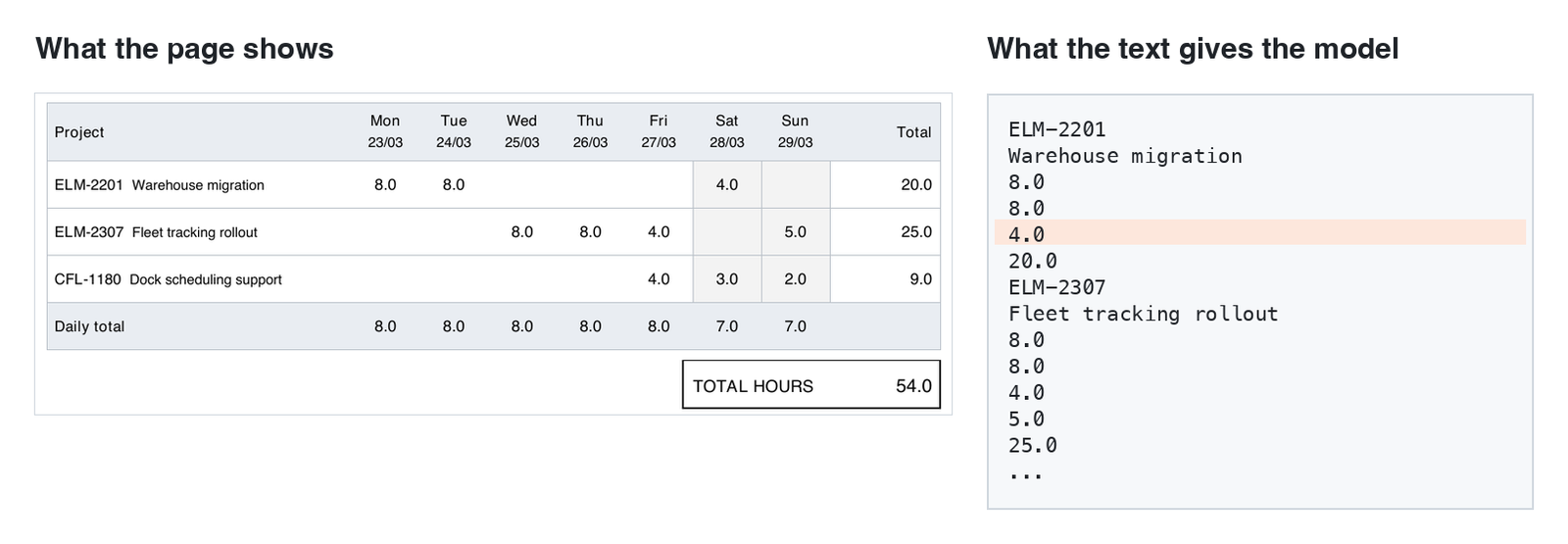
When the model read the extracted text, these two layouts saved incorrect values in 13 of 30 attempts. The values were in the text, but their position was not, and no check can recover information that the text does not contain.
Grids with empty cells
On paper, the 4.0 in the first row is Saturday. In the text, the empty cells are gone: the values follow one another, and nothing says which day the 4.0 belongs to.
Check boxes in two columns
A ticked box is a lone X in the text, between two labels. A single choice has no second value to compare with, so a check cannot tell a wrong one from a right one.
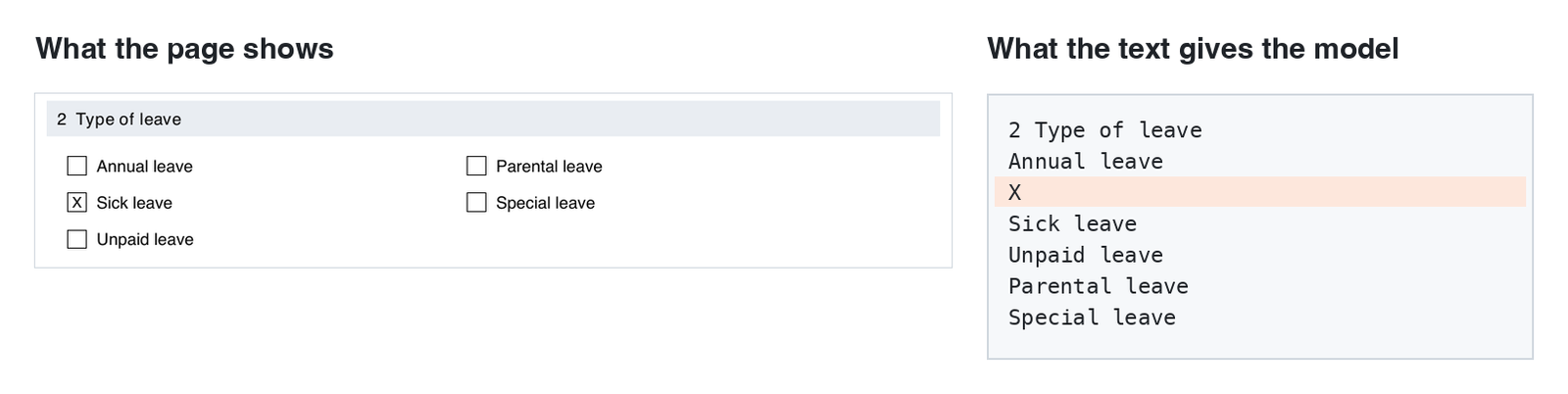
One form setting: a vision model reads the PDF
Send the PDF to the vision model
With "model_input": "file", ADM still finds the form with the markers on the text. Then it sends the PDF itself to the vision model of the profile instead of the text. The vision model receives the page layout, including columns and check boxes.
{
  "markers": [
    "Brightline Staffing Ltd",
    "^WEEKLY TIMESHEET$"
  ],
  "model_input": "file"
}
A smaller diagnostic experiment
The same 8 PDFs, text against vision
| Input method | Run 1 correct | Run 2 correct |
|---|---|---|
| Extracted PDF text | 6 of 8 | 4 of 8 |
| PDF sent to vision model | 8 of 8 | 8 of 8 |
Sending the PDF increased the median processing time from 2.7 to 4.2 seconds and used about three times as many input tokens. Set it on the forms that need it, not on the whole profile.
The four timesheet and four leave request PDFs, two runs per method, with the same schema, checks and model. These are the documents that showed the problem, so this small sample is no error rate.
Will it work on your documents?
Contact us to arrange a test with your documents. We show you the extraction, the checks and a measurement on them.
Request a test with your documentsOr build it yourself: start the step-by-step tutorial.
Built into ADM
From the inbox folder to your ERP, in SQL and APEX
Form extraction runs on the documents, folders and permissions of APEX Document Management. The results are rows in your database.
Document metadata
Accepted values are saved as annotations on the document, such as invoice.total_amount = 557.63. Search and filter on them.
A view for reports
adm_my_form_extractions_v returns status, values and issues, only for the documents that the current user may see.
A hook for your ERP
AFTER_FORM_EXTRACTION runs your PL/SQL in the same transaction when a result is accepted.
A background job
Extracts every new document and every new version of an inbox folder. Each one costs at least one model call.
A review queue
Documents that need a person get a review tag. Approve them in the manager, or call approve from your own page.
A manager for administrators
An APEX region: edit the configuration, see the text and the matching markers, test an extraction, run measurements.
Read the results in your own APEX page or report
select document_name, status, form_code, issues
     , json_value(fields, '$.total_amount')
         as total
  from adm_my_form_extractions_v
 where profile_name = 'supplier_invoices';
Model providers
OpenAI, Anthropic, Google, OCI Generative AI, Mistral and Ollama, through the open-source PL/SQL library UC AI. API keys stay in APEX web credentials.
Requirements
Oracle Database 19c or later, Oracle APEX 24.2 or later, APEX Document Management with the AI Pack (included with the ADM license and optional to install; see its install prerequisites), and access to a model provider.
Frequently Asked Questions
Common questions about form extraction in APEX Document Management.
See it on your own documents
Contact us to arrange a test with your documents. We show you the extraction, the checks and a measurement on them. Or build it yourself with the step-by-step tutorial.