
- AI
 APEX Office Print
Template-based printing and document generation for APEX
 APEX Media Extension
Image processing for the Oracle Database
 APEX Office Edit
Office document editing for APEX
 Plug-ins Pro
Professional APEX plug-ins built and maintained by our team
Cloud Office PrintTemplate-based printing and document generation for any technology
 APEX Project Eye
Quality assurance & productivity tool for APEX developers
 APEX Message Service
Real-Time communication in APEX
 dbLinterNew
Boost database quality with automated code reviews
 APEX Document ManagementNew
APEX-based enterprise document management platform
- APEX Project Eye
- About
- Features
- Pricing

Insight
Into your Oracle
APEX Applications!
APEX Project Eye combines interactive, drill-down page summaries, graphical page flow diagrams, automatic documentation generation, database object dependency information, and session tracing, making it easy to see how an application is built, what it depends on, who is using it and how.
Get started for free
ABOUT
APEX Project Eye is for everyone!
Ready to know your applications inside-out?
For Developers
Interested in being more productive? We can save you at least 4 hours per week. APE gets you up-to-speed fast with live insight, accurate documentation, and tools like our interactive page flow and entity relationship diagrams!
For Project Managers
At-a-glance application performance statics. Perfect for keeping an eye on all of your projects and knowing when and where bottlenecks or errors occur.
For Directors & Executives
APEX applications, like all projects, are an investment. Maintaining that investment is important and it’s not uncommon for application maintenance to make up 70% of a project’s total cost.

See it in action!
The Live Insight feature turns APE into your second screen. Bringing you real-time insight into your application as you develop.
FEATURES
APEX Project Eye does it all!

Live Insight
Our Live Insight feature turns APE into your second screen. Bringing you real-time insight into your application as you develop. As you navigate the application builder, APEX Project Eye follows along, showing you all the relevant information for the page you are working on. Without navigating to any other page, you can see Object Dependencies, Page Links, Page performace statistics and errors.
Automatic Documentation Generation
Use our set of easy-to-follow guidelines for writing inline comments in your PL/SQL, APEX, and database object code and APE will generate a set of complete documentation at the press of a button. Never worry about outdated documentation again! Automatic documentation feature is available with a valid APEX Office Print license (sold separately).
Application/Project Dashboard
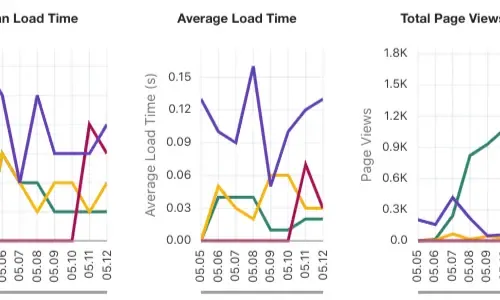
Get a cockpit style view of the usage and performance of your projects and applications in a sleek, graphical way. With all of the information at your fingertips, you can easily dive into and monitor page events, user activity, top pages, errors, performance, and database object dependency.
Application/Project Tree View
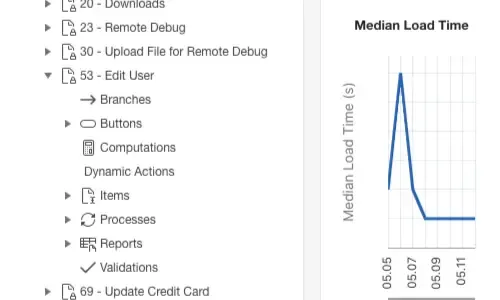
Take a quick stroll through your application using our Tree View. All pages are conveniently grouped and displayed for easy access. By selecting a page, you can get a quick overview of exactly what is implemented on the page, you can even add or edit page level help text. See what components exist on the page as well as the security settings and database objects that are being used.
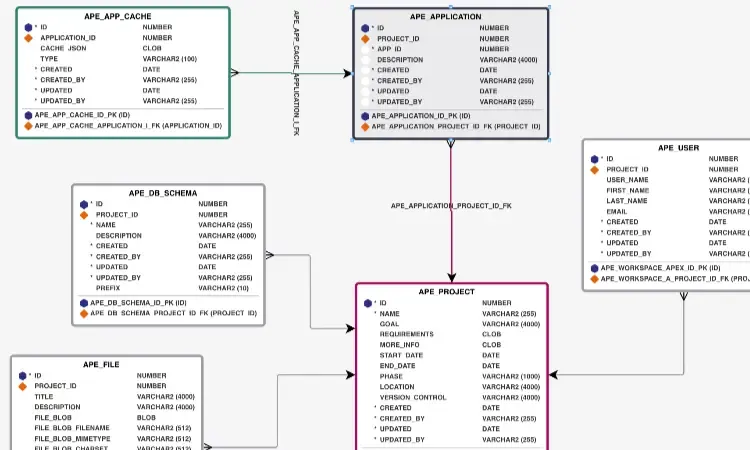
Interactive Entity Relationship Diagram
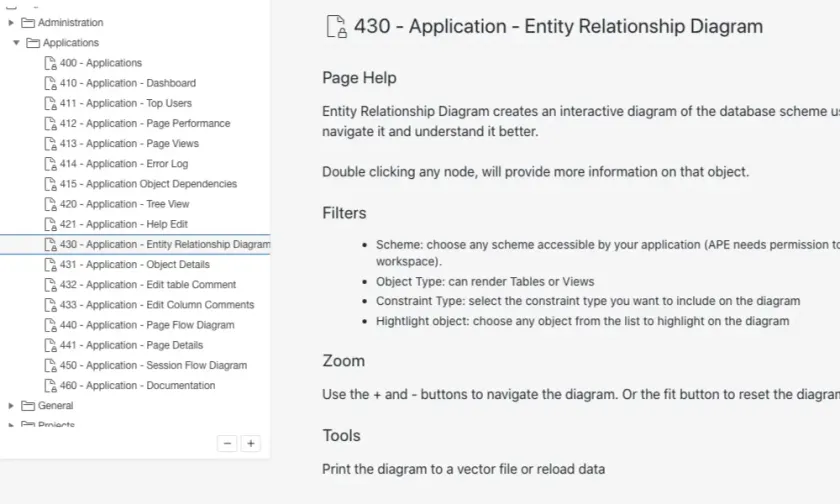
Know exactly what database objects are used by your project/application. Filter the results by table prefix to see a subset of your tables. Drag tables however you choose and export the diagram to be included in documentation, if desired. Single clicking on a table highlights and labels all inbound and outbound links so that relationships are clearly visible. Double clicking a table displays all references to the object within the application/project so that you can be sure you know what needs to be updated if table changes are made.
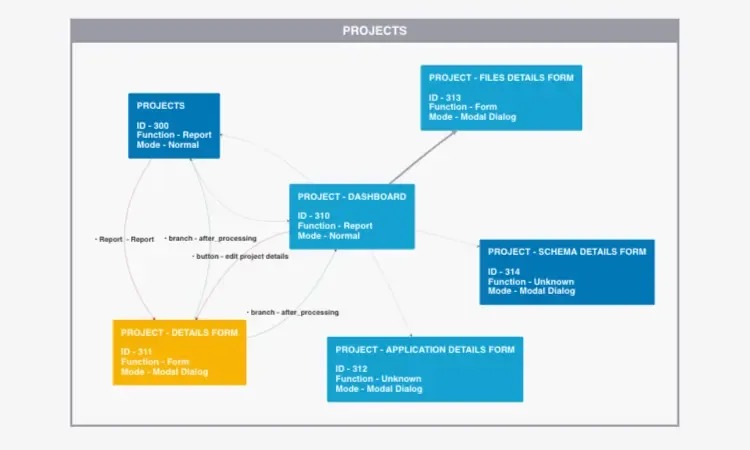
Interactive Page Flow Diagram
Never get lost in your application again! Know exactly how to navigate to any page with our interactive page flow diagram. Filter the results by page group, authorization scheme, and link types to get exactly the view of the application you are looking for. Drag to rearrange the layout and export your diagram to include in other documents or references. Click on any page to highlight and label inbound and outbound links for easy viewing. Double click to view detailed page information.
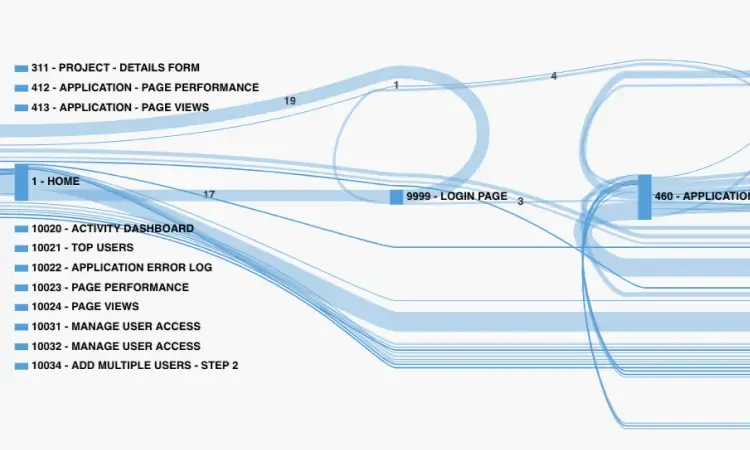
Interactive Session Flow Diagram
Know exactly how your users traverse your project/application. Filter the session window by date range or even a specific timeframe. The resulting diagram depicts the flow of your application. Thicker lines are the most frequently used pathways. Gain real inside information as to what pages your users are actually using.
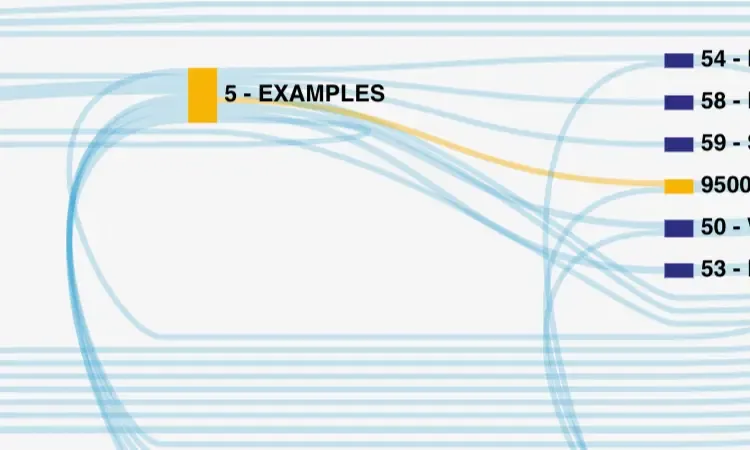
Session Replay
Have a user with an issue you can't solve? Want to see exactly what happened before the error? Are you just curious how the application/project is being used? Replay the session! Sessions can be replayed visually on the Session Flow diagram. Just select the session in question and step though all the moves the user has made. The path of the session is highlighted on the screen and details about each step are displayed for easy debugging.
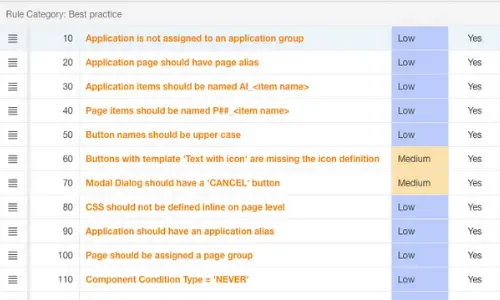
Quality Assurance
Ensure your applications are up to your standards! Do you prefer your report column headings centered? Like buttons to use a particular template? Want to make sure all your database table columns have comments? Create rules for the way you work, and our Quality Assessments will make sure they are followed. Use the Rules Repository to create and combine your rules into various Quality Standards that can be run on an entire workspace, an entire schema, a single application, a page group, or just a single page. Assessment results are shown in an easily understandable format which even provides developers a link to navigate directly to the affected component in the APEX builder to resolve the issue in no time. Once created, Quality Standards can even be easily transferred from one environment to another, so there is no need to define rules from scratch when starting a new project.
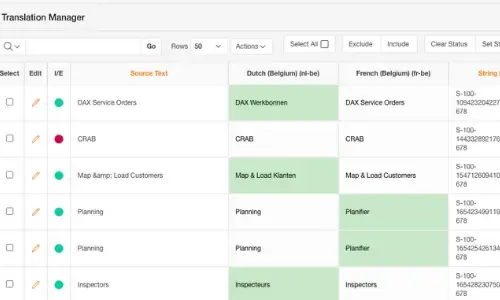
Translation Manager
Are you working on a multilingual project and drowning in translations? Our Translation Manager is here to save the day! Manage all your translations in one place. From strings to text messages, anything that can be translated in APEX can be done with APEX Project Eye. Quickly and easily see which translations have been translated and which have not. Take more control over your XLIFF exports by customizing them to fit your needs - choose text to be excluded that does not need to be translated or only export the strings that have been recently created. The Translation Manager is user-friendly and makes translating and managing translated applications simple.
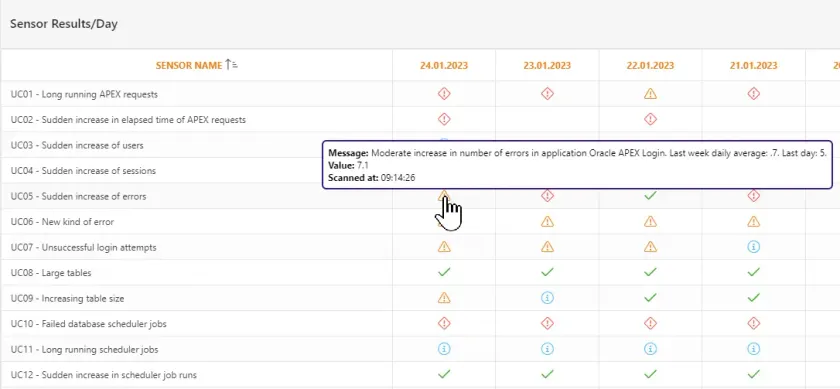
Watch Tower
Are you working on a multilingual project and drowning in translations? Our Be one step ahead with APE Watchtower. The monitoring framework for your applications, database, external sources, and business processes. Set up sensors based on SQL statements and control when and how you should be notified if the measurements are outside your acceptable boundaries. Browse through the scan logs and personalize the dashboard for an overview based on your needs.
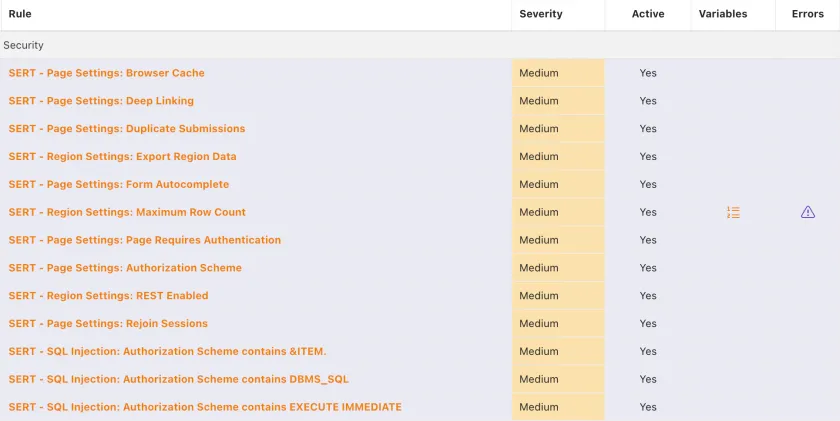
SERT security checks
Security is important in any application. APE includes now all the SERT security checks. Going from URL tampering, XSS, Authentication inconsistency, SQL injection to high risk settings, in total 119 checks, will be done against your application to find vulnerabilities. You not only get a better insight in your security risks, but APE will also suggest how to correct them.
Pricing
Affordable Options
One-time license fee includes up to 4 databases (DEV, TEST, QA, PROD) per company. Our awesome email support and free software updates are included for one year with every license purchase. From the 2nd year onwards 20% of the license fee can be paid to keep getting new versions and support.
Trial
90 Day License
Live Insight
Application/Project Dashboard
Application/project Tree View
Interactive Entity Relationship Diagrams
Interactive Page Flow Diagram
Session Flow
Quality Assurance*
Translation Manager
Watch Tower
Documentation Generation
Email Support
One Database
One Workspace
Professional
Live Insight
Application/Project Dashboard
Application/project Tree View
Interactive Entity Relationship Diagrams
Interactive Page Flow Diagram
Session Flow
Quality Assurance
Translation Manager
Watch Tower
Documentation Generation
Email Support
Four Databases
Unlimited Workspaces
Enterprise
Live Insight
Application/Project Dashboard
Application/project Tree View
Interactive Entity Relationship Diagrams
Interactive Page Flow Diagram
Session Flow
Quality Assurance
Translation Manager
Watch Tower
Documentation Generation
Priority Support
Unlimited Databases
Unlimited Workspaces
(*) The Quality Assurance module included in the Trial License is limited to 5 rules per assessment and 100 total assesment runs. The Quaulity Assurance Assistant in the Professional Use and Enterpirse License is unlimited.
Purchase directly from us or one of our beloved resellers!
Find trusted partners in your region who can help you implement and support APEX Project Eye
View Our ResellersNeed something more personalised?

Get In Touch.
Ready to Get Started?

United Codes Blog
Unlock the latest trends

APE Watchtower is the alarm system for your APEX applications: you set up sensors that monitor your applications, database, external services, or even business processes, and if one of them detects something fishy, Watchtower raises the alarm: on your Watchtower Dashboard, in your APE Inbox, or by email.

APEX Project Eye 26.2 introduces Watchtower Summary, a new Watchtower feature that puts a compact summary of every scan directly on the dashboard, so you can see the state of a scan — and what to do about it — the moment it finishes.

APEX Project Eye 26.2 introduces SLA in Watchtower, letting teams define recurring compliance activities, sign them off in seconds, and prove, with a full history, that someone was really watching.

How we at United Codes modernize Oracle APEX applications: the methodology, the tools, and the lessons from real migration projects.

I'll be upfront: I don't usually get excited about software releases the way some people do. But APEX 26.1 is different. After spending time with it over the past few weeks, I can say with confidence that this one actually changes how we work. The United Codes team has been putting it through its paces, and I wanted to share our collective first impressions before we get too deep into the weeds on individual features.

APEX Project Eye 26.1 delivers a major upgrade to Page Links, expanding support for newer APEX components and adding dedicated reports to help you understand how users move through your applications. These improvements make it easier to spot unreachable pages, dead ends, and navigation hubs so you can refine your application flows with confidence.
APE Watchtower is the alarm system for your APEX applications: you set up sensors that monitor your applications, database, external services, or even business processes, and if one of them detects something fishy, Watchtower raises the alarm: on your Watchtower Dashboard, in your APE Inbox, or by email.
APEX Project Eye 26.2 introduces Watchtower Summary, a new Watchtower feature that puts a compact summary of every scan directly on the dashboard, so you can see the state of a scan — and what to do about it — the moment it finishes.
APEX Project Eye 26.2 introduces SLA in Watchtower, letting teams define recurring compliance activities, sign them off in seconds, and prove, with a full history, that someone was really watching.
How we at United Codes modernize Oracle APEX applications: the methodology, the tools, and the lessons from real migration projects.
I'll be upfront: I don't usually get excited about software releases the way some people do. But APEX 26.1 is different. After spending time with it over the past few weeks, I can say with confidence that this one actually changes how we work. The United Codes team has been putting it through its paces, and I wanted to share our collective first impressions before we get too deep into the weeds on individual features.
APEX Project Eye 26.1 delivers a major upgrade to Page Links, expanding support for newer APEX components and adding dedicated reports to help you understand how users move through your applications. These improvements make it easier to spot unreachable pages, dead ends, and navigation hubs so you can refine your application flows with confidence.
APE Watchtower is the alarm system for your APEX applications: you set up sensors that monitor your applications, database, external services, or even business processes, and if one of them detects something fishy, Watchtower raises the alarm: on your Watchtower Dashboard, in your APE Inbox, or by email.
APEX Project Eye 26.2 introduces Watchtower Summary, a new Watchtower feature that puts a compact summary of every scan directly on the dashboard, so you can see the state of a scan — and what to do about it — the moment it finishes.
APEX Project Eye 26.2 introduces SLA in Watchtower, letting teams define recurring compliance activities, sign them off in seconds, and prove, with a full history, that someone was really watching.
How we at United Codes modernize Oracle APEX applications: the methodology, the tools, and the lessons from real migration projects.
I'll be upfront: I don't usually get excited about software releases the way some people do. But APEX 26.1 is different. After spending time with it over the past few weeks, I can say with confidence that this one actually changes how we work. The United Codes team has been putting it through its paces, and I wanted to share our collective first impressions before we get too deep into the weeds on individual features.
APEX Project Eye 26.1 delivers a major upgrade to Page Links, expanding support for newer APEX components and adding dedicated reports to help you understand how users move through your applications. These improvements make it easier to spot unreachable pages, dead ends, and navigation hubs so you can refine your application flows with confidence.