
Ask the desk and handle the click
By the end of this lesson, a message to the desk returns an invoice list that your package built, and a click on a row reaches an APEX page.
Send a message the way the region does
Section titled “Send a message the way the region does”In lesson 2 you wrote the answer yourself. In this lesson the model writes it.
The chat region does two things when a user sends a message. It writes one row to
uc_ai_chat_messages for the message, and it starts the procedure
uc_ai_chat.execute_agent_job in a scheduler job. 03_ask_the_desk.sql writes a
similar row and calls the same procedure in your own session, so you can test the
widget without an APEX page. An APEX region can also store Session Init Code on that row. The job runs
this code before the agent, for example to initialize application context.
This script leaves it empty.
The row has the values that the region attributes give it:
| Column | Value in the script | Region attribute |
|---|---|---|
agent_code | SC_DESK | Agent Code |
agent_request_params | engineer_name, today, question | Agent Input Mapping |
run_context | contract_id 88 and engineer | Agent Run Context |
widgets | sc_invoices | Widgets and Custom Widgets |
The script calls the model of the agent SC_DESK, so a call to a model must work in
your schema (see lesson 1). It starts a new conversation for each run. Each
session ID starts with SCW_. The question is a constant at the top of the script.
sql your_user/your_password@your_db @03_ask_the_desk.sqlInvoices with an uncredited amount: INV-1001 and INV-1002. INV-1003 is fully credited.
{"type":"sc_invoices","invoice_nos":["INV-1003","INV-1001","INV-1002"],"title":"Contract invoices"}Your wording will differ. What must match is the data, and the checks below.
The script prints the answer of the model and the parts that the chat stored:
Turn : done in 4 secondsTool calls: SC_LIST_INVOICESParts : 1 text 2 widget item_list ["INV-1003","INV-1001","INV-1002"]The recording is the first of three runs, all on the same day, in a schema that
00_setup.sql created. In all three runs the model called SC_LIST_INVOICES once,
wrote a block that the package accepted, and put the same three invoice numbers in
the same order. These values varied:
| Run | Seconds | Wording of the first sentence |
|---|---|---|
| 1 | 4 | ”Invoices with an uncredited amount: INV-1001 and INV-1002.” |
| 2 | 3 | ”Invoices with an uncredited balance: INV-1001 and INV-1002.” |
| 3 | 3 | ”There are 3 invoices. Two still have an uncredited amount: INV-1001 and INV-1002.” |
These recordings show three runs on one day. Your run can call more tools or name other invoices.
Read the stored widget
Section titled “Read the stored widget”The chat stores the parts on the row of the answer. This query reads the newest conversation that the script started:
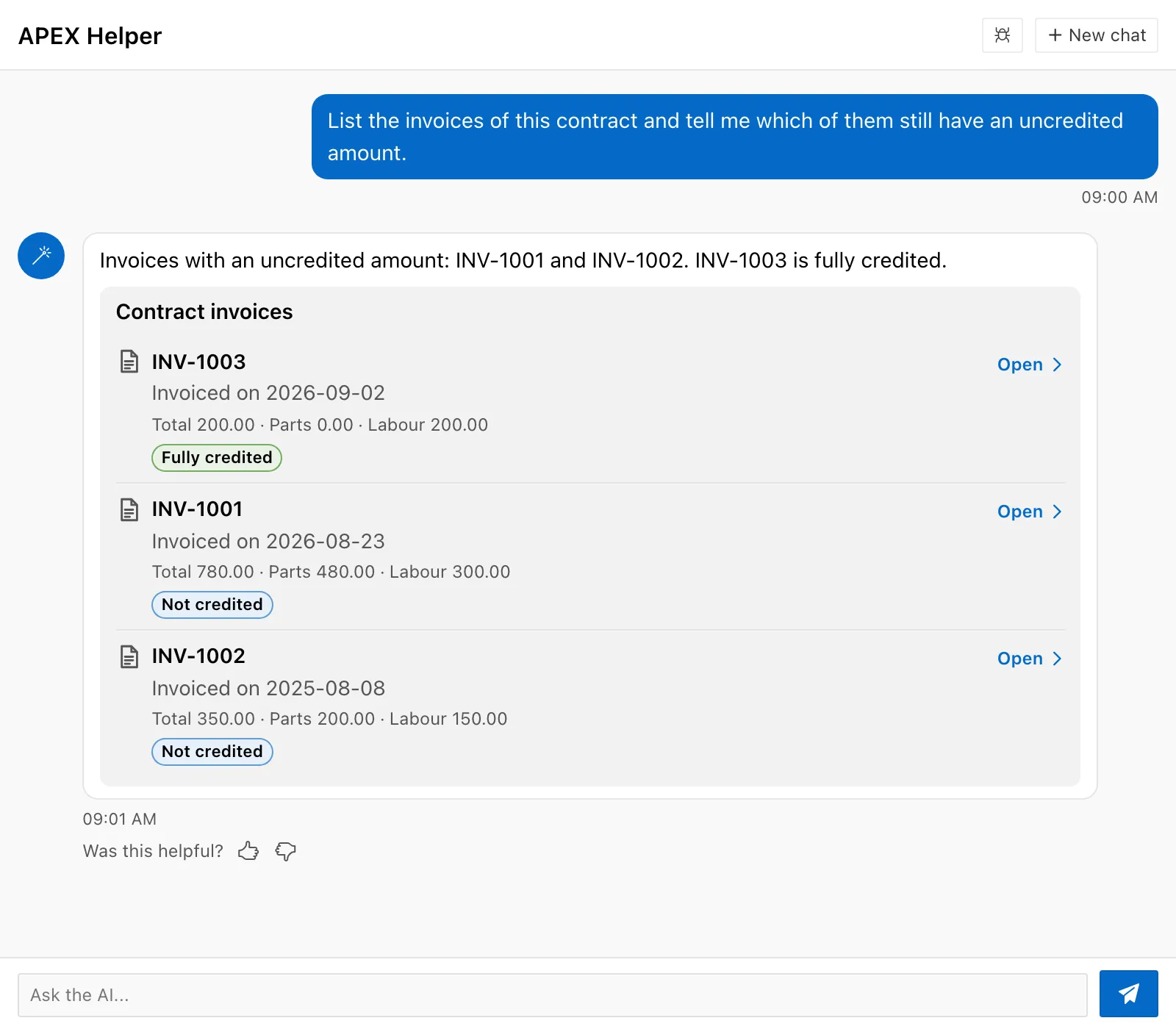
select jt.title, jt.badge from uc_ai_chat_messages m , json_table( m.parts , '$[*].spec.items[*]' columns ( title varchar2(40 char) path '$.title' , badge varchar2(40 char) path '$.badges[0].text' ) ) jt where m.session_id = ( select max(session_id) from uc_ai_chat_messages where session_id like 'SCW\_%' escape '\' ) and m.role = 'assistant';TITLE BADGE----------- ---------------INV-1003 Fully creditedINV-1001 Not creditedINV-1002 Not creditedThe badges come from your package and from your tables. The model wrote only the three numbers. The chat renders the answer once, after the run, and stores the result. A later credit note does not change the stored badges. Lesson 4 explains this behavior.
In the browser, the stored list looks like this. The screenshot comes from the local test page of the plug-in, with the values of this run.
Receive the click in an APEX page
Section titled “Receive the click in an APEX page”This part is optional. It uses the chat region and the page item P10_CONTRACT_ID
from lessons 1 and 2 of Put an Agent in
APEX. The
lesson has no recorded output for the page steps.
A click on a row raises the browser event uc-ai-chat-action. The event bubbles up
to the chat region. It carries action, id, label, and title: the name,
id, and label of the action of the row, and the title of the item. The
guide describes them.
-
Turn on the type
Section titled “Turn on the type”Set Custom Widgets of the chat region to
sc_invoices. -
Add an item and a region for the details
Section titled “Add an item and a region for the details”Add a hidden page item
P10_INVOICE_NO. Set Value Protected of the item to No, because JavaScript sets the value in the browser. Add a classic report region with the static IDinvoice-details, and this query:select i.invoice_no, i.invoiced_on, i.parts_amount, i.labour_amountfrom sc_invoices iwhere i.contract_id = :P10_CONTRACT_IDand i.invoice_no = :P10_INVOICE_NOSet Page Items to Submit of the region to
P10_INVOICE_NO. -
Add a dynamic action
Section titled “Add a dynamic action”Create a dynamic action on the page with these values:
Setting Value Event Custom Event Custom Event uc-ai-chat-actionSelection Type Region Region The chat region Add a true action of the type Execute JavaScript Code:
if (this.data.action === "sc-open-invoice") {apex.item("P10_INVOICE_NO").setValue(this.data.id);apex.region("invoice-details").refresh();}In a dynamic action,
this.dataholds the data of the custom event. -
Test the event without a model
Section titled “Test the event without a model”Open the page. In the console of the browser, raise the event on the chat region yourself. Replace
chat-region-idwith the static ID of your chat region:apex.event.trigger("#chat-region-id", "uc-ai-chat-action",{ action: "sc-open-invoice", id: "INV-1001", label: "Open", title: "INV-1001" });The report region
invoice-detailsthen showsINV-1001. A click on a real row raises the same event with the values of that row.
The query of the report repeats the contract condition. The click comes from the browser, and a user can raise the same event with any invoice number from the browser console, as step 4 does. The page must check on the server that the invoice belongs to the contract of the page. The widget limits what the model can show. It does not limit what the browser can send.
Key takeaways
Section titled “Key takeaways”- The region sets the types, the run context, and the input values. The script writes the same row, so you can test the path without a page.
- The package read the amounts from the tables and calculated the badges.
- The click is a browser event. The page must check the id again on the server.