
Chat Widgets
A chat widget is a small component inside the answer of an agent. A widget is a key figure, a status notice, a short list of values, a table, or a bar or line chart. The feature belongs to the APEX Chat plug-in. It is off by default. To show your own records, for example a list that the user can open, see Custom Chat Widget Types.
The model describes a widget in a code block marked ucai-widget. Inside the
block, a JSON object specifies the widget type and content:
Open invoices right now:
```ucai-widget{"type":"stat_card","label":"Open invoices","value":37,"unit":"invoices"}```
Nine of them are overdue.
The plug-in handles each answer in these steps:
- The server reads the JSON and creates a widget specification with only allowed keys. It does not pass the model’s JSON directly to the browser.
- For a table or chart that names a tool as its source, the server reads rows from that tool’s result in the current answer.
- The server stores the result with the answer, in the column
uc_ai_chat_messages.parts. - The browser displays the card, list, table, or chart. It treats labels and values as plain text, so they cannot contain HTML, links, or images.
If a widget fails the server checks, the chat shows its code block as text. The rest of the answer still appears.
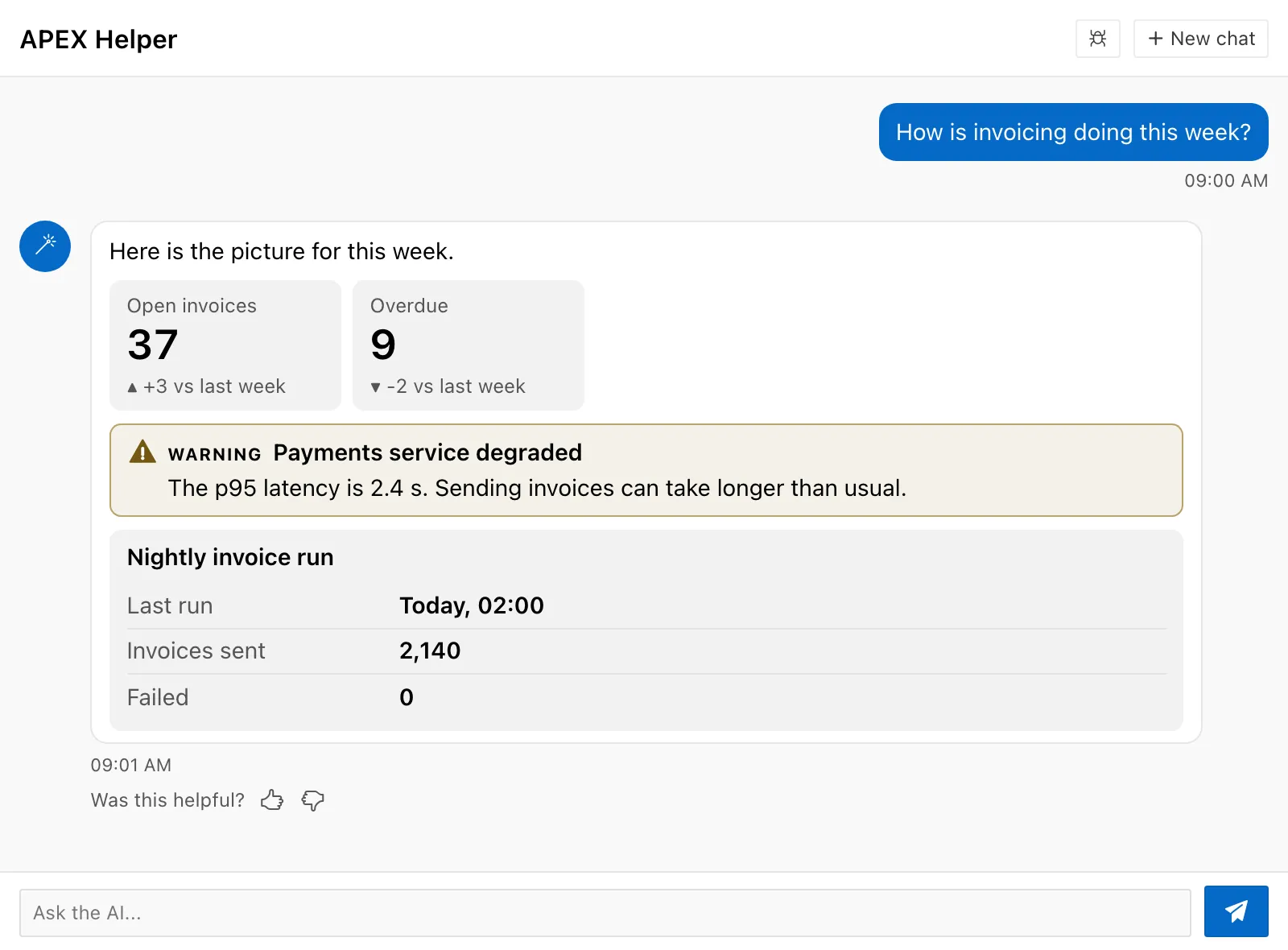
The next screenshot shows one answer with two stat cards, a status notice, and a key value list.
Requirements and upgrade
Section titled “Requirements and upgrade”Widgets need UC AI 26.5 or later, and the plug-in version that ships with it.
The agent of the region must have the type profile or orchestrator.
To add widgets to an existing installation, do these steps in order:
-
Upgrade UC AI
Section titled “Upgrade UC AI”In the UC AI schema, run
upgrade_uc_ai.sql. You can run the script more than once. -
Import the plug-in
Section titled “Import the plug-in”Import the plug-in export file of the new plug-in version into your APEX application. A region that uses an older export keeps the feature off. It raises no error.
Turn on widgets
Section titled “Turn on widgets”Open the region, go to the group Conversation, and check the types under Widgets. No type is checked by default.
| Checkbox | Widget type |
|---|---|
| Stat card | stat_card |
| Status | status |
| Key value | key_value |
| Table | table |
| Chart | chart |
The region decides which types the model can use. A request from the browser cannot add a type. Types that you registered yourself go in the attribute Custom Widgets. See Custom Chat Widget Types.
When you check at least one type, the plug-in adds a WIDGET PROTOCOL block to the system prompt of the agent. The block describes only the checked types. Do not copy the protocol into your prompt profile. See Adding text to the system prompt.
Widgets work with agents of the type profile or orchestrator. When an agent of
another type receives the protocol, execute_agent raises ORA-20503 and the first
turn fails. When no type is checked, every agent type works.
Widget types
Section titled “Widget types”Each widget is one JSON object with a type key. The server ignores every key that
this page does not list.
| Type | Shows | Keys |
|---|---|---|
stat_card | One key figure | label, value, unit, delta, trend (up, down, or flat) |
status | A notice | level (ok, info, warn, or error), title, text |
key_value | A short list of label and value pairs | title, items (1 to 20 objects with label and value) |
table | Rows with columns | title, columns (1 to 12 names), and source or data |
chart | A bar or line chart | title, kind (bar or line), x, y, x_label, y_label, and source or data |
Examples:
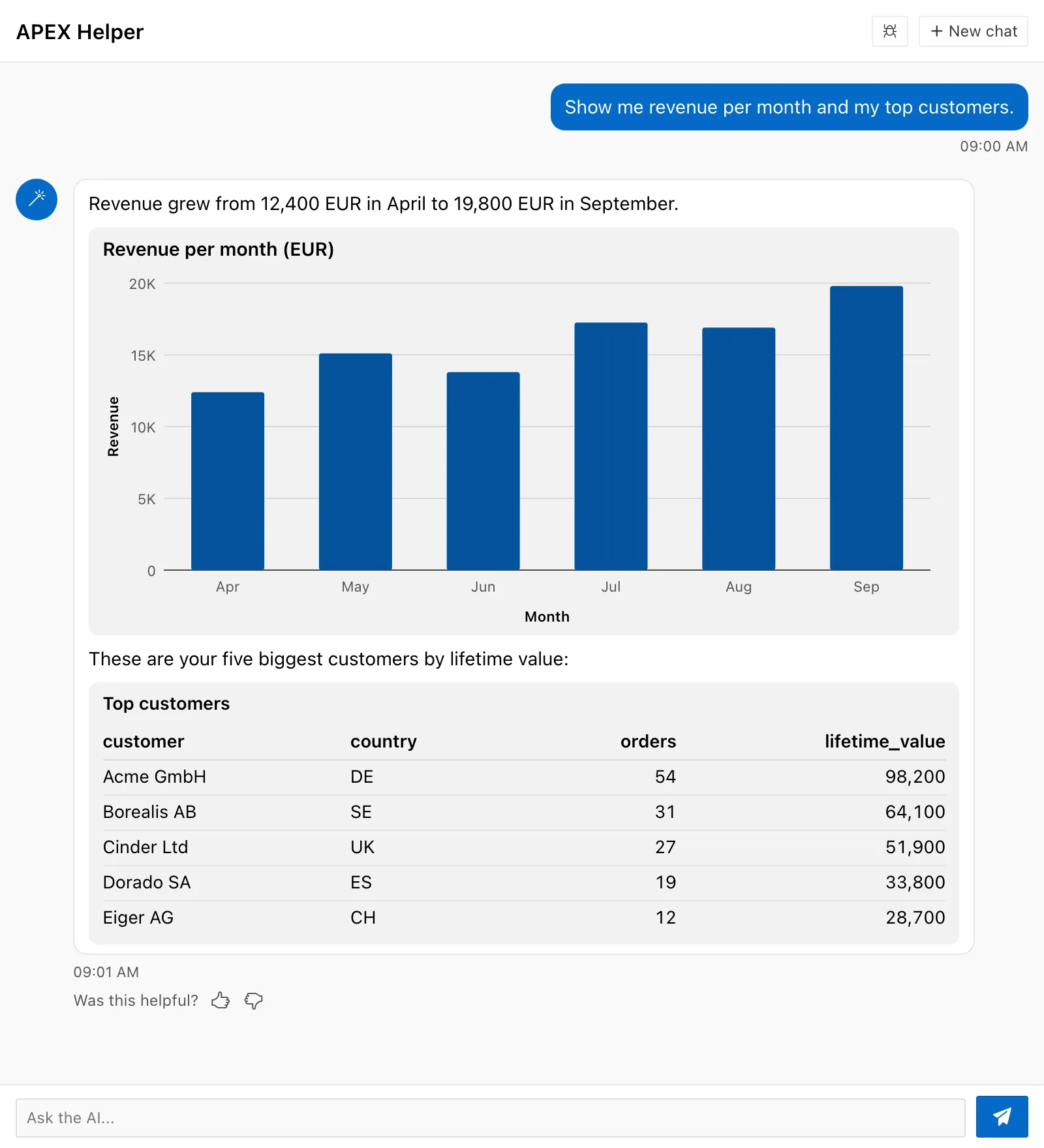
{"type":"stat_card","label":"Open invoices","value":37,"delta":"+4%","trend":"up"}{"type":"status","level":"warn","title":"Payments degraded","text":"Card payments fail intermittently."}{"type":"table","title":"Top customers","columns":["name","country","lifetime_value"],"source":"tool:get_top_customers"}{"type":"chart","kind":"bar","x":"month","y":"revenue","source":"tool:get_sales","args":{"year":2025}}Data binding for tables and charts
Section titled “Data binding for tables and charts”A table or a chart takes its rows from source or from data. A widget that has
both keys is invalid.
"source":"tool:<tool_name>" names a tool that ran in the same answer. The server
reads the result of the tool and builds the rows. The model writes the name of the
tool and the names of the columns. It does not write the rows.
| Rule | Detail |
|---|---|
| Default call | Without args, the server uses the latest call of the tool in this answer |
args | An object that picks the call. The server uses the latest call whose arguments contain every key and value of args |
| Scope | Only the tool calls that the agent of the region made in the same answer |
| Result format | A JSON array of objects. For a JSON object, the server uses the first member that holds an array |
| Column names | The keys of the rows, exactly. For example lifetime_value, not Lifetime Value |
If the same tool ran more than once in an answer, the model uses args to pick one
call. The chart example uses args to select the 2025 result, even if a later call
requested 2026.
As an alternative to a tool source, data supplies the rows directly as an array
of objects. If no tool returned the rows,
or if the rows come from an earlier answer, the model can use data. The model
writes the values of data, so they are as reliable as other text of the model.
Limits
Section titled “Limits”| Item | Limit | When the limit is exceeded |
|---|---|---|
| Widgets per answer | 6 | The seventh widget and each later widget stay as text |
| Size of the JSON of one widget | 30,000 characters | The widget stays as text |
| Table columns | 12 | The widget stays as text |
| Table rows | 50 | The widget shows the first 50 rows |
| Chart points | 200 | The widget stays as text |
| Key value items | 20 | The widget stays as text |
Invalid widgets
Section titled “Invalid widgets”A widget is invalid when the server cannot parse the JSON, when a key breaks a rule of this page, or when the data cannot be found. The block then stays in the answer as text. The answer does not fail.
The reason is visible only when the flag show_errors is on in Debug Config.
The browser then shows the line “Widget not shown” and the reason below the block.
See Developer. Some
reasons:
the widget is not valid JSONno result of tool get_sales in this turnno call of tool get_sales matches the argscolumn Name is not in the rows; use the exact keys of the rowswidget type chart is not enabled
Ask for a widget in the prompt profile
Section titled “Ask for a widget in the prompt profile”The model decides for each question whether a widget shows the data better than a sentence. To ask for a widget in a known case, add a sentence to the prompt profile of the agent:
When the user asks for the number of open invoices, call GET_INVOICE_STATSand show the result as a stat card. Then give the finding in one sentence.Security and trust
Section titled “Security and trust”A widget is exactly as reliable as the text of the model. A tool result or a
document that contains an instruction can change what the model writes into a
widget, in the same way as it can change the text. A status widget with the level
ok looks like a verdict of the system, so treat it as model output.
The design limits what a widget can do:
- A widget has no HTML, no link, and no image. The browser writes every value as plain text.
- The server rebuilds each widget from allowed keys and caps the size. The client cannot enable a type that the region leaves off.
- With
source, table and chart rows come from tool results in the current answer. Withdata, the model supplies the rows itself.
Known limitations
Section titled “Known limitations”- Widget instructions stay unchanged throughout a conversation. The first turn stores the widget instructions in the system message. Later turns reuse that message. Changes to the enabled widget types do not update those instructions. After you change the types, start a new chat, even if the first turn failed.
- The protocol uses input tokens. The text has about 2,000 characters with all five types, and every model call of the conversation sends it. Check only the types that you need.
Accessibility
Section titled “Accessibility”Each widget uses semantic HTML: a dl for key values, and a table with a
caption and column headers for tables. A status widget has role="status" and
shows the level as an icon, a text label, and a color. A chart has role="img"
with a text summary and a hidden table that holds every value. The widgets use the
color variables of the plug-in, so the dark styles of Universal Theme apply.