
Using native PL/SQL API
:::note Prerequisites
Before implementing the plug-in please red the implementation prerequisites described in parent document.
:::
This instruction covers required steps to implement the Rich Text Editor Pro using native Oracle APEX PL/SQL API. The guidelines utilize APEX wizard creating report with form creating required components which are later replaced with PL/SQL processes handling CLOB values.
Create report page linked with modal page
Section titled “Create report page linked with modal page”In the application builder home page click Create Page button.
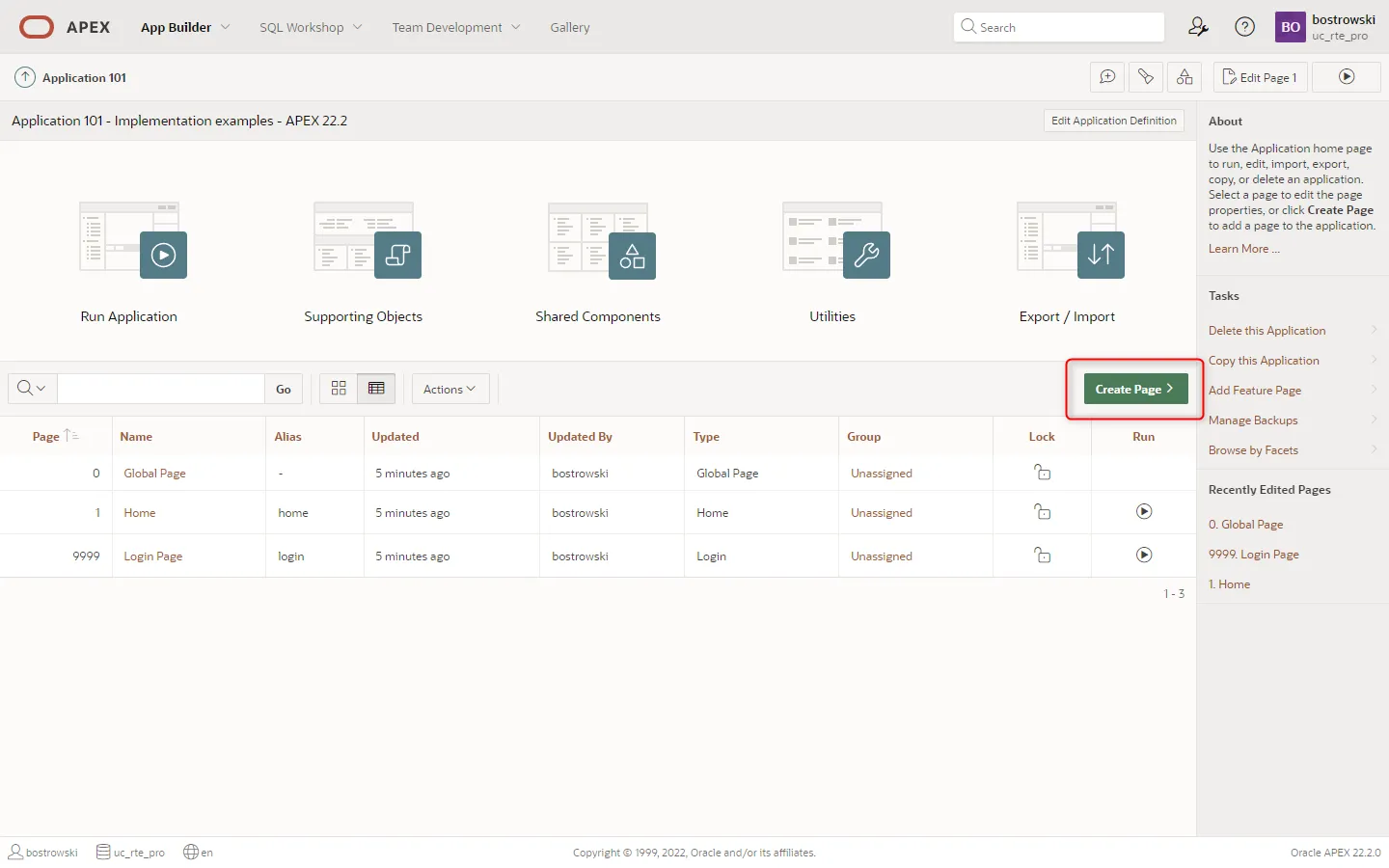
In the Create Page wizard step select Interactive Report and click the Next button.

In the Create Interactive Report wizard step
- Set Page Number to
4 - Set Name to
Rich Text documents (PL/SQL API) - Enable Include Form page
- Set Form Page Number to
5 - Set Form Page Name to
Create rich text document - Set Form Page Mode to
Modal Dialog - Set Table / View Name to
UC_FROALA_SAMPLE_CLOBS - Click the Next button

In the Create Interactive Report wizard step set Primary Key Column 1 to ID (Number) and click the Create Page button.

Adjust report columns
Section titled “Adjust report columns”:::note about the step
This steps hides columns from table UC_FROALA_SAMPLE_CLOBS which are used by the plug-in sample application and are not important for this guidelines.
:::
Navigate page designer to page 4 - Rich Text documents (PL/SQL API) and hide the following columns by setting column attribute Identification / Type to Hidden Column:
- SESSION_ID
- CLOB_CONTENT
- STATIC_ID


To identify document in a report, show the column ID by setting Identification / Type to Plain Text.

Modify modal page items
Section titled “Modify modal page items”:::note about this step
Page items P5_SESSION_ID and P5_STATIC_ID were created by APEX page wizard. This page items are not important for this guidelines.
:::
Select page items P5_SESSION_ID and P5_STATIC_ID, press delete key and save the page.

Remove form components
Section titled “Remove form components”:::note about this step
Removed processes in this step are native form component processes loading, creating, updating and deleting rows in the database table. These components were created by APEX wizard and they will be replaced with custom PL/SQL processes using native APEX PL/SQL API.
:::
- Select before header and processing processes and using
DELETEkey remove these processes. - Select region Create rich text documents (PL/SQL API) and change Type to
Static Content


Enable page item plug-in
Section titled “Enable page item plug-in”Select page item P5_CLOB_CONTENT and:
- Change Identification / Type to
UC - Rich Text Editor Pro [Plug-In] - (Optional) Set Settings / Upload Image(s) on Request(s) to
SAVE,CREATE - Set Appearance / Template to
Optional - Above

Page processes handling documents
Section titled “Page processes handling documents”In this step four process are created to load, create, update and delete a document in the database table UC_FROALA_SAMPLE_CLOBS. All processes uses PL/SQL bind variables referencing page items values in the session state.
Before header - load a document
Section titled “Before header - load a document”Create a new page process and:
- Set Identification / Name to
Load a document - Set Identification / Type to
Execute Code - Set Execution / Point to
Before Header - Set Source / Language to
PL/SQL - Set Source / PL/SQL Code
- Set Success Message to
Document with ID = &P5_ID. loaded - Set Server-side Condition / When Button Pressed to
CREATE

select clob_contentinto :P5_CLOB_CONTENTfrom uc_froala_sample_clobswhere id = :P5_ID;Processing - Create a document
Section titled “Processing - Create a document”Create a new page process and:
- Set Identification / Name to
Create a new document - Set Identification / Type to
Execute Code - Set Execution / Point to
Processing - Set Source / Language to
PL/SQL - Set Source / PL/SQL Code
- Set Success Message to
A new document with ID &P5_ID. created - Set Server-side Condition / When Button Pressed to
CREATE

insert into uc_froala_sample_clobs ( clob_content, description, session_id) values( :P5_CLOB_CONTENT, :P5_DESCRIPTION, :APP_SESSION) returning ID into :P5_ID;Processing - Update a document
Section titled “Processing - Update a document”Create a new page process and:
- Set Identification / Name to
Update a document - Set Identification / Type to
Execute Code - Set Execution / Point to
Processing - Set Source / Language to
PL/SQL - Set Source / PL/SQL Code
- Set Success Message to
Document with ID &P5_ID. updated - Set Server-side Condition / When Button Pressed to
SAVE

update uc_froala_sample_clobs set clob_content = :P5_CLOB_CONTENT, description = :P5_DESCRIPTIONwhere id = :P5_ID;Processing - Delete a document
Section titled “Processing - Delete a document”Create a new page process and:
- Set Identification / Name to
Delete a document - Set Identification / Type to
Execute Code - Set Execution / Point to
Processing - Set Source / Language to
PL/SQL - Set Source / PL/SQL Code
- Set Success Message to
Document with ID &P5_ID. deleted - Set Server-side Condition / When Button Pressed to
SAVE

delete from uc_froala_sample_clobs where id = :P5_ID;Test it
Section titled “Test it”To test the implementation using interactive report and modal page implementing the plug-in run page 4 - Rich Text documents (PL/SQL API).

